
Grant and revoke shares
Share many sites or advertisers with many users at once from Account → Shares — pick entities and recipients, choose Is Owner, Can Edit or Can View, Share, and Unshare from the grid — or add one share from an entity's Sharing settings card.
The Shares page connects existing users to sites or advertisers in bulk — many entities to many users in one Share — and lists every share you can see, so access is audited and revoked in the same grid. One entity at a time, the same share is added from the Sharing settings card on its edit page. A client who has no login yet gets one on Create a statistic account for a client; what each recipient sees and the width bounds are on Share sites and advertisers with users.
Example. Northwind Media runs 3 sites for the publisher Harbour Publishing. The network manager opens Shares → Inventory sharing, ticks the 3 sites and the publisher’s two users, picks Can View and clicks Share: 6 rows appear in the grid. When the contract ends, she ticks the 6 rows and clicks Unshare (6).
Typical scenarios
| You want | Do | Where |
|---|---|---|
| A publisher’s whole team to see 3 sites’ statistics, nothing editable | Tick the sites and the users, Sharing type = Can View, Share | Account → Shares → Inventory sharing |
| An agency to run one advertiser’s campaigns | Tick the advertiser and the agency user, Can Edit | Shares → Advertisers sharing |
| A colleague to own a site, delete included | Is Owner (offered only when your role may delete it) | Shares page or the site’s Sharing settings card |
| One user added to one advertiser | Sharing settings card → username, type, Add | the advertiser’s edit page |
Step by step
-
Go to Account → Shares and pick the tab: Inventory sharing (sites) or Advertisers sharing.
-
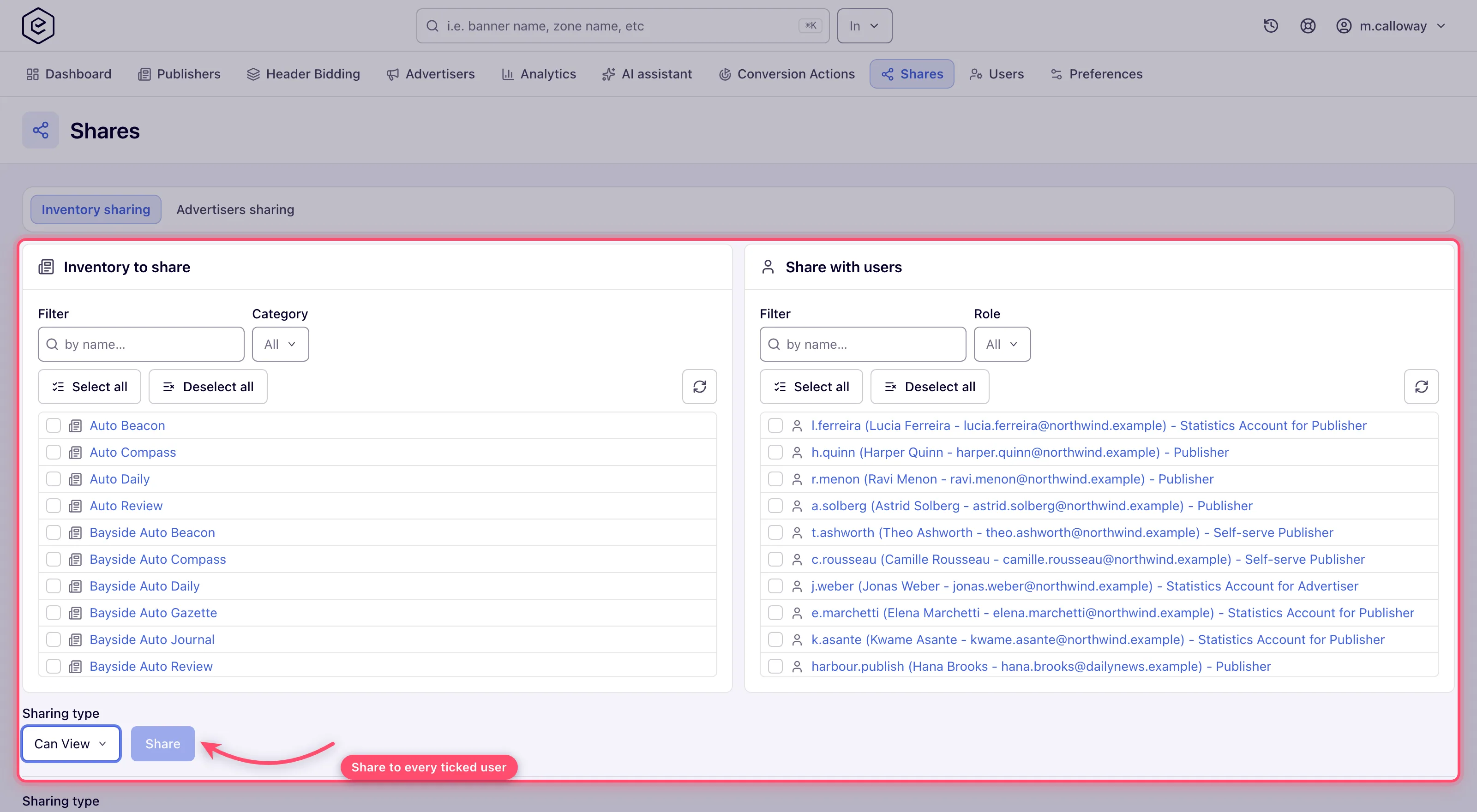
In the left panel (Inventory to share / Advertisers to share), tick the entities. Use the Filter box to narrow by name and — if your role has the categorization permission — the Category selector. Select all / Deselect all act on the currently filtered list. Set your filters first, then tick: changing a filter clears the ticks.
-
In the right panel (Share with users), tick the recipients. Filter by name or narrow by Role. Each row shows username, full name, e-mail and role so you can tell users apart.
-
Pick the Sharing type:
Type Recipient can Is Owner Everything on the entity, including deleting it (when their role may delete) and sharing it on up to Is Owner. Can Edit View and modify the entity. May share it on, up to Can Edit, when their role holds the Share permission — see Sharing a single entity. Can View View the entity and its statistics. Cannot share it, and — since release 154 — cannot link banners onto a shared site’s placements or a shared advertiser’s banners onto placements, unless the role holds Link on entities shared for viewing only. See Hierarchy and linking. Is Owner is in the list only when your role may delete: an Is Owner share lets its holder delete the entity, so you can hand it out only on entities you could delete yourself.
-
Click Share and confirm (Share access?). Every ticked entity is shared with every ticked user — the grid below refreshes with the new rows and a Done toast appears.
-
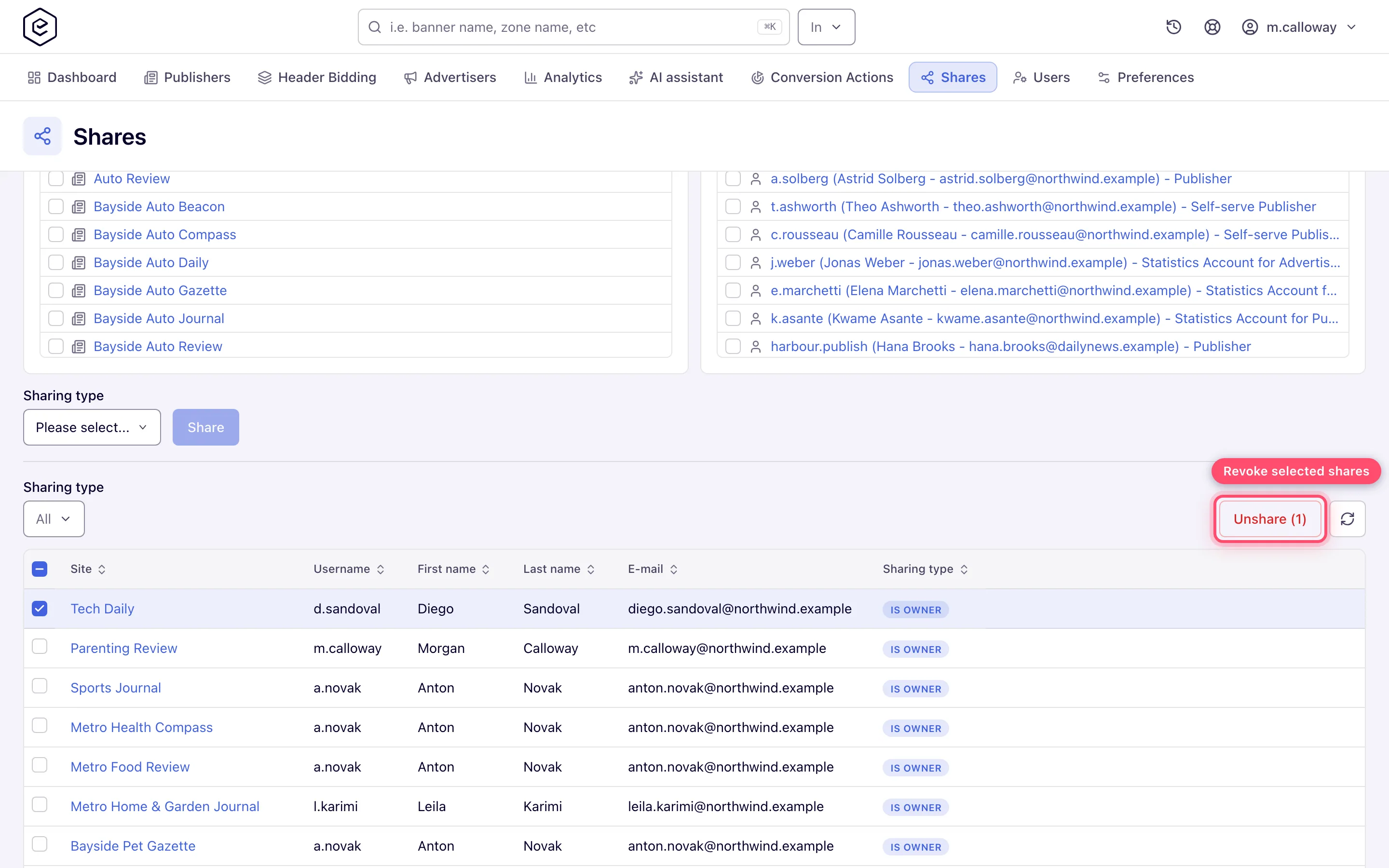
To revoke access, tick rows in the grid and click Unshare, then confirm (Remove access?). The button shows the selection count, e.g. Unshare (3).
Sharing a single entity from its edit page
Three edit pages carry a share card. Type a username, pick the sharing type and click Add (tooltip Share); tick a row and click the remove button (Remove access) and confirm to revoke.
| Entity | Card title | Default type | Who gets the card and its add/remove toolbar |
|---|---|---|---|
| Advertiser | Sharing settings | Can Edit | Anyone who can edit the advertiser and holds the Share permission — they see the card with its toolbar; everyone else does not see the card |
| Site | Sharing settings | Can View | Anyone with the Share permission sees the list; the toolbar is the site owner’s |
| Conversion action | Conversion Action Sharing | Can Edit | The list is read-only unless you are the owner or hold Share at all width |
Caveats and exceptions
- The pickers and the grid are linked. Ticking entities or users doesn’t just prepare the share — it also filters the grid below to the matching rows. Changing the Filter text, Category or Role in a picker reloads its list and clears everything you had ticked in it. The Share with users list follows the Share permission of its own tab — Inventory on Inventory sharing, Campaigns on Advertisers sharing — so a role holding only one of the two sees an empty user list on the other tab.
- Silent skips at shared width. The page offers only the entities you own, and a combination the server refuses (for instance a type above your own share on that entity) is skipped without an error — the toast still says Done. Check the grid afterwards.
- Refusal messages on the cards. A refused add or remove shows the server’s reason, so a refusal caused by the width bound says which bound it was. A refusal that carries no reason falls back to Only owner can change advertiser share settings on an advertiser, Access denied when adding on a site and Only the owner can remove access to this site when removing.
The caveats that apply to every share — who has the page, who can be a recipient, what the recipient sees, the shared width bounds, Is Owner and the right to delete — are on Share sites and advertisers with users.
Not working?
| Symptom | Cause | Check |
|---|---|---|
| A site or advertiser is not in the left picker | At shared width only entities you own are offered | Hold it as Is Owner, or ask the network manager |
| Is Owner is not in the Sharing type list | Your role may not delete the entity | Delete at all width, or own the entity at shared width |
| Toast says Done but a row is missing | At shared width a refused combination (a type above your own share) is skipped silently | Check the grid; share at your own type or lower |
| Nothing shared; refusal names Is Owner | None of the ticked entities could get Is Owner | Pick entities you own, or Can Edit |
| My ticks vanished | You changed a filter after ticking | Set filters first, then tick |
| The grid looks short | Ticked entities or users filter it | Clear the ticks and filters |
| Cannot delete record on Unshare | None of the selected rows could be removed under the shared bounds (own share below Can Edit, a higher row, or your own row) | Someone who holds Share with a higher share removes it |
| Some rows survived Unshare | Those were outside the bounds; the rest went | Same |
| A user in the picker is in italics and does not link | Their role is one you cannot manage; sharing with them still works | — |
The missing tab, an empty user list, Can View recipients and statistic accounts are on Share sites and advertisers with users and Create a statistic account for a client.
Reference
The page’s controls and the permissions behind them are in the hub’s Reference; the single-share REST calls in Over the API.
