
Video behind server-side ad insertion (SSAI)
Serve a video placement through a CTV stitcher — how Epom reads the viewer's IP, device and consent from what the stitcher forwards, which stitcher to pick on the placement so the tag carries its macros, what each macro parameter does, and how to keep a stitcher's data-centre traffic from being banned as fraud.
What it is and why
On connected TV most streams do not let the player fetch ads: a stitcher (AWS MediaTailor, Google DAI, SpringServe, FreeWheel, Publica, Brightcove, Yospace…) calls the placement’s VAST tag on behalf of each viewer, splices the creative into the stream and usually fires the tracking pixels from its own servers. Every request therefore arrives from a data centre, and unless the stitcher passes the viewer along, Epom sees one address and one user-agent for thousands of households. This page is about telling Epom which stitcher calls the tag, so the tag asks for the viewer’s details in that vendor’s own macro syntax, and about what the ad server does with what comes back.
Example. A FAST channel runs through SpringServe. With Server-side ad insertion (SSAI)
left Off, 40,000 viewers in an evening look like one device in one city, geo targeting matches
whatever the stitcher’s data centre resolves to, and frequency capping counts them as one visitor.
Set it to SpringServe (Magnite), re-copy the tag, and it ends in
clientIp={{IP}}&clientUa={{USER_AGENT}}&ifa={{DEVICE_ID}}…: each request now carries the
viewer’s IP, the TV’s user-agent and its advertising ID, so targeting, capping and the bid
requests to DSPs see 40,000 TVs.
Typical scenarios
| You have | Set | Then |
|---|---|---|
| A FAST channel sold through SpringServe or Publica | SSAI = SpringServe (Magnite) / Publica | Re-copy the tag; every parameter in the table below is filled by the stitcher, schain included |
| An AWS MediaTailor or Brightcove stream | SSAI = AWS Elemental MediaTailor / Brightcove SSAI (VOD) | The stitcher fills the IP (and, for Brightcove, the user-agent); everything else arrives only if your player passes it to the session under the parameter’s own name |
| Google DAI | SSAI = Google Ad Manager DAI | IP, user-agent, device ID, page URL, break length and the GDPR / US privacy signals are filled; Google has no macro for the content, GPP or the supply chain |
| A stitcher not on the list | SSAI = IAB standard macros, or ask an admin to add the vendor under Upstream macro presets | The IAB VAST 4 macros fill IP, user-agent, device ID, page URL, break length and consent |
| A stitcher that reaches you only with headers, no macros | SSAI stays Off; ask the stitcher to send X-Device-IP and X-Device-User-Agent | Epom reads the viewer from the headers (table below) |
| A channel whose inventory partner sells it before you | SSAI = the stitcher, and the site’s Seller type = Intermediary | The chain the stitcher passes in schain reaches buyers with your node appended — see Supply chain setup, scenario 7 |
Step by step
-
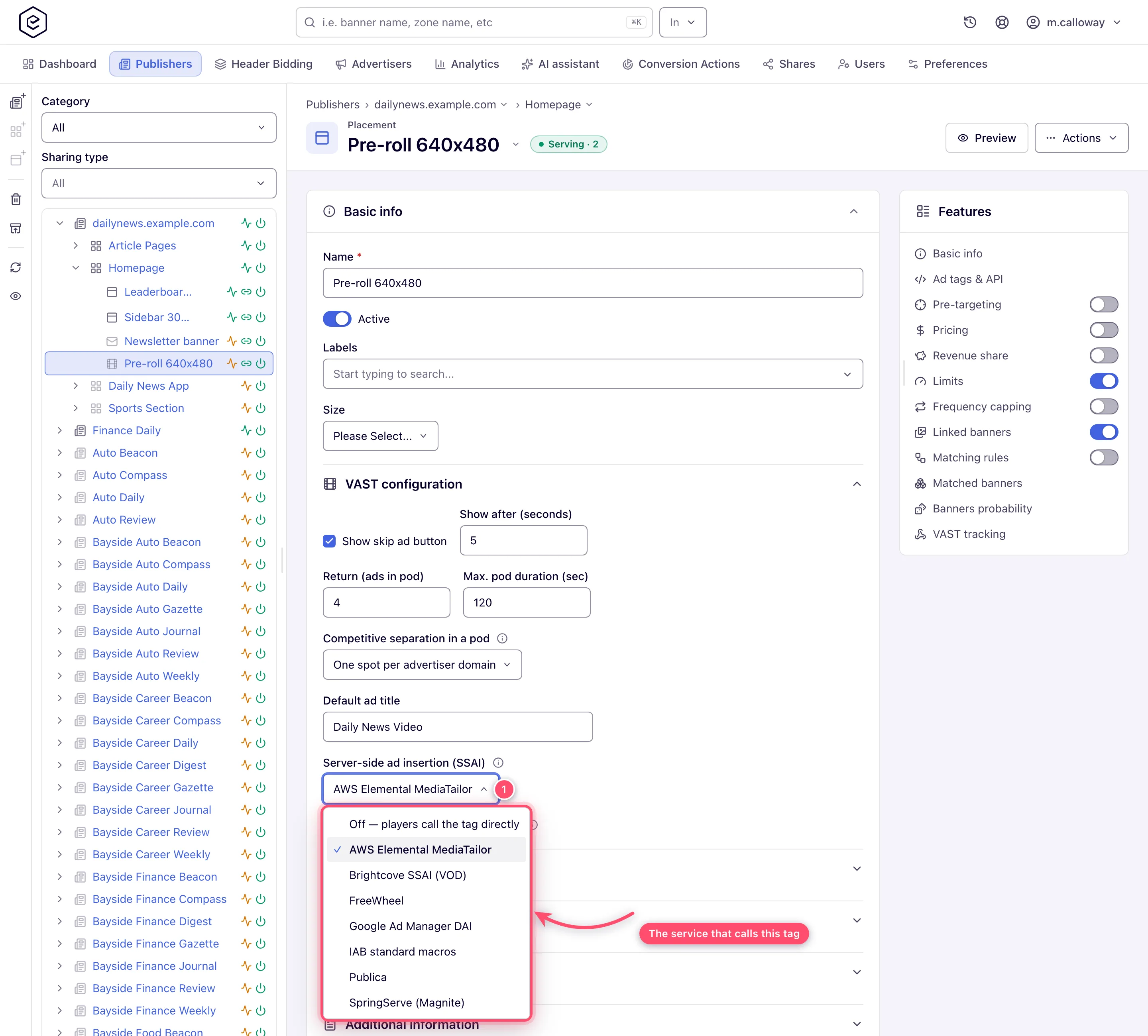
Open the video placement, expand Basic info → VAST configuration and set Server-side ad insertion (SSAI) to the service that calls this tag. The setting needs no permission of its own — anyone who can edit the placement can change it.
-
Click Save — the setting saves with the rest of Basic info.
-
Open Ad tags & API → VAST tags. The VAST, VPAID and VMAP tags now end in that vendor’s macros, and under them the Server-side ad insertion (SSAI) macros table explains each one. Entries marked as player-provided (MediaTailor’s
[player_params.*], Brightcove’s{{url.*}}) are filled only from what your player passes to the stitcher’s session.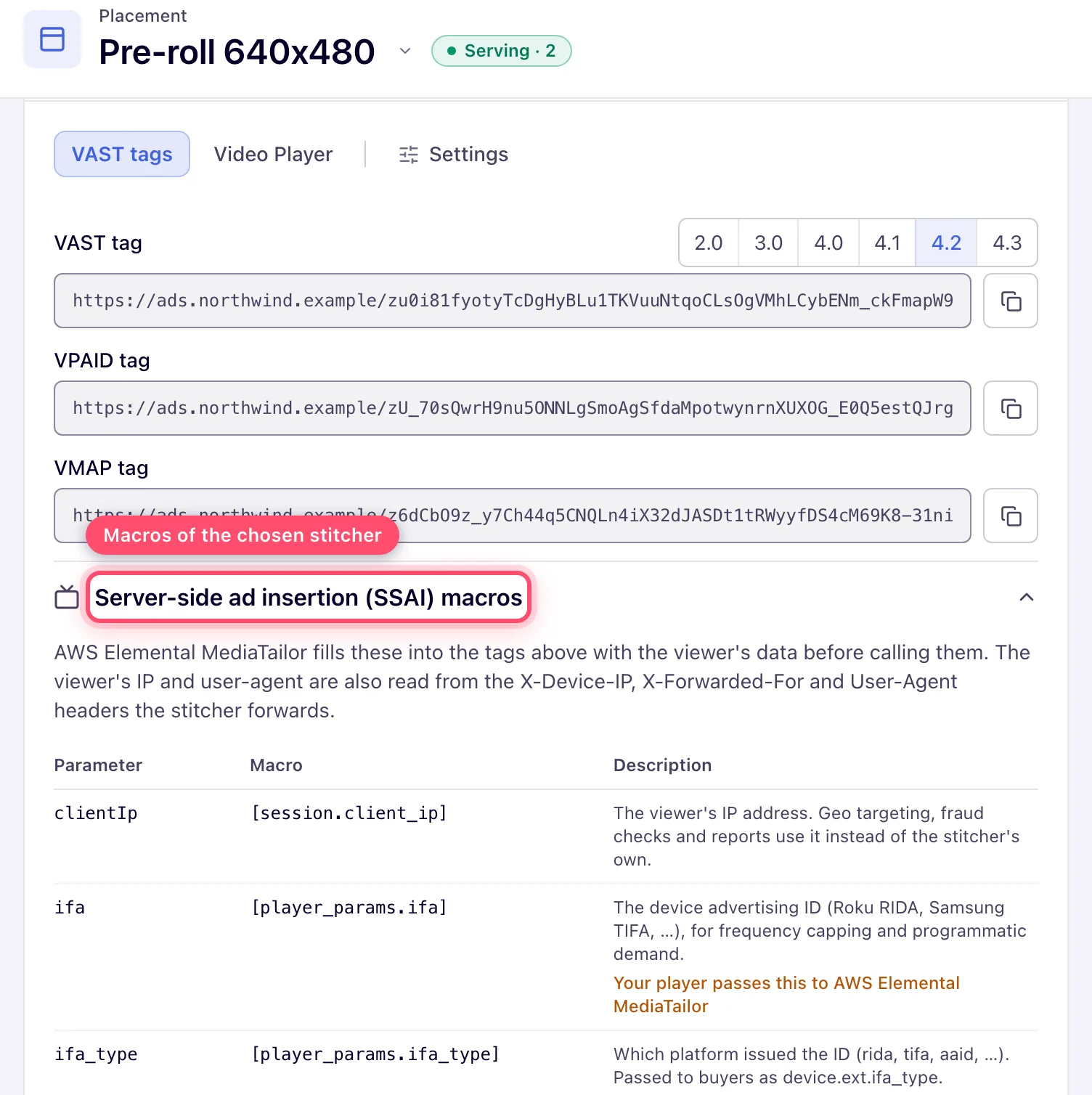
-
Copy the tag and give it to the stitcher, replacing the one it had: a tag copied before you picked the vendor carries no macros.
-
Ask the stitcher to forward the viewer’s headers as well —
X-Device-IP(orX-Forwarded-For) andX-Device-User-Agent— because macros go into the tag only. The impression, click and VAST event pixels the stitcher fires carry no macros, so for them Epom relies on the headers. -
Add the stitcher’s egress ranges as Whitelist rows on the Ban & white-listed IPs tab under Admin → Validation & anti-fraud → Validation settings (Moderation & quality) — or ask your network administrator to. See the fraud caveat below for why.
-
If the channel’s inventory partner sells it before you, set the site’s Seller type to Intermediary so the chain the stitcher passes in
schainis used (scenario 7).
How Epom reads the viewer
The request comes from the stitcher’s data centre, so the viewer’s details are taken from what it forwards, first match wins:
| Viewer detail | Taken from, first match wins |
|---|---|
| IP address | clientIp tag parameter → X-Device-IP → X-Forwarded-For (first address) → other proxy headers → the connection |
| User-Agent | clientUa tag parameter → X-Device-User-Agent → the request’s User-Agent |
| Language | X-Device-Accept-Language → Accept-Language |
| Page / app referer | X-Device-Referer → Referer → X-Referer |
The device user-agent replaces the stitcher’s rather than being combined with it, so device, OS and browser targeting, bot detection and the user-agent sent to programmatic demand all see the TV, not the stitcher. The same rules apply to impression, click and VAST event pixels, so a pixel fired by the stitcher with the viewer’s headers counts against that viewer.
What the creative side of the response carries for a stitcher — a stable creative id, the mezzanine file and event names every VAST version accepts — is described under Video banners. What the slot pays can travel in the answer too: see Pricing in the VAST answer.
Tell Epom which stitcher calls the tag
Headers are not all a stitcher can pass on. Most of them — and ad servers that resell video the same way — also fill macros in the tag URL: the viewer’s IP and device, the app, the show, the ad break and the viewer’s privacy choices. Each vendor has its own macro syntax, and nothing is filled unless the tag asks for it. The Server-side ad insertion (SSAI) setting is what makes the tag ask.
The list is the network’s upstream macro presets, kept by admins under Admin → Upstream Macro Presets — a vendor not on it is a new preset there, not a code change. It ships with these:
| Setting | What it fills |
|---|---|
| Off (default) | nothing — players call the tag directly |
| IAB standard macros | the IAB VAST 4 macros: [DEVICEIP], [DEVICEUA], [IFA], [PAGEURL], [BREAKMAXDURATION], [GDPRCONSENT], [GPPSTRING], … [LATLONG] and [REGULATIONS] pack two values into one, so latitude, longitude, gdpr and coppa are not filled; there is no supply chain macro |
| Google Ad Manager DAI | [DEVICEIP], [DEVICEUA] (the only user-agent macro that expands inside a VAST redirect), [IFA], [PAGEURL], [BREAKMAXDURATION], %%GDPR%%, [GDPRCONSENT], %%US_PRIVACY%%, %%TFCD%% — Google has no macro for content, GPP or the supply chain |
| AWS Elemental MediaTailor | [session.client_ip], [session.referer] and [session.avail_duration_secs] from MediaTailor itself; everything else as [player_params.<parameter>], which your player passes. No user-agent macro: MediaTailor forwards the viewer’s User-Agent header |
| SpringServe (Magnite) | every parameter in the table below: {{IP}}, {{USER_AGENT}}, {{DEVICE_ID}}, {{CONTENT_GENRE}}, {{US_PRIVACY}}, {{GPP_STRING}}, {{SCHAIN}}, … |
| Brightcove SSAI (VOD) | {{system.ip_address}} and {{system.user_agent}} from Brightcove; everything else as {{url.<parameter>}}, which your player passes |
| FreeWheel | #e{request.clientAddress}, #e{request.userAgent}, #{request.deviceId}, the page and the ad break, and the privacy key-values your player sets (_fw_gdpr, _fw_gdpr_consent, _fw_us_privacy, _fw_is_lat) |
| Publica | every parameter in the table below: [IP], [%UA%], [DID], [%CONTENT_GENRE%], [US_PRIVACY], [GPP], [SCHAIN], … |
A SpringServe placement’s VAST tag, for example, ends in:
?clientIp={{IP}}&clientUa={{USER_AGENT}}&ifa={{DEVICE_ID}}&ifa_type={{IFA_TYPE}}&lmt={{LMT}}&dnt={{DNT}}
&latitude={{LAT}}&longitude={{LON}}&bundle={{APP_BUNDLE}}&appName={{APP_NAME}}&appStoreUrl={{APP_STORE_URL}}
&requestUrl={{URL}}&o={{DOMAIN}}&maxDuration={{MAXIMUM_DURATION}}&maxPodDuration={{POD_MAX_DUR}}&maxAds={{POD_AD_SLOTS}}
&contentGenre={{CONTENT_GENRE}}&contentRating={{RATING}}&contentLivestream={{CONTENT_LIVESTREAM}}&contentLanguage={{LANGUAGE}}
&gdpr={{GDPR}}&gdprConsentIab={{CONSENT}}&usPrivacy={{US_PRIVACY}}&gpp={{GPP_STRING}}&gppSid={{GPP_SID}}&coppa={{COPPA}}
&schain={{SCHAIN}}
(one line in the real tag). The parameter names are always ours; a preset only says which of the vendor’s macros fills each. What each one carries — the same descriptions the macros table shows:
| Parameter | What the stitcher fills in |
|---|---|
clientIp | The viewer’s IP address. Geo targeting, fraud checks and reports use it instead of the stitcher’s own. |
clientUa | The viewer’s device user-agent, for device, OS and browser targeting. |
ifa | The device advertising ID (Roku RIDA, Samsung TIFA, …), for frequency capping and programmatic demand. |
ifa_type | Which platform issued the ID (rida, tifa, aaid, …). Passed to buyers as device.ext.ifa_type. |
lmt | 1 when the viewer limits ad tracking. Passed to buyers as device.lmt. |
dnt | 1 when the viewer’s device asks not to be tracked. Passed to buyers as device.dnt. |
latitude, longitude | Device coordinates, when the player knows them. Passed to buyers as device.geo.lat / lon (GPS). |
bundle | The bundle ID of the app or channel. |
appName | The app or channel name. Passed to buyers as app.name. |
appStoreUrl | The app’s store page. Passed to buyers as app.storeurl. |
requestUrl, o | The page or content URL and its domain, for domain targeting and reports. |
maxDuration | The longest ad the player accepts, in seconds. Buyers get the shorter of it and the placement’s maximum. |
maxPodDuration, maxAds | The ad break’s length in seconds and how many ads it holds, for ad pods. |
contentGenre, contentRating, contentLivestream, contentLanguage | The show’s genre, age rating (TV-PG, …), whether it is live (1/0) and its language. Passed to buyers in content.*, and targetable with Custom Parameter targeting. |
gdpr, gdprConsentIab | Whether GDPR applies and the TCF consent string. Used for the consent check; passed to buyers when the network forwards privacy signals. |
usPrivacy | The US Privacy string, such as 1YNN. Passed to buyers when the network forwards privacy signals. |
gpp, gppSid | The GPP consent string and the sections that apply. Passed to buyers when the network forwards privacy signals. |
coppa | 1 for child-directed traffic. Passed to buyers when the network forwards privacy signals. |
schain | The supply chain of the sellers before you, in the IAB form 1.0,1!asi,sid,hp. Buyers receive it in source.schain with your own node added at the end. Used only on sites whose seller type is Intermediary or Both (see Supply chain setup). |
The setting is also on the REST API — ssaiStitcher on /rest-api/placements/update/video takes a
preset’s code (SPRINGSERVE, AWS_MEDIATAILOR, …), and GET /rest-api/upstream-macro-presets
lists them with their macros — and is copied when the placement is duplicated.
Caveats and exceptions
Player-provided values. MediaTailor’s [player_params.*] and Brightcove’s {{url.*}} are
filled only from what your player passes to the stitcher’s session — the table on the VAST tags
tab marks them. Pass what your player knows (the device ID, the app, the show, the consent
strings) under the parameter’s own name, or it arrives empty.
Your own defaults win. A parameter you already set as a
default parameter (say ifa=${IFA}) keeps your value; the stitcher’s
macro for it is not added.
A macro the stitcher leaves unfilled is ignored. [DEVICEUA], {{IP}}, [%UA%],
#{request.deviceId} and the like arriving literally count as “not sent”, so a stitcher that
does not know a macro cannot turn it into one shared fake device — or a fake genre or consent
string.
Privacy signals reach buyers only where the network allows it. gdpr, the TCF string,
usPrivacy, gpp/gppSid and coppa go into the bid request (regs.* and user.consent for
OpenRTB 2.6 partners, regs.ext / user.ext for older ones) only when Pass privacy signals to
DSPs is on in the GDPR settings.
The other signals always go.
Device IDs. ifa_type (rida, tifa, aaid, …) and lmt are forwarded to programmatic
demand as OpenRTB device.ext.ifa_type and device.lmt. An all-zero ID — what a TV hands out
once the viewer limits ad tracking — is treated as no ID, so those viewers are not merged into
one for frequency capping. Frequency capping on TV traffic needs the server-side subject and a
filled ifa: see Frequency capping → Apps, WebViews and connected
TV.
Programmatic demand is told the impression is stitched server-side: bid requests from an
SSAI placement carry OpenRTB imp.ssai = 3.
Macros go into the tag only, not into tracking pixels: the stitchers above document no substitution inside the VAST they return, so pixels rely on the forwarded headers.
The supply chain on the tag is honoured only on an Intermediary or Both site. On a
Publisher site a chain in schain is ignored — nobody sells before you there, and anyone can
add a parameter to a tag. MediaTailor and Brightcove fill schain only from what the player
passes to the session, and the IAB and Google DAI macro sets have no supply chain macro; without
it the request falls back to the chain without upstream nodes.
Warning: a stitcher that forwards no viewer IP sends every viewer’s pixels from a few addresses of its own. Impression-fraud detection then sees one address with thousands of impressions and bans it, and every ad request through that stitcher can then be blocked. Ask the stitcher to send
X-Device-IP(orX-Forwarded-For), and add its egress ranges as Whitelist rows on the Ban & white-listed IPs tab under Admin → Validation & anti-fraud → Validation settings — see Moderation & quality.
Not working?
| Symptom | Check | Where |
|---|---|---|
| Every viewer reports from one city, or geo targeting never matches | The stitcher passes neither clientIp (a filled macro) nor X-Device-IP / X-Forwarded-For | The SSAI setting on the placement; the tag the stitcher actually calls (re-copied after the setting?); the stitcher’s header configuration |
| Device or OS targeting sees a server, not a TV | No clientUa macro and no X-Device-User-Agent; MediaTailor forwards the User-Agent header, Google DAI fills [DEVICEUA] | The macros table on the VAST tags tab; the stitcher’s settings |
A macro arrives as literal text ({{IP}}, [DEVICEUA]) | The stitcher does not know that macro — it is treated as not sent, so nothing is faked, but nothing is targeted either | The vendor’s macro documentation; pick the right preset or ask an admin to adjust it under Upstream macro presets |
| A player-provided value is always empty on MediaTailor or Brightcove | The player does not pass it to the session under the parameter’s own name | The player’s session parameters; the player-provided badges on the macros table |
| Requests from the stitcher are blocked, or stopped overnight | Its data-centre addresses were banned by impression-fraud detection because no viewer IP was forwarded | Admin → Validation & anti-fraud → Validation settings → Ban & white-listed IPs: whitelist the egress ranges; Moderation & quality |
| Frequency caps never fire on TV | The cap uses the cookie subject, or ifa is empty or all zeros (limited ad tracking) | The cap’s Subject; the ifa the stitcher fills; Frequency capping |
| Buyers get no consent string or US privacy signal | Pass privacy signals to DSPs is off for the network, or the vendor has no macro for it (IAB and Google DAI have no GPP) | GDPR settings; the preset table above |
| Buyers see an incomplete chain, or the partner’s node is missing | The site’s Seller type is Publisher, so the tag’s schain is ignored; or the stitcher fills no schain macro | The site’s Supply chain section; scenario 7 |
| Impressions differ from the stitcher’s count | Pixels fired from the stitcher without viewer headers are judged on the stitcher’s address | Analytics discrepancies; step 5 above |
Reference
| Item | Value |
|---|---|
| Setting | Server-side ad insertion (SSAI), Basic info → VAST configuration, default Off; no permission of its own |
| Shipped presets | IAB standard macros, Google Ad Manager DAI, AWS Elemental MediaTailor, SpringServe (Magnite), Brightcove SSAI (VOD), FreeWheel, Publica; admins add more under Upstream macro presets |
| REST | ssaiStitcher on POST /rest-api/placements/update/video.do (a preset code such as SPRINGSERVE, AWS_MEDIATAILOR); GET /rest-api/upstream-macro-presets lists the presets and their macros; copied on duplicate |
| Bid request | imp.ssai = 3; device.ext.ifa_type, device.lmt, device.dnt, device.geo.lat/lon, app.name, app.storeurl, content.*, source.schain (your node appended); regs.* / user.consent only with Pass privacy signals to DSPs |
| Headers read | X-Device-IP, X-Forwarded-For, X-Device-User-Agent, X-Device-Accept-Language, X-Device-Referer (table under How Epom reads the viewer) |
