
Configure optimization settings
The network-wide rotation algorithm on Admin → Ad serving → Optimization settings — Manual Weighting, eCPM Optimization and eCPM with Burn-up, their estimates, periods and thresholds, and the CTR and I2C optimized traffic shares — step by step, with the caveats and what each field does.
What it is and why
One network-wide setting decides how ad serving picks the campaign inside a delivery priority tier — by weight, or by the eCPM each campaign earns — and two more decide how much of an optimized campaign’s traffic the CTR and I2C optimizers are allowed to steer. Nothing here touches the priority tiers or the creative pick; those are set per campaign and creative on Optimize ad rotation.
Example. Under eCPM Optimization with Burn-up Period with Optimized traffic share at its stock 95, the optimized campaign with the best measured eCPM gets 95 % of the optimized traffic and the other 5 % goes to a random losing campaign, so a campaign that is behind on eCPM still collects data. With CTR optimized traffic share at 90, a campaign with CTR optimization on serves its best-clicking creative on 90 % of requests and rotates the rest by plain weight; at 100 the other creatives get nothing once the model has ranked them.
Typical scenarios
| You want | Set | Where |
|---|---|---|
| Campaigns share a tier by the weights managers set — the default, and what the Banners probability card models exactly | Optimization algorithm = Manual Weighting | Campaigns optimization |
| The campaign that earns the most per thousand wins its tier outright, weights ignored | eCPM Optimization (beta); Estimated CTR and Estimated conversion rate for CPC / CPA campaigns with no data yet | Campaigns optimization |
| Some campaigns compete on eCPM, the rest keep their weights | eCPM Optimization with Burn-up Period (Beta); Optimized traffic share 95; a 24-hour Burn-Up period; managers tick eCPM Optimization on the campaigns to optimize | Campaigns optimization; the campaign’s Advanced settings |
| CTR-optimized campaigns keep 10 % of traffic for the creatives that are not winning | CTR optimized traffic share 90 | CTR / I2C optimization |
| An optimized campaign serves its winner and nothing else | CTR optimized traffic share / I2C optimized traffic share 100 | CTR / I2C optimization |
Step by step
-
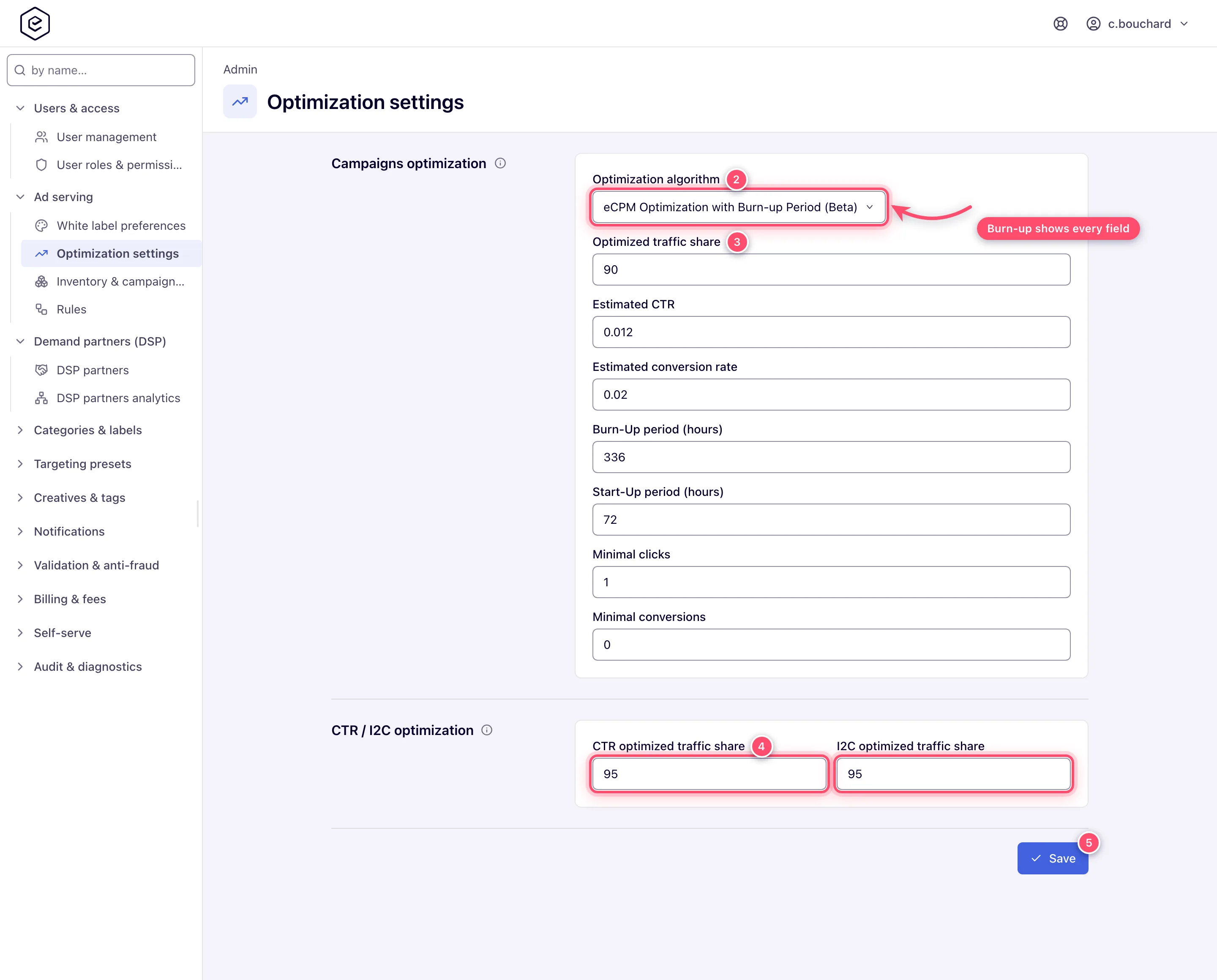
Open Admin → Ad serving → Optimization settings. The page needs the administrator permission Optimization Settings.
-
In Campaigns optimization, pick the Optimization algorithm: Manual Weighting, eCPM Optimization (beta) or eCPM Optimization with Burn-up Period (Beta). The fields below appear for the algorithm that reads them — none under Manual Weighting, the two estimates under eCPM Optimization, all seven under Burn-up.
-
Fill in the fields the algorithm shows (table under Reference): the estimates seed a CPC or CPA campaign’s eCPM before it has data; the Burn-Up and Start-Up periods are in hours; the minimal clicks and conversions let a campaign skip the start-up wait on a placement and country where it has already proved itself.
-
In CTR / I2C optimization, set the CTR optimized traffic share and I2C optimized traffic share (0 – 100): the share of an optimized campaign’s traffic each optimizer steers toward its best performer. The remainder is served by plain creative weight.
-
Click Save. The page confirms with Auto-optimization settings are saved…. Ad servers pick the change up with their next cache update.
Caveats and exceptions
The algorithm changes the campaign pick only. Delivery priority tiers still run first, and the creative inside the chosen campaign is still drawn by weight or by its CTR / I2C bandit.
| Algorithm | How the campaign inside a tier is chosen | Does campaign Weight matter? |
|---|---|---|
| Manual Weighting (default) | Weighted random draw on campaign weight | Yes — it is the mechanism |
| eCPM Optimization (beta) | The campaign with the highest eCPM for the request’s country wins outright; ties broken at random | No — weight is not read at all |
| eCPM Optimization with Burn-up Period (Beta) | Non-optimized campaigns compete on weight first; if the draw lands on an eCPM-optimized campaign, only optimized campaigns continue and the one with the best measured eCPM over its burn-up window wins | Yes, for the first split |
Under Burn-up, Optimized traffic share splits the optimized campaigns between the winner
and the rest: the remainder (100 − the share) goes to a random non-winner, so a campaign that
is losing on eCPM still gets a trickle. The stock value is 95, i.e. 5 % to the losers.
Only Burn-up puts an eCPM Optimization checkbox on the campaign. The checkbox on the campaign’s Advanced settings is rendered only under eCPM Optimization with Burn-up Period, and only for a role holding Set “eCPM Optimization”. Under Manual Weighting and plain eCPM the checkbox is not rendered and a campaign’s stored flag has no effect. The checkbox is disabled on a House ads campaign.
The per-campaign eCPM inputs are not the ones on this page. Burn-Up period, Start-Up period, Minimal clicks, Minimal conversions, Estimated CTR and Estimated conversion rate all exist a second time on each campaign’s Pricing card, and it is the campaign’s
copy that ad serving reads. This page sets the network defaults. The campaign-level estimates
appear only under Burn-up, only on CPC / CPA campaigns, and only with the Manage “eCPM
Optimization” permission (enabled or read-only); the campaign card also carries Subperiod (h)
and Subperiod weights. See Configure pricing.
Minimal clicks and conversions are not CTR or I2C floors, despite sitting on the same page. They belong to the eCPM burn-up algorithm: once a CPC or CPA campaign has recorded that many clicks or conversions on a given placement + country since its last reset, that combination may use its measured eCPM even if the start-up window has not elapsed yet. They do nothing for a CPM campaign, and nothing at all under Manual Weighting.
A traffic share of 100 means no exploration. The CTR and I2C optimizers serve a single winner; the share is the only thing that keeps traffic flowing to the other creatives. A manager whose optimized campaign “serves one creative only” is seeing this setting, not a bug — see Not working? on the rotation guide.
eCPM beta and the Banners probability card. The card still divides by campaign weight under eCPM Optimization (beta), which ad serving does not read; under Burn-up the card shows the burn-up split and is authoritative. The weight columns on the linked trees grey out a campaign weight the draw does not read, with an ⓘ naming the reason.
The eCPM Optimization Details window — in the Actions menu of a campaign or a placement — lists the learned per-country / per-placement eCPM records and lets a manager delete a selection of them. It appears only under Burn-up and only with the matching permission. Clearing the records after a landing-page overhaul stops stale learning from holding a campaign back.
The SSP bidding thresholds are not on this page. They open from the SSP bidding optimization button on Admin → DSP Partners.
Not working?
- Managers see no eCPM Optimization checkbox on campaigns. Where: the Optimization algorithm here — it must be eCPM Optimization with Burn-up Period — and the role’s Set “eCPM Optimization” permission on Admin → Users & access → User roles & permissions.
- The estimates are missing on a campaign’s Pricing card. Where: the algorithm (Burn-up only), the campaign’s pricing type (CPC or CPA only) and the role’s Manage “eCPM Optimization” permission.
- An optimized campaign serves one creative and nothing else. Where: CTR optimized traffic share / I2C optimized traffic share — at 100 there is no exploratory slice.
- Saving says you do not have permission. Where: the administrator permission Optimization Settings on your admin role.
- A change does not show in serving yet. Ad servers read the setting on their next cache update, not on the next request.
Reference
| Field | Section | Shown when | What it does |
|---|---|---|---|
| Optimization algorithm | Campaigns optimization | always | Manual Weighting / eCPM Optimization (beta) / eCPM Optimization with Burn-up Period (Beta). |
| Optimized traffic share | Campaigns optimization | Burn-up only | 0 – 100. Share of optimized traffic given to the eCPM winner; the rest goes to a random losing campaign. |
| Estimated CTR | Campaigns optimization | eCPM and Burn-up | 0 – 1. Turns a CPC price into an estimated eCPM (1000 × CTR × price) before real data exists. |
| Estimated conversion rate | Campaigns optimization | eCPM and Burn-up | 0 – 1. Same for CPA (1000 × CR × price). |
| Burn-Up period (hours) | Campaigns optimization | Burn-up only | The lookback window, in hours, that a campaign’s measured eCPM is averaged over. A whole number, 0 or more. |
| Start-Up period (hours) | Campaigns optimization | Burn-up only | How many hours of history a campaign must have before its measured eCPM is trusted instead of the estimate. A whole number, 0 or more. |
| Minimal clicks | Campaigns optimization | Burn-up only | Clicks on a placement + country that let a CPC campaign skip the start-up wait. A whole number, 0 or more. |
| Minimal conversions | Campaigns optimization | Burn-up only | The same for a CPA campaign. |
| CTR optimized traffic share | CTR / I2C optimization | always | 0 – 100. Share of an optimized campaign’s traffic the CTR bandit steers. The remainder is served by plain banner weight. 100 means no exploration at all. |
| I2C optimized traffic share | CTR / I2C optimization | always | The same for the I2C bandit. |
| Permission | Lets you |
|---|---|
| Optimization Settings (administrator) | Open and save this page. |
| Set “eCPM Optimization” (account role) | See and tick the campaign’s eCPM Optimization checkbox under Burn-up. |
| Manage “eCPM Optimization” (account role) | See (read-only) or edit the campaign’s own eCPM estimates and periods on its Pricing card. |
How the algorithm sits inside the whole pick, the CTR and I2C internals and the Banners probability card: Optimization reference.
Related pages:
- Optimize ad rotation
- Optimization reference
- Admin area map
- DSP partners — the SSP bidding thresholds
- Configure pricing — the campaign’s own eCPM estimates
- User roles
