
Set up the network as a seller
The one-time supply-chain setup of the network — the seller domain, Publish sellers.json and its contact address, the network-wide ads.txt / app-ads.txt lines with OWNERDOMAIN and MANAGERDOMAIN, and listing the sites you sell — step by step.
What it is and why
Before any site or partner can be set up, the network itself is named as a seller: the domain buyers know you by, the sellers.json published at that domain, and the ads.txt lines every site you sell must carry. You do this once, in Admin → White Label → Supply chain, then opt in the sites you sell. The scenarios on Supply chain, sellers.json and ads.txt: setup by scenario add what each site or partner needs on top of it.
Example. The network Northwind Ads sells Sports Daily to DSPs. The bid request says
asi: northwind-ads.example, sid: 4831207; https://northwind-ads.example/sellers.json lists
seller 4831207 as Sports Daily Media Ltd, sportsdaily.example; and
https://sportsdaily.example/ads.txt contains northwind-ads.example, 4831207, DIRECT. The
seller domain and the published sellers.json are the network setup; the listed site is step 4.
Typical scenarios
| You want | Set | Where |
|---|---|---|
Buyers to verify your seller IDs at https://northwind-ads.example/sellers.json | Seller domain northwind-ads.example, Publish sellers.json on, the contact address | Admin → White Label → Supply chain |
An SSP that sells every site (meridian-ssp.example, MRD-5512, RESELLER, 7c1e2a90b3d54f6a) in every publisher’s block | Its line in ads.txt / app-ads.txt lines | Admin → White Label → Supply chain |
| Your manager line in every site’s file, with a US-specific one | MANAGERDOMAIN=northwind-ads.example and MANAGERDOMAIN=northwind-ads.example, US | Admin → White Label → Supply chain |
| The sites you sell listed in sellers.json, staging sites kept out | List in sellers.json on those sites only | The site, or the sites grid |
Step by step
The one-time network setup comes first; each scenario then adds what it needs.
-
Name the network as a seller. In Admin → White Label → Supply chain, set Seller domain to the domain buyers know you by, for example
northwind-ads.example. Point that domain at the platform sohttps://northwind-ads.example/sellers.jsonreaches it. -
Switch on Publish sellers.json and fill sellers.json contact address. The contact e-mail is the Email in Company info.
-
Add network-wide ads.txt lines, if a partner sells every site you have: paste its block into ads.txt / app-ads.txt lines on the same page. Invalid lines are refused on save, with their line numbers.
OWNERDOMAIN=andMANAGERDOMAIN=are set here and nowhere else: oneOWNERDOMAIN, and oneMANAGERDOMAINper country (MANAGERDOMAIN=northwind-ads.example, US; the one without a country is the global one). A second one is refused on save.MANAGERDOMAINopens every site’s file.OWNERDOMAINnames the site’s owner, so it opens only the files of the sites you own yourself — those nobody owns or your admin user owns, whichsellers.jsonlists under your own name; a publisher adds its own.CONTACT=andSUBDOMAIN=belong to the publisher’s own file and are refused here as well; lines saved before that are left out of every block.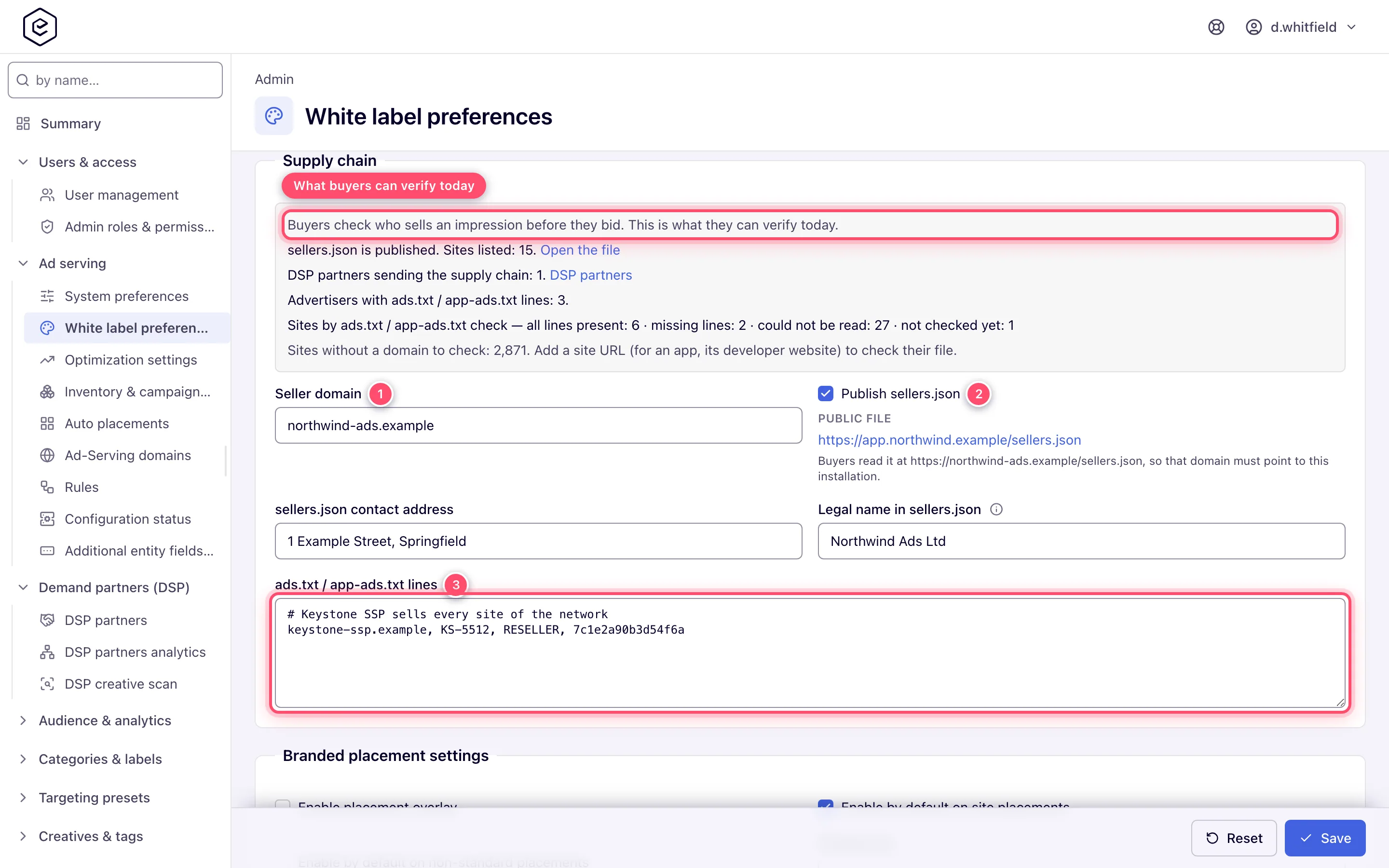
-
Opt sites in. Turn on List in sellers.json on each site you sell, or select sites in the sites grid and press List in sellers.json.
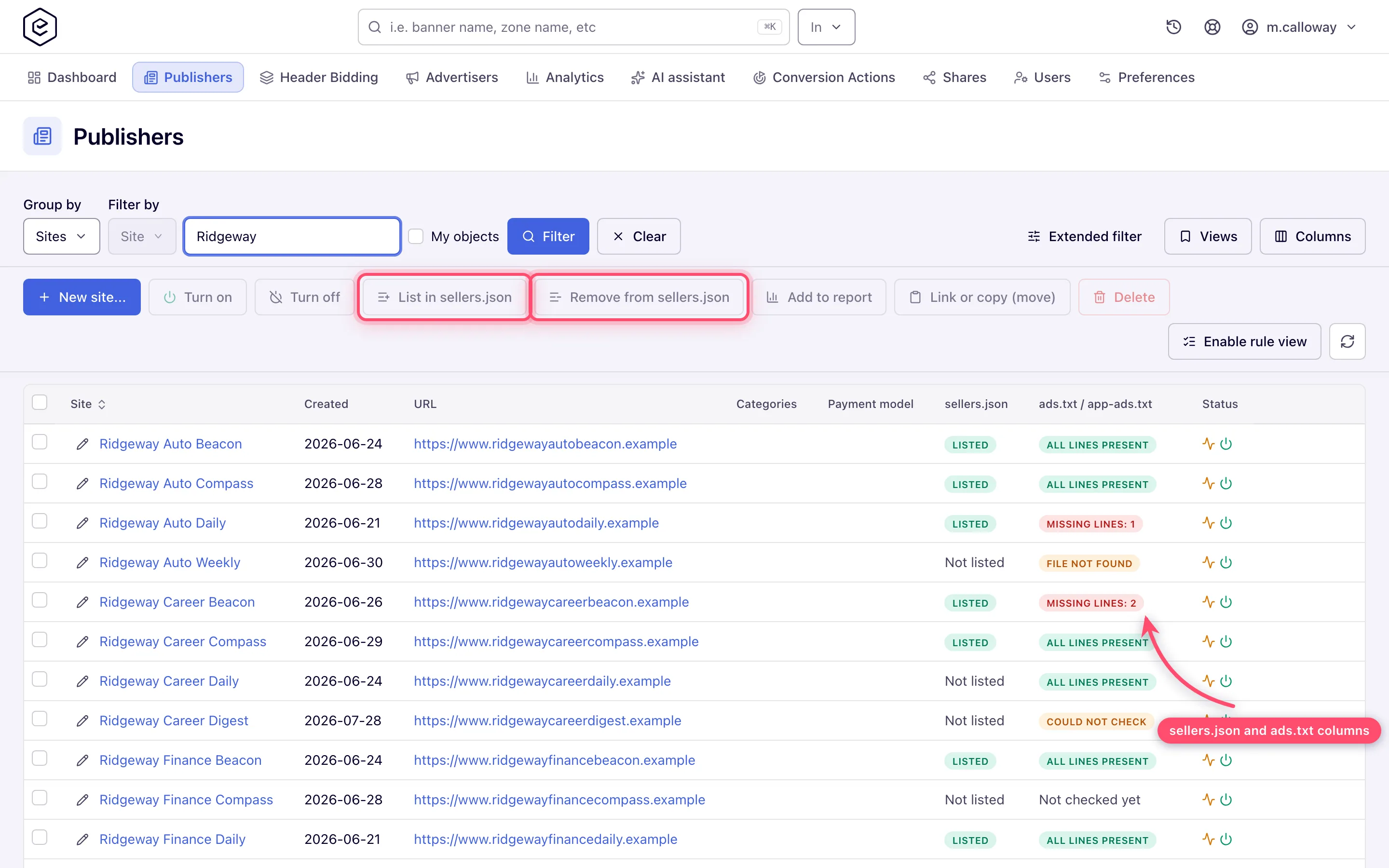
Then pick the scenario that matches each site or partner — the overview is on Supply chain, sellers.json and ads.txt: setup by scenario.
Caveats and exceptions
The supply chain in DSP bid requests does not depend on List in sellers.json. List every site you sell to DSPs with the chain switched on, or buyers will not find its seller ID.
The caveats that apply to every supply-chain setting — who can do this, what a seller ID change touches, which line the network’s own entry is — are on Supply chain, sellers.json and ads.txt: setup by scenario.
Not working?
- A pasted line is refused on save. Where: the message names the line number.
OWNERDOMAINandMANAGERDOMAINtake one entry each (oneMANAGERDOMAINper country);CONTACT=andSUBDOMAIN=belong to the publisher’s own file. Delete the line and save again. - A site is not in sellers.json. Where: the site’s List in sellers.json switch, or the sellers.json column of the sites grid — sites start unlisted.
- sellers.json does not open at your seller domain. Where: the domain’s DNS — it has to
point at the platform for
https://<seller domain>/sellers.jsonto reach it.
The causes of Missing lines: N, File not found and Could not check on a site are on Supply chain, sellers.json and ads.txt: setup by scenario.
Reference
Every setting and where it lives, and the terms: Where things live and Glossary on the hub. The sellers.json fields and the file’s shape: Supply chain and sellers.json.
