
Set up the conversion action, CPA pricing and the affiliate postback
The first half of a CPA offer — define the conversion action with its attribution windows, price it per conversion on the action and the campaign, hand the partner the Click ID postback with att=, and let them carry sub1–sub10 through to the conversion.
What it is and why
A CPA offer starts with three things the advertiser pays for: a conversion action that says
what counts and for how long after the click, a price per conversion, and a postback the
partner’s tracker fires server-to-server when the conversion happens. This page sets the three up
and lets the affiliate keep its own sub1/sub2 breakdown on every conversion; the caps, the
kill-switch and the reconciliation are the next stages of
Run a CPA offer with affiliate postbacks.
Example. The action Install carries a 7-day post-click window and a $4.00 Global price; the
campaign is on CPA with Use general pricing ticked. The affiliate’s tracker stores
$$CLICK_ID$$ from the landing URL and fires the Conversion Tracking URL with att=click when the
app opens, and &sub1=affiliate42 on the click comes back as $$SUB1$$ on the conversion.
Typical scenarios
| You want | Set | Where |
|---|---|---|
| $4.00 per install, 7 days after the click, views not credited | action: Post-click window 7 Days, Post-view window 0; Pricing Global 4.00; campaign Pricing CPA + Use general pricing | Conversion Actions; campaign → Pricing |
| The partner’s tracker posts back with a click identifier | Postback (S2S) tab → Click ID method: $$CLICK_ID$$ in the landing URL, (clickid) in the Conversion Tracking URL | campaign → Conversion actions → Conversion tracking code |
| The affiliate’s own sub-values come back on the conversion | &sub1=affiliate42&sub2=creative-b on the click; $$SUB1$$ … $$SUB10$$ in creatives and landing URLs | the partner’s click URL |
| One offer through three campaigns, a click on one may convert on another | the same Campaign alias on all three | campaign → Conversion actions card (needs a grant) |
Step by step
The stock Advertiser role has no campaign Conversion actions card, no tracking code and no CPA pricing, so on that role steps 2 and 3 are done by your network manager.
-
Define the conversion action. Go to Account → Conversion Actions → + Create and name the action (max 64 chars, letters / digits /
-/_— the name feeds the Sub ID macro, so keep it stable). Set the attribution windows: Post-click attribution window (7 Days) and Post-view attribution window. Clicks always take priority over views when both could attribute. Keep Detailed conversion log on — you will want per-event rows in the Conversions Log when the partner disputes numbers. Leave Default attribution type at Unattributed while you are still agreeing the integration (see the caveats for when to change it). Full field reference: Create and edit conversion actions.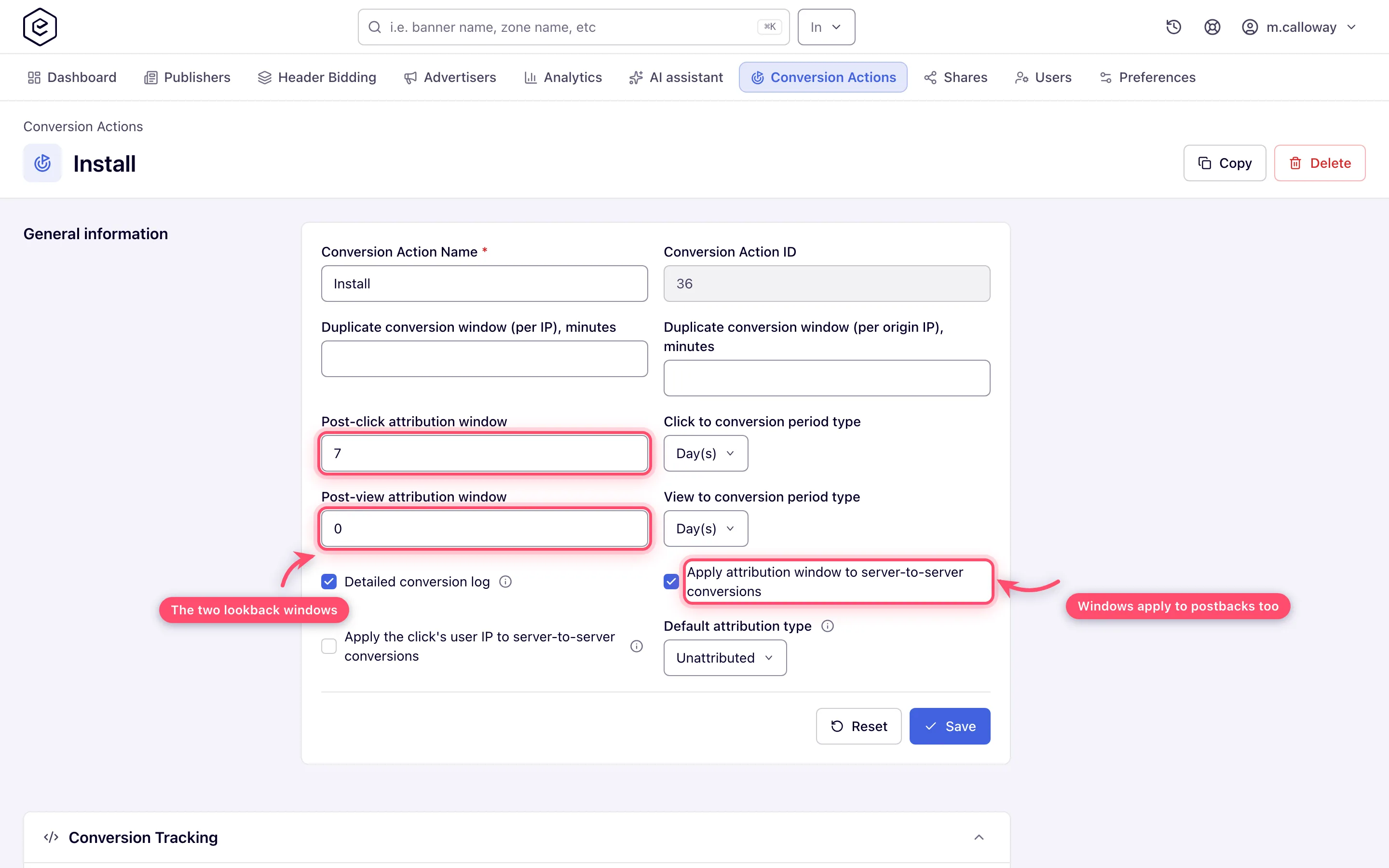
-
Price the conversions (CPA). On the action’s edit page, switch the Pricing card on and set the Global price per conversion, plus per-country rows if payouts differ by market. On the campaign’s Pricing card pick type CPA. The grid prices per country and per action; tick Use general pricing to fall back to the action-level prices instead of maintaining a second grid (Configure pricing).
-
Link the action to the campaign and hand over the postback. On the campaign, switch the Conversion actions card on and confirm your action is listed with its Conversion action key. Select the action row, click Conversion tracking code, open the Postback (S2S) tab, and pick the method with the partner (full walkthrough):
- Click ID — the partner puts
$$CLICK_ID$$in the landing URL, stores the substituted value at click time, and requests the Conversion Tracking URL with it in place of(clickid)when the user converts. This is the one to give a new integration. - Click ID (per action, legacy) — the collapsed method below it: same flow with
$$SUB_ID(YourAction_ID)$$and(subid), kept for integrations already built on it.
The macros belong in the landing URL, where the ad server expands them; the
(…)placeholders belong in the Conversion Tracking URL, where the partner substitutes them. Check the Ad-serving domain selector above the tabs before you copy anything — it sets the host in the tracking URLs as well as in the pixel snippets.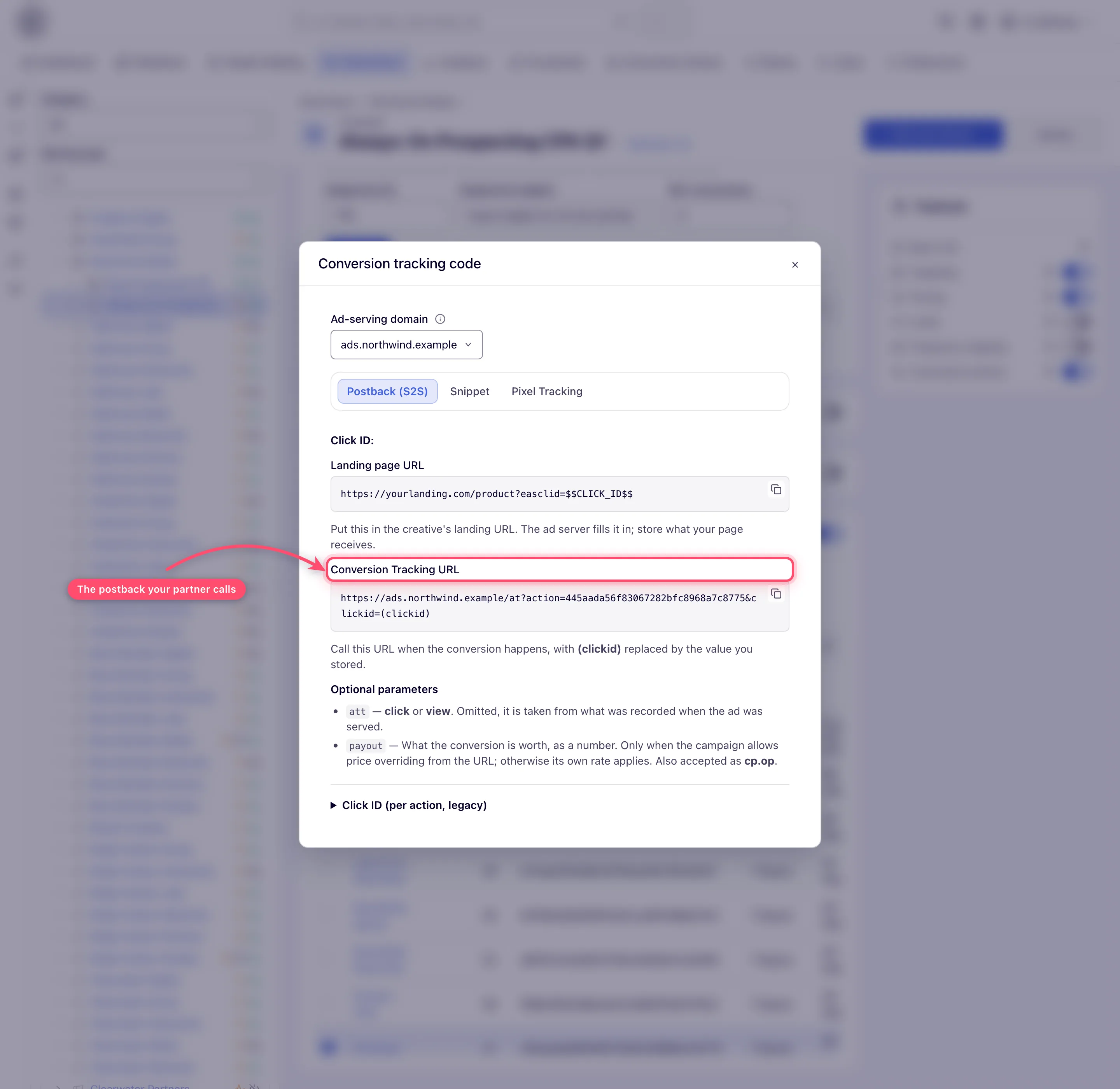
Have the partner add
att=from the Optional parameters listed beside the URL —clickorview— so each conversion is classified from what their tracker recorded (details in the caveats). Running the same offer through several campaigns? Give them the same Campaign alias on the Conversion actions card so a click on one campaign can convert against another. - Click ID — the partner puts
-
Let the partner carry their own sub-values. Affiliates arriving from another platform expect to append their own breakdown values to the click and get them back on the conversion. Ten names work without any setup on your side —
sub1throughsub10, the same names Everflow and Affise use:…&sub1=affiliate42&sub2=creative-bEach is available in creatives and landing URLs as
$$SUB1$$…$$SUB10$$(or$$CUSTOM_PARAM_ESC(sub1)$$when the value goes into a URL), and each travels with the click through to the conversion, so the partner’s own dimension survives the round trip.
Caveats and exceptions
Attribution
- A window of 0 does not close view attribution to a postback. On the pixel route it means
“never attribute”, but on the server-to-server route it means “do not measure”, so a partner
who posts
att=viewis still counted. - Default attribution type is a fallback: it classifies a postback only when neither the
partner’s
att=nor a click the ad server recorded says what it was. Set it to Post-click (or Post-view) only once you know the partner’s tracker cannot sendatt=and you know which one it means. On an action that also has Apply attribution window to server-to-server conversions ticked, that choice is what makes a late postback expire instead of counting. - How
att=is read.att=is not part of the Conversion Tracking URL the tab generates — it is one of the Optional parameters listed beside it. Values:click(alsopostclick,clickthrough,ct) orview(alsoimpression,imp,postview,viewthrough,postimpression,vt,vta), from whatever the partner’s MMP or affiliate tracker recorded. Values are case-insensitive;-/_separators are ignored; bare digits are rejected as ambiguous. A partner who does not send it at all still gets every conversion counted — it is classified from what the ad server recorded when it served the click, and only when that tells nothing does the action’s Default attribution type decide, which is Unattributed until you change it. An empty-looking split is therefore the first thing to check: either the partner is not fillingatt=in and the ad server has no click to go on, or the default is answering for them. Reconcile using the Post-click conversions / Post-view conversions report columns and the Conversions Log’s Attribution type column. Full rules: Get the pixel and S2S tracking code. - A late postback is dropped only once the action measures the window. Two things have to be
true: the action has Apply attribution window to server-to-server conversions ticked (on
by default on actions created from release 149, off on older ones), and the conversion claims
a click or a view — from the partner’s
att=, from a value the ad server handed out while processing a click, or from the action’s Default attribution type. When both hold, a conversion reported 10 days after the click against a 7-day window is not counted and not backdated: it is recorded only as a zero-revenue Expired post-click conversions diagnostic (no CPA charge, no piggybacks). When either is missing, the same postback is counted whatever its age. Watch that column when a partner claims conversions you do not see, and align the window with the partner’s real conversion latency (trials, delayed approvals).
Macros and sub-values
- A rename changes the macro’s text, not its meaning. The Sub ID macro embeds the action name
(
$$SUB_ID(NewName_<id>)$$), but only the trailing_<id>is read. Partners who hard-coded the old name keep converting against the same action; the text just stops matching what you see in the panel. What does not work is a macro written without the id ($$SUB_ID(Signup)$$) — that one is left in the URL untouched, so always hand partners the generated macro rather than one typed by hand. - Only
sub1…sub10are recognised bare —sub11or a misspelling stays an ordinary request parameter. Anything else you want to pass needs thecp.prefix (Macros reference). - No role has the Campaign alias control out of the box; ask your network manager.
The caveats that apply to the whole offer — the roles — are on Run a CPA offer with affiliate postbacks.
Not working?
The conversion is counted but classified wrongly, or the partner’s macros do not expand? The likely causes:
| Symptom | Likely cause | Check |
|---|---|---|
| The post-click / post-view split is empty | The partner is not sending att= and the ad server has no click to go on, or the Default attribution type is answering | Partner’s postback URL → att=; action → Default attribution type; Conversions Log → Attribution type |
| Late conversions are counted although the window is 7 days | The S2S window checkbox is off (default on older actions), or the conversion claims neither click nor view | Action → Apply attribution window to server-to-server conversions, Default attribution type |
att=7 or att=1 is ignored | Bare digits are rejected as ambiguous | Use click / view (or their synonyms) |
The partner’s $$SUB_ID(Signup)$$ is left in the URL | A macro without the _<id> suffix is not expanded | Hand them the generated macro from the Postback tab |
| The partner renamed the action and conversions stopped | They did not — only the _<id> is read; look for another cause | Compare the id in their URL with the action’s |
sub11 does not come back on the conversion | Only sub1 … sub10 are recognised bare | Use cp. for anything else |
| The tracking URL has the wrong host | The Ad-serving domain selector above the tabs was on another domain when copied | Conversion tracking code → Ad-serving domain |
Role and permission symptoms, and the other stages, are on Run a CPA offer with affiliate postbacks.
Reference
The fields of the action and the full postback rules: Create and edit conversion actions, Get the pixel and S2S tracking code and the Macros reference.
