
Copy, move and link with the clipboard
Put banners, campaigns, zones or placements on the clipboard from the grids view and paste copies, move them one level down or link banners to placements — with the drag-and-drop equivalent on the entity tree and the caveats on copies that fail part-way.
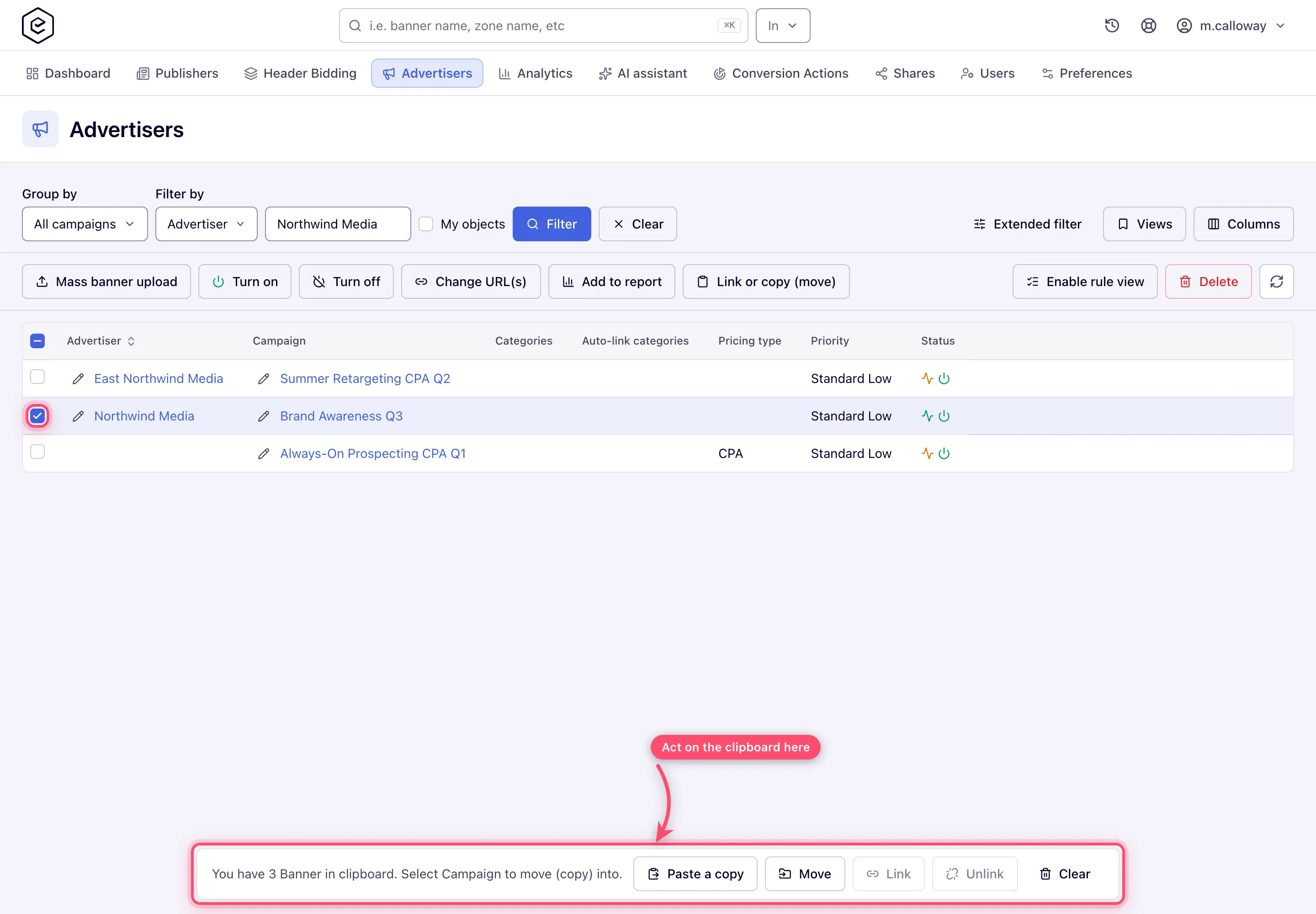
The clipboard is how you copy, move or link a set of entities between containers without re-creating them: select rows in the grids view of Account → Advertisers (or Publishers), put them on the floating clipboard with Link or copy (move), navigate to the destination and act from the clipboard bar. The entity tree offers the same with drag and drop. The other bulk operations are on Bulk banner operations.
Example. Northwind Brand Q3 has three 300×250 banners that the agency wants in Northwind Retargeting too. Tick the three → Link or copy (move) → Group by All campaigns → tick Northwind Retargeting → Paste a copy → 3 copies each: nine new banners, the originals untouched.
Typical scenarios
| You want | Use | Where |
|---|---|---|
| Copy a set of banners into another campaign, 3 copies each | Link or copy (move) → clipboard → Paste a copy → 3 | grids view; up to 20 copies |
| Move a campaign to another advertiser | Link or copy (move) → tick exactly one advertiser → Move | grids view, Advertisers level |
| Serve a banner on 12 placements without copying it | Link or copy (move) → tick the placements → Link | grids view, placements as the destination |
| A second copy of a banner in the same campaign | paste with nothing selected in that campaign’s grid | the campaign’s own grid |
Step by step
Link or copy (move) puts the selected rows on a floating clipboard; navigate to the destination and act from the clipboard bar.
- Paste a copy / Move — same family, one level down: banners into a campaign, campaigns into an advertiser, zones into a site, placements into a zone. Move needs exactly one destination row. A copy asks Please enter number of copies, from 1 to 20; over the API and in every console copy path the same ceiling of 20 applies.
- Link / Unlink — across families: banners ↔ placements, creating or removing serving links without copying anything.
Copying into the level you are already in — a second copy of a banner in the same campaign — needs no destination row. Stand in that container’s own grid with nothing selected and paste: an empty selection means “here”. The clipboard bar says where it will land before you commit.
Dragging does the same on the entity tree: drag a banner onto a campaign, a campaign onto an advertiser. Only rows that will accept the drop highlight, and the badge on the highlighted row shows which operations are on offer — one icon means the outcome is fixed, two mean you will be asked to choose.
Caveats and exceptions
A copy of several can fail part-way. The copies already saved stay: the REST answer names the
copy that failed and lists the ones that exist, and a bulk campaign copy lists a campaign whose
copy failed in failedCampaignIds after rolling that one campaign’s copy back.
Zones and placements move through the clipboard too (a zone into a site, a placement into a zone). A moved placement keeps its placement key, so its published ad tags keep working — see Move or copy a zone or placement.
Copying or moving a banner with Keep creative(s) linked silently drops the links your Link Placements to Banners grant does not reach — at Shared or Shared linked a copy keeps only the links on inventory shared with you. The copy still succeeds; check the new banner’s placement count if it matters.
The clipboard holds one entity type at a time — see Bulk banner operations, together with the caveats that apply to every bulk operation (who can do it, read-only shares, bulk delete).
Not working?
| Symptom | Cause | Check — where |
|---|---|---|
| Selected item(s) are not … when adding to the clipboard | The clipboard holds another entity type | accept to clear, or paste the first set first |
| Fewer copies than asked | A copy failed part-way; the saved ones stay | the REST answer / failedCampaignIds |
| The copied banner has fewer placements | Links outside your Link Placements to Banners grant were dropped | the new banner’s Linked placements |
The causes shared by every bulk operation — the tree view, read-only shares — are on Bulk banner operations.
Reference
The toolbar action that feeds the clipboard is in The bulk toolbar actions; what a link and an unlink mean is on Hierarchy and linking.
Related
- Bulk banner operations
- Mass banner upload
- Bulk edit banners: properties, URLs, status and labels
- Hierarchy and linking — what link and unlink mean
- Zones — moving a zone or placement
