
Retarget with a first-party cookie, suppress buyers, cap and measure
Mark site visitors with the ad server's cookie pixel and target them with a Cookie Value rule, any-of or all-of across several cookies, exclude the segment or cookie that marks buyers, cap exposures with the subject that survives cookie loss, and read cookie delivery in the Targeting Cookie report.
What it is and why
When the audience is “visitors who did X on the site”, a Cookie Value rule is the lightweight alternative to a DMP upload: the page fires the ad server’s cookie pixel, the rule matches the cookie. The same include / exclude machinery then suppresses the people you do not want, a frequency cap keeps a known user from being bombarded, and the Targeting Cookie report shows what the cookies delivered. This is the second half of Target audiences and retarget known users.
Example. The page fires /multi-cookie.gif?aud=cart_abandoner|30d for visitors who left a
full basket; the campaign gets a Cookie Value rule aud = cart_abandoner as Include, the
segment Booked as Exclude, and a cap of 3 impressions per day with the subject User
(cookie-based + server-side storage) — the ~116,000 clickers who have not booked, three times a
day at most.
Typical scenarios
| You want | Set | Where |
|---|---|---|
| Retarget cart abandoners without an upload | the page fires `/multi-cookie.gif?aud=cart_abandoner | 30d; Cookie Value rule aud=cart_abandoner` Include |
| Visitors who saw pricing and booked a demo, in any order | one pixel per step under its own cookie name, one Include rule each, the Included list switched to and | campaign → Targeting → Cookie Value |
| Exclude recent buyers | the segment or cookie value that marks buyers, Exclude | the same campaign |
| Not more than 3 impressions a day per known user | Frequency capping 3 / 1 Day(s), subject User (cookie-based + server-side storage) | campaign → Frequency capping |
Step by step
Cookie Value rules are on for the stock Advertiser, Publisher and Network Manager roles.
4. Retarget with a first-party cookie
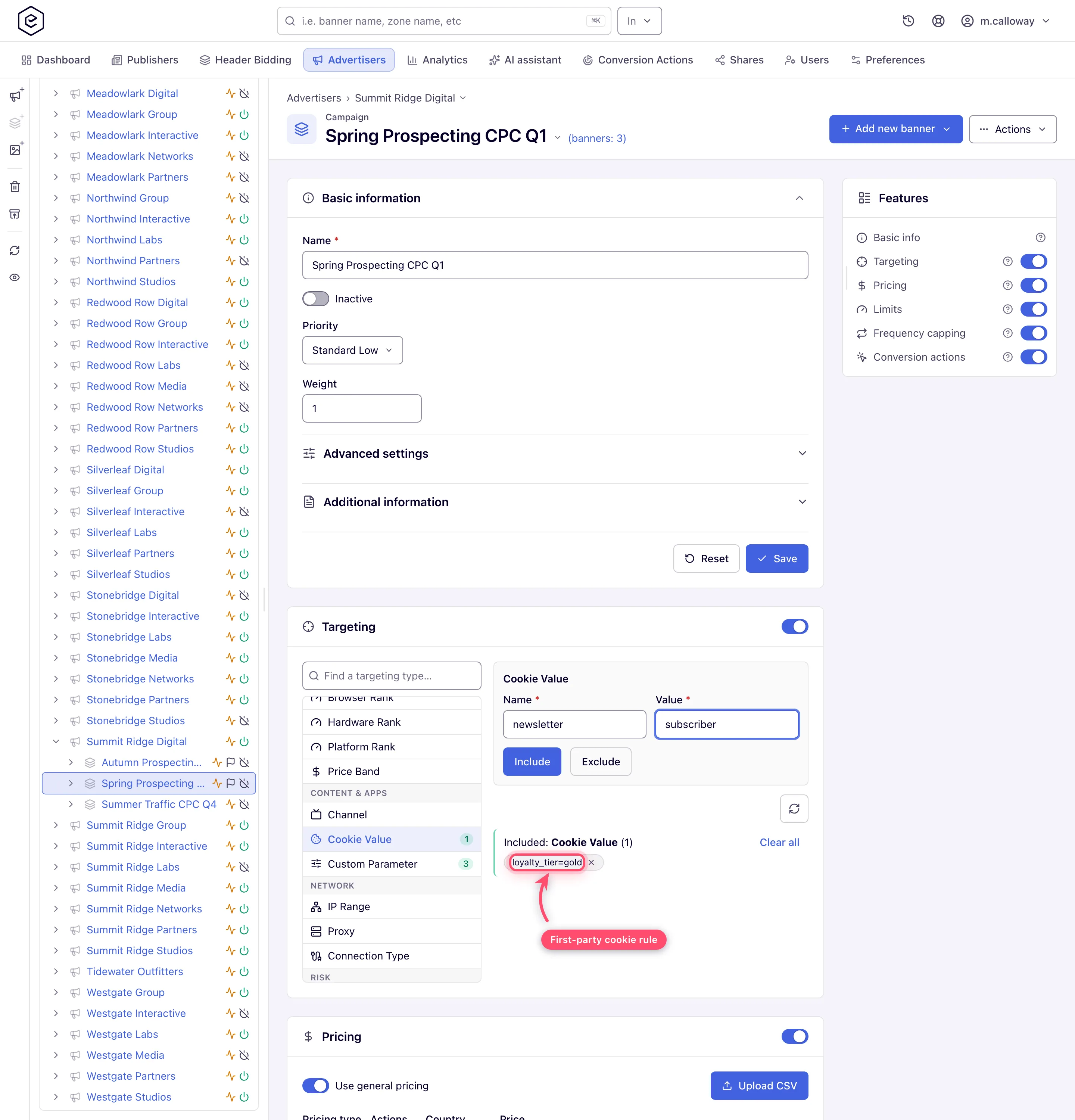
If your audience is “visitors who did X on the site”,
the lightweight alternative to a DMP upload is Cookie Value targeting. Have the page fire
Epom’s cookie pixel for those visitors,
<img src="https://<ad-serving-domain>/multi-cookie.gif?aud=cart_abandoner|30d" width="1" height="1" alt="">
(see the caveat on which cookies count), then add a Cookie Value rule: cookie name +
cookie value, then Include. If the audience is several steps — saw pricing and booked
a demo, in any order — fire one pixel per step, each under its own cookie name, add one
Include rule per step and switch the Included list to and with the or ▾ between the
chips (Several cookies: any of or all of).
Values given for one cookie name are alternatives, so aud = cart_abandoner and aud =
wishlist in one list reach either audience.
5. Suppress the people you do not want
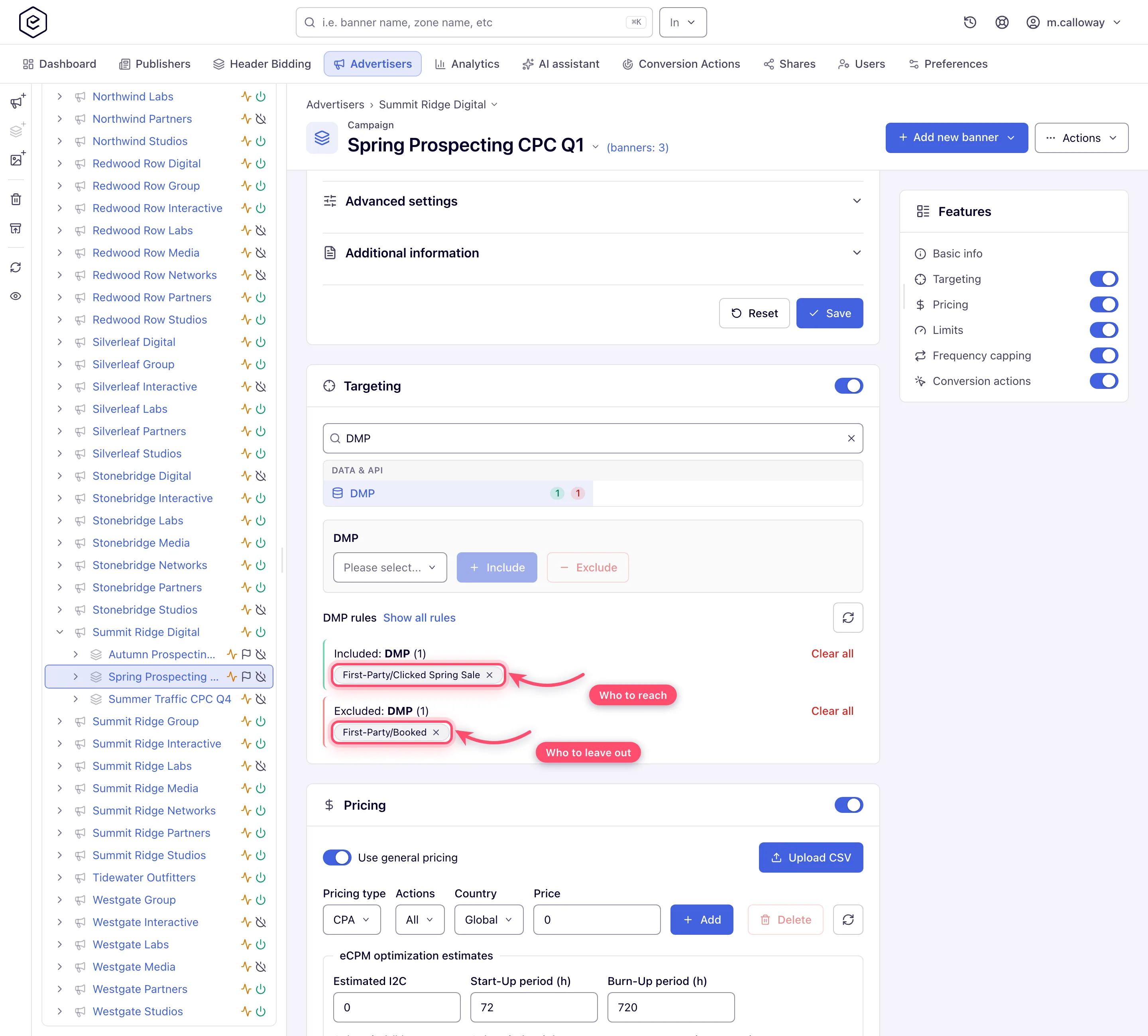
Exclusion works the same way in reverse — pick the segment (or cookie value) that marks converters / customers and click Exclude. A typical retargeting pair is one include rule (“visited product pages”) plus one exclude rule (“purchased”) on the same campaign. Mind how the and / or connector combines dimension groups if you mix DMP and Cookie Value rules (Add targeting rules).
6. Cap it
Retargeting is the fastest way to annoy a known user. Add a frequency cap with the User (cookie-based + server-side storage) subject so the cap survives cookie loss as far as possible.
7. Measure
Standard delivery reporting works as usual (Run a report). For cookie-based delivery specifically, the Targeting Cookie report type shows cookie name / value statistics — it is only meaningful while cookie logging is enabled on your network, and it is not in any stock role — ask your network manager (or, as a network manager, your network administrator; cookie logging is switched on by Epom support) (Report types).
Caveats and exceptions
Cookie Value
- Only cookies the ad server set count. A Cookie Value rule reads only the cookies Epom’s own
cookie endpoints wrote (
/multi-cookie.gif,.js,.htmlandset-cookie.gif): their names start witheas_3p_, and the rule’s Name is the part after it. A cookie your site’s own script sets is never read — not even one set for the serving domain. Fire the pixel instead (step 4). The browser then sends that cookie only with ad requests to the serving domain that set it, and only where third-party cookies are allowed: not on Safari or any iPhone browser, not on Firefox across sites, not in private windows, apps or connected TV.
The caveats that apply to every audience rule — privacy and consent, and the roles — are on Target audiences and retarget known users.
Not working?
The cookie rule never matches, or known users see the ad far more than the cap? The likely causes:
| Symptom | Likely cause | Check |
|---|---|---|
| A Cookie Value rule never matches a cookie your site sets | Only eas_3p_* cookies written by Epom’s own endpoints count | Fire /multi-cookie.gif instead |
| Known users see the ad far more than the cap | Cookie-only subject; the visitor looks new each session | Frequency capping → subject User (cookie-based + server-side storage) |
| No Targeting Cookie report type | Not in any stock role; needs cookie logging enabled on the network | Your network manager (or, as a network manager, your network administrator); Epom support for cookie logging |
The user-ID causes that every match depends on, and the audience-file causes, are on Target audiences and retarget known users.
Reference
Several cookies, any of or all of: Custom parameter and cookie targeting; the cap: Set up frequency capping; the report: Report types.
