
Demand partners' ads.txt lines
Scenarios 3 and 4 of the supply-chain setup — a network whose ad tag resells your inventory as a third-party code banner, and an exchange that hands over a multi-line ads.txt block with comments and variables — where the lines go, which sites carry them, and which lines are refused.
What it is and why
A demand partner is not a brand buying campaigns: it is another network, an exchange or a DSP seat that resells the impression through its own ad tag, set up in your account as an advertiser. It asks every publisher to carry its ads.txt line, and that line travels with the partner’s banners: it lands in the block of every site where one of them is linked, and nowhere else. The one-time network setup is on Set up the network as a seller; where the other kinds of partner put their lines is on Supply chain, sellers.json and ads.txt: setup by scenario.
Example. Lakeshore Media resells Sports Daily through a JavaScript tag that runs as a
third-party code banner on two of its placements. Its line
lakeshore-tags.example, LKS-20417, RESELLER, pasted once on the Lakeshore advertiser, appears
in the Sports Daily block under Lakeshore Media · Demand partner — and drops out the day the
banner is unlinked.
Typical scenarios
| You sell… | Set | Then read |
|---|---|---|
| To another network’s ad tag (a third-party code banner that resells) | That network’s line on its advertiser’s Demand partner ads.txt / app-ads.txt lines | Scenario 3 |
| Through an exchange that hands you a block with comments and variables | Paste the block as given on the advertiser; drop any OWNERDOMAIN / MANAGERDOMAIN line it refuses | Scenario 4 |
An ordinary advertiser that only buys campaigns has no ads.txt line: ads.txt lists the companies that sell the inventory, not those that buy it.
Step by step
Scenario 3: tag-based demand from another network
Setup. The advertiser Lakeshore Media is not a brand buying campaigns: it is another network, a demand partner whose JavaScript ad tag runs as a third-party code banner and resells the impression. Lakeshore asks every publisher to carry its line. Open Account → Advertisers → Lakeshore Media → Basic info → Demand partner ads.txt / app-ads.txt lines, paste the line, press Add lines:
lakeshore-tags.example, LKS-20417, RESELLERWhere it appears. Only on sites where one of Lakeshore’s active banners is linked to an active placement. Unlink the banner or switch it off and the line drops out of those sites’ blocks and checks. On the site page its line is grouped under Lakeshore Media · Demand partner, so the publisher can see why it is needed. A reader who may not see that advertiser gets the same line under Demand partner alone.
sellers.json / schain: unchanged — Lakeshore buys through its own tag, not through a bid request from you.
Scenario 4: an exchange hands over a multi-line block
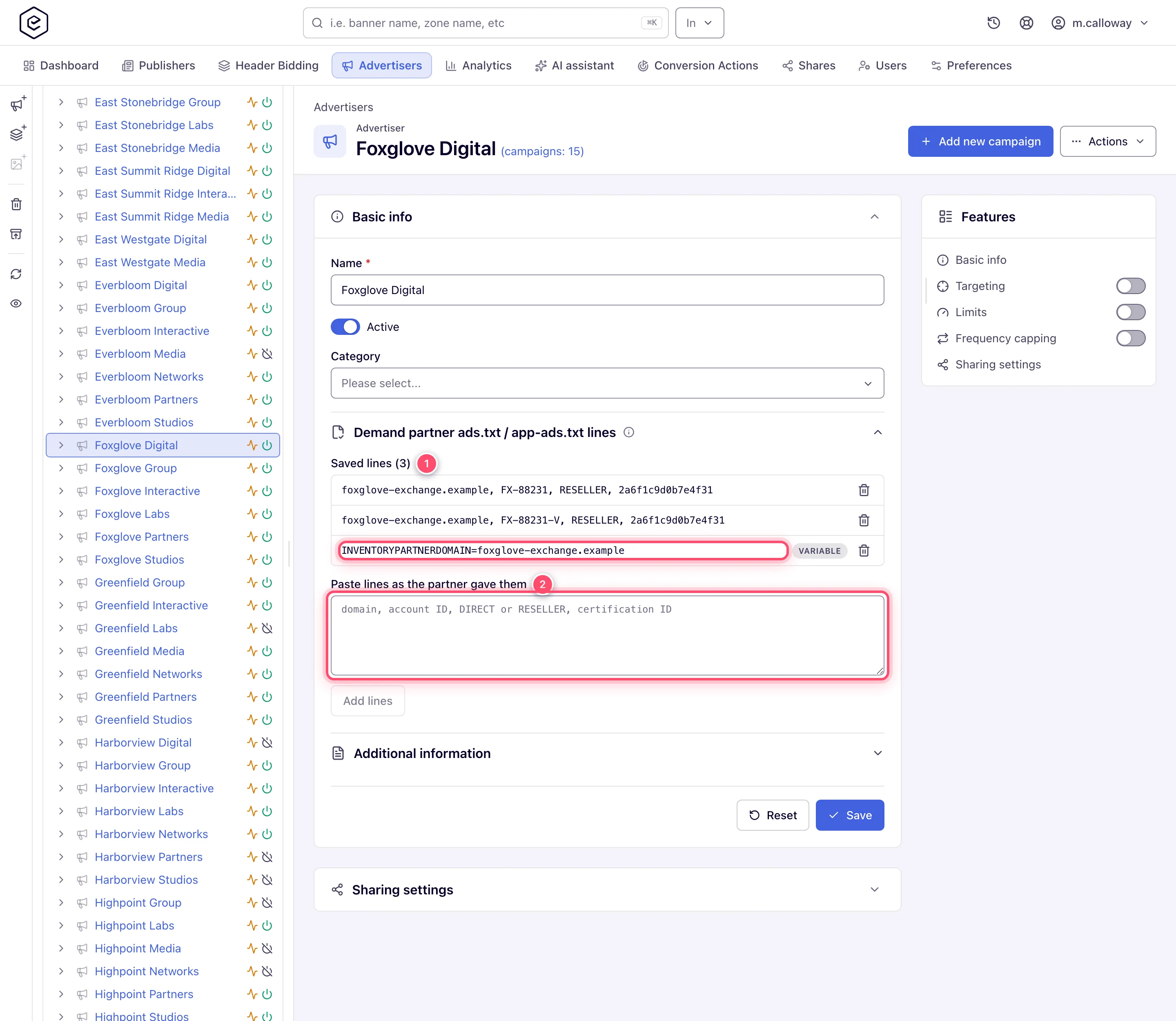
Setup. The SSP behind advertiser Foxglove Digital — a DSP seat that resells through its own exchange — sends a block with comments and variables. Paste it on the advertiser’s Demand partner ads.txt lines exactly as received:
# Foxglove exchange block, paste as given
foxglove-exchange.example, FX-88231, RESELLER, 2a6f1c9d0b7e4f31   # display
foxglove-exchange.example, FX-88231-V, RESELLER, 2a6f1c9d0b7e4f31 # video
INVENTORYPARTNERDOMAIN=foxglove-exchange.example
MANAGERDOMAIN=foxglove-group.example
Add lines stores nothing and names the line to drop:
Line 5: OWNERDOMAIN and MANAGERDOMAIN describe the site owner; set them in White Label.Under the IAB ads.txt 1.1 rules OWNERDOMAIN and MANAGERDOMAIN say who owns the site and who
manages its inventory, so a partner cannot set them for the publisher. CONTACT and SUBDOMAIN
are the publisher’s own entries and are refused the same way. Delete the line and paste again.
INVENTORYPARTNERDOMAIN names the partner itself and is kept.
Comments and blank lines are dropped. Domains and relationships are lower- and upper-cased. Each record is kept once. Variables appear in the publisher’s block but are not required when the live file is checked. A variable stored before these lines were refused stays listed with Not published: it is left out of every site’s block until you remove it. The same rules apply to a site’s Additional ads.txt lines.
Caveats and exceptions
The subsection needs its own permission. Advertiser ads.txt / app-ads.txt Lines (demand partners) is off for every role until an administrator grants it; read-only shows the lines under a Read-only mark, disabled hides the subsection. The full permission table, and the caveats that apply to every supply-chain setting, are on Supply chain, sellers.json and ads.txt: setup by scenario.
Not working?
- The partner’s line is missing from a site’s block. Where: the partner’s banners — the line is carried only where one of its active banners is linked to an active placement of that site.
- Add lines stores nothing. Where: the message names the line.
OWNERDOMAIN,MANAGERDOMAIN,CONTACTandSUBDOMAINare refused; delete that line and paste the rest again. - A variable shows Not published. Where: the saved lines — it was stored before such lines were refused and is left out of every block until you remove it.
The causes of Missing lines: N, File not found and Could not check on the site are on Supply chain, sellers.json and ads.txt: setup by scenario.
Reference
The terms (Demand partner, RESELLER, certification authority ID) are in the hub’s
Glossary; every setting and its page in
Where things live.
