
Frequency capping reference
Every field, kind, subject and REST call of the Frequency capping card, with the corner cases — the companion to the Set up frequency capping guide.
The companion to Set up frequency capping. The guide has the steps, the caveats and the fix-it checklist; this page holds every field, kind, subject and REST call, and the corner cases.
The five kinds of cap
| Kind | Counts | Counter resets |
|---|---|---|
| Request | the entity being chosen for an ad response, before any impression is confirmed | period expires |
| Frequency | a validated impression of the entity (bot-free, valid impression hash, known country) | period expires |
| Click | a click on the entity’s ad | period expires |
| Action | a conversion attributed to the entity for this visitor — of any action, or only of the one Conversion action the row names | period expires |
| No-Click | an impression that the visitor did not follow with a click | period expires, or the visitor clicks — a click zeroes the counter |
Request capping is the strictest of the impression-side pair: the ad only has to be returned, not rendered. On a placement it is stricter still — the counter ticks once per ad request that still had eligible demand at the end of filtering, whether or not an ad was finally chosen.
What each level offers
The Capping type list offers these kinds on each level:
| Kind | Advertiser | Campaign | Banner | Placement |
|---|---|---|---|---|
| Request | — | ✔ (once granted) | ✔ (once granted) | ✔ (once granted) |
| Frequency | ✔ | ✔ | ✔ | ✔ |
| Click | — | ✔ | ✔ | ✔ |
| Action | — | ✔ | ✔ | ✔ |
| No-Click | — | ✔ | ✔ | — |
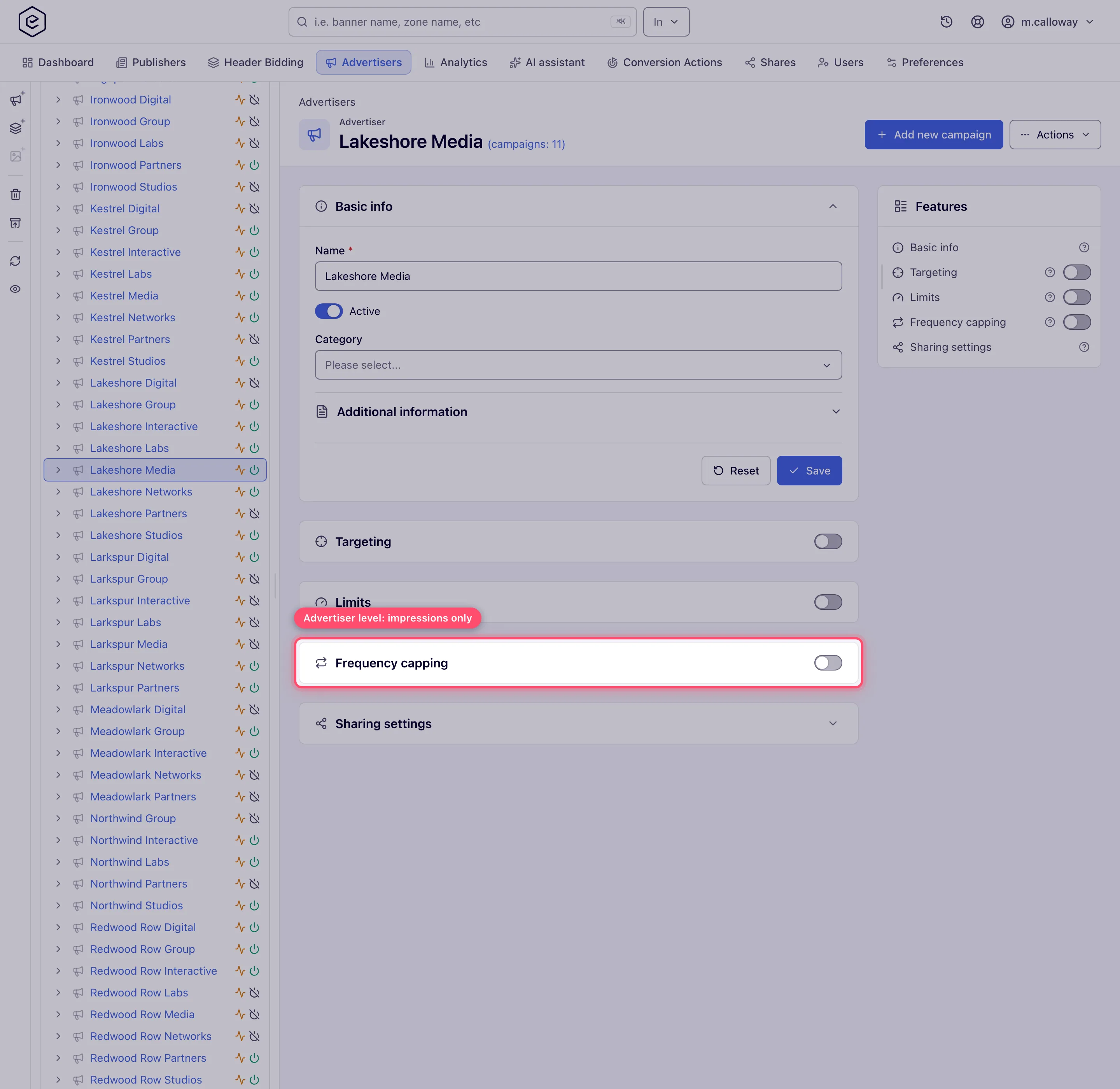
The advertiser level is deliberately minimal: one kind, covering everything underneath it — one impression cap that every campaign and banner of that advertiser shares.
Each kind has its own permission, and a placement uses a separate set; No-Click has none of its own and follows Frequency Capping.
The dialog calls a kind one thing, the grid calls it another
| In the Capping type list | In the grid’s Type column |
|---|---|
| Request Capping | By requests |
| Frequency Capping | By impressions |
| Click Capping | By clicks |
| Action Capping | By conversions — accepted conversions of any action, or of the one action named under it; rejected ones and VAST playback events do not count |
| No-Click Capping | No-Click Capping (unchanged — this one has no short label) |
Fields
| Field | What it does | Default | Accepted values |
|---|---|---|---|
| Capping type | Which of the five kinds this row is | first kind in the list | fixed once the row exists — the grid has no Type editor |
| Conversion action | Action Capping only. Which conversion action the row counts | Any action | Any action, or one of your conversion actions. Video and viewability events are not offered. Fixed once the row exists, and not available together with Flat |
| Subject | Where the counter is kept for this row | User (cookie-based) | see Where the counter lives. Hidden unless server-side storage is on and IP capping (or L.E.S. IP capping) is enabled for the network and your role holds the matching IP-subject permission |
| Amount | Events allowed per visitor per period | 0 | 0 – 8 388 607. 0 means no restriction — the ad server skips any cap whose amount is 0 |
| Period | How many period units the window lasts | 1 | 1 – 255 |
| Period type | The unit | Day(s) | Second(s), Minute(s), Hour(s), Day(s), Week(s), Month(s), Year(s) |
| Flat | Spread the allowance evenly instead of letting it burst | off | see Flat |
Amount and Period are whole numbers. Cross either bound and the cap is not saved — the card says
the values are wrong, and the server error names the field, e.g. “Period: must be less than or
equal to 255”. Keep Period ≤ 255 and raise the Period type instead: “1 Year”, not “365 Day(s)”.
The REST API answers the same input with a 400 whose errors names the field.
The period window, and when it rolls over
The window is Period × Period type measured from the first counted event, per visitor
and per cap. It is not aligned to midnight, to a calendar week, or to the network’s time zone,
and it does not slide.
Concretely, for “3 per 1 Day”: the first impression at 14:20 opens a window that closes at 14:20 the next day. The second and third impressions inside it are counted but do not move the end. The fourth is blocked. At 14:20 the next day the record expires, the counter starts from zero, and the next impression opens a fresh window.
Month and year are real calendar lengths, not fixed 30/365-day blocks — the ad server computes the window by adding the period to a calendar date when it loads the cap into its cache.
Flat
| Flat | Behaviour for “Amount 6, Period 1 Day” |
|---|---|
| off | all six can happen back to back, then the visitor is blocked until the 24-hour window expires |
| on | each event blocks the visitor for period ÷ amount — one impression roughly every four hours, refreshed at every event |
Flat trades the count for a spacing: a flat row keeps no counter at all, only a “blocked until” timestamp.
Several caps of the same kind behave differently depending on Flat. Add two ordinary (non-flat)
impression caps and both apply: the visitor is blocked as soon as either is exceeded. Add two
flat impression caps and only the most restrictive one applies — the ad server picks the
single flat cap with the smallest period ÷ amount and ignores the rest.
Where the counter lives
| Subject | Counter lives in | Enforced when |
|---|---|---|
| User (cookie-based) — default | cookies on the ad-serving domain (400-day lifetime; two per kind of cap — one for flat rows, one for the rest). An Action row is also counted in the server-side store, see below | always, but only for visitors whose browser keeps that cookie; an Action row also through the server-side store while it is enabled |
| User (server-side storage) | the network’s server-side capping store, keyed by the visitor id the ad server resolved for the request (see below) | only while server-side capping storage is enabled for the network |
| User (cookie-based + server-side storage) | the cookie when a cookie is possible, the server-side store when it is not. An Action row is counted in both, see below | cookie half always; server-side half only while server-side storage is enabled |
| IP | server-side store, keyed by the client IP | server-side storage and IP capping enabled for the network, and your role holds Capping IP Subject |
| L.E.S. IP | server-side store, keyed by the last external source IP (the address seen before proxies) | server-side storage and L.E.S. IP capping enabled, and your role holds Capping Last External Source IP Subject |
A cookie is treated as impossible — so a mixed cap falls back to the server-side counter and a plain cookie cap simply under-counts, apart from an Action cap, which the server-side store holds as well — when any of these is true:
- the ad request reports private browsing (
im=1); - the browser is Safari, Mobile Safari, Firefox, Firefox Mobile, Firefox Minimo, Brave or DuckDuckGo;
- the operating system is iOS, iPadOS or Apple TV;
- the browser or OS could not be identified at all.
That list is most of the mobile web. A cookie-based cap is therefore a weaker control than it looks: it is per browser profile, the visitor clears it by clearing cookies, and for a large share of real traffic it never accumulates in the first place. If a cap has to hold, use User (cookie-based + server-side storage) on a network that has server-side storage enabled.
The server-side counter is keyed by the visitor id the ad server resolves per request, and in
the default mixed user-identity mode that id comes from a uuid request parameter if the
tag supplies one, otherwise the Epom UUID cookie, otherwise a device fingerprint. So a
server-side counter usually survives a cleared cookie — but on a network configured for
cookie-only identity resolution, clearing cookies resets it too.
The column and its selector render only when server-side capping storage is enabled for the network, IP capping (or L.E.S. IP capping) is enabled for it, and your role holds the matching IP-subject permission. Where they are missing, existing rows keep whatever subject they were created with and the ad server still honours it — you simply cannot see or change it. A row created through the REST API with subject User (server-side storage) on a network that has server-side storage switched off is counted nowhere and blocks nothing.
What happens when a cap is hit
The check runs during ad selection, after targeting and before the winner is picked, so a capped entity is removed from the auction rather than winning and being suppressed.
| Cap on | Effect for that visitor, for the rest of the window |
|---|---|
| Banner | that banner drops out; other banners in the campaign still compete and one of them can win |
| Campaign | the whole campaign drops out; other campaigns still compete |
| Advertiser | the advertiser and every campaign under it drop out |
| Placement | selection stops for that request — no ad at all is returned for the slot, not a different advertiser’s |
Caps at different levels stack; they never override one another. An advertiser cap of 8 per week, a campaign cap of 3 per day and a banner cap of 2 per 12 hours are three independent conditions, and the visitor is blocked at whichever runs out first — at whatever scope owns it.
Counters belong to visitors, not to your account. Editing an amount, deleting a row or turning the card off does not clear counters already sitting in visitors’ cookies or in the server-side store; those expire on their own schedule. Raising a cap from 3 to 5 takes effect for a visitor already at 3 only once the ad server reloads its cache.
A cap on one conversion action
An Action cap counts every accepted conversion of the entity unless you pick a Conversion action for it. With one picked, the row counts only that action’s conversions — “stop showing the offer after a Purchase, but keep showing it after Add to cart”.
- Rows act together. A conversion adds to every Any action row and to the rows on that action, never to a row on another action. The visitor stops seeing the ad as soon as any row reaches its amount — for example 3 conversions of any action per week and 1 Purchase per 30 days side by side.
- The grid shows it. Under By conversions in the Type column, each row names its action: Any action, the action’s name, or the name followed by (deleted). An action that is not shared with you shows by its id, as Action #41 (hidden) (or Action #41 (hidden, deleted)). The legacy console shows the same in a read-only Conversion action column.
- One action per row. To cap two actions separately, add two rows.
- Fixed once the row exists. The action has no editor in the grid. To move a cap to another action, delete the row and add a new one — a row’s count would otherwise carry over to the new action.
- No Flat. The flat counter keeps one record per entity, so it cannot tell one action from
another. Flat is switched off and disabled while an action is picked, and the API refuses
flat=truewith an action. - A deleted action leaves the row in place, labelled (deleted). Nothing converts on it any more, so the row stops counting — but a visitor who had already reached it stays capped until its period ends. Delete the row to release them.
- Counters. Each such row keeps its own counter, in the cookie and in the server-side store alike, so it never feeds or reads the Any action counter. A cookie or mixed row counts in both stores; see Conversion caps count in both stores.
The total number of conversions of an action — from all visitors together — is a different control: Per conversion action limits.
Conversion caps count in both stores
A conversion often never passes through the visitor’s browser. An S2S postback comes from your tracker’s server: it carries none of the visitor’s cookies, so a cookie written in its answer goes back to the tracker and is lost. A conversion and the next ad request can also be in different cookie jars, for example a private window and a normal one. A cap kept only in the cookie misses both cases. So does a mixed cap whose ad request happens to have a cookie.
So on a network with server-side capping storage, an Action Capping row with the subject User (cookie-based) or User (cookie-based + server-side storage) records every conversion in both stores: in the cookie, when the conversion request can carry one, and in the server-side store under the visitor id. The visitor id of a conversion is the one it is attributed to, from the click or impression, so an S2S postback counts against the right visitor.
- Serving checks both stores. The ad stops once either count reaches the amount. The two counts are compared separately, never added, so a conversion recorded in both stores counts once: a cap of 2 still allows two conversions.
- It applies to every Action row, whether it counts Any action or one conversion action. A row on one action keeps its own server-side counter, so an S2S Lead still does not count towards a 1 Purchase cap.
- Existing caps change at the upgrade (release 155). Cookie and mixed conversion caps now start firing for conversions reported by S2S postback and for conversions made in another cookie jar. Before, they never saw those conversions.
- The sequential-conversion check sees the same counts. With Do not record the same user sequential conversions on, an S2S conversion is now rejected when the visitor’s cookie or mixed cap is reached, as a pixel conversion already was.
- Other kinds are unchanged. Impression, click, request and No-Click caps on the cookie or mixed subject stay in the cookie, and User (server-side storage) rows count as before. The extra server-side lookup is made only for an ad request whose candidates carry a cookie or mixed Action row, and when the request already asks the server-side store it is folded into that lookup.
- Without server-side storage nothing changes. On such a network, conversion caps stay cookie-only.
- Private windows. In the default identity mode a visitor id starts as a fingerprint of the IP, user-agent and language, and the Epom UUID cookie keeps it. A private window of the same browser on the same network therefore usually resolves the same id, so the server-side count follows the visitor between the two windows. A visitor who changes network or browser in between gets a new id.
- Where the two stores differ. The server-side copy of a row ends at the exact period, like the
cookie, a period over 127 days included. Two differences remain:
- a Flat row’s server-side copy blocks only once Amount conversions fall within one
period ÷ amount, so above an amount of 1 it holds less tightly than the cookie; - rows that share a server-side counter take the lowest amount among them (see server-side counters are filed by whole days).
- a Flat row’s server-side copy blocks only once Amount conversions fall within one
- IP and L.E.S. IP rows on S2S. An S2S postback is counted under the tracker’s server address, not the visitor’s. S2S conversions therefore never reach a visitor’s IP cap. With the sequential-conversion check on, once that address reaches the cap, the tracker’s further S2S conversions on the entity are rejected, whoever converted. For conversions reported by S2S, use a user subject — or tick Apply the click’s user IP to server-to-server conversions on the conversion action (with User IP in click IDs included on the network), and the conversion counts under the visitor’s own IP instead. See Create and edit conversion actions.
Over the API
Every kind of cap can be listed, created, edited and deleted over REST; the full parameter list is in Targeting, capping and limits via API.
- By capping record.
GETandPOST/rest-api/{advertiser|campaign|banner|placement}/capping/{id}list an entity’s caps and create one (type,amount,period,periodType,flat,subject, andactionIdfor an Action cap on one conversion action; the new record comes back undercapping).POST /rest-api/capping/{cappingId}edits one — every field is required, partial updates are not supported there — andPOST /rest-api/capping/deletetakesid:TYPEpairs and refuses the whole call when one of them is not a cap of that type. - By kind, on a campaign or banner.
…/{id}/frequency-capping,click-capping,action-cappingandno-click-cappingeach haveset.do,update.do, aGETand aDELETE.set.docreates the rule or replaces the one for that subject;update.donever creates one — on a banner with no rule for the subject it answers404naming the banner, the kind and the subject (for an Action rule also the action it looked for: the one inactionId, or the rule on every action whenactionIdis omitted) and points atset.do, and the fields it does not receive keep their value. - Permissions. Writes need Manage Capping & Limitations (Manage Inventory Capping for a
placement) plus the permission of the kind and of the subject. A refusal is a
403that names the missing permission; a cap on an entity you may not change is also a403, an id that is not a cap of the stated type is a404, and so is a deleted entity. - Bad values — an Amount above 8 388 607 or a Period outside 1–255 — are a
400whoseerrorsnames the field. - Conversion action.
actionIdis accepted on the Action types only. An action you cannot see or that is deleted is a404;actionIdon another kind, together withflat=true, or naming a video or viewability event is a400. On an update,actionIdmay repeat the stored action but never change it (400). A list row carriesactionId,actionNameandactionDeletedwhen it counts one action, and noactionIdwhen it counts every action. A row on an action that is not shared with you carries itsactionIdwithactionNamenull; the MCP overviews (campaign_overview,placement_overview) sayactionHidden: truethere instead. - The switch has no API. There is no stored “capping enabled” flag: the switch reads on when the entity has at least one cap row. Switching it off in the console deletes every Request, Frequency, Click, Action and No-Click cap on that entity after a confirmation; the REST API deletes without one.
Corner cases
Corner case — No-Click capping on the server-side subjects (since release 154). Until release 154 a No-Click row with subject User (server-side storage), IP or L.E.S. IP was never counted and never fired, and a mixed one stopped working for exactly the traffic that cannot keep cookies. On a network with server-side capping storage they now count like any other cap: a mixed row falls back to the server-side counter on incognito and cookieless traffic, and a click releases the record, so the next impression opens a fresh window. Rows of that kind that were left in place because they did nothing start limiting delivery on the upgrade — review them. An IP or L.E.S. IP No-Click cap is one counter for everyone behind the address (a mobile-carrier NAT, an office): their unclicked impressions add up, and a click from any of them releases it for all.
Corner case — Request capping is invisible until your network administrator grants it. Request Capping and Inventory Request Capping are off for every role on a stock network, so
Request Cappingis absent from every capping type list and the Add call is refused. An admin enables it per role in Admin → Users & access → User roles & permissions under Campaign Capping & Limitations (and Inventory Capping & Limitations for placements).
Corner case — a reached cap can reject conversions, but a cap on one action only its own. With the network’s Do not record the same user sequential conversions check on, a conversion is rejected while the banner or campaign is capped for that visitor. A reached cap on one action counts only against conversions of that action: once 1 Purchase per 30 days is reached, a second Purchase from the same visitor on that banner is rejected, but a Lead is still recorded. Any other reached cap — an Any action row, a frequency or click cap — rejects every conversion. The check is off by default.
Corner case — a kind you cannot see is still enforced. A kind your role lacks is filtered out of the grid but the ad server still applies it, so a card can be shorter than what the entity actually caps.
Corner case — server-side counters are filed by whole days. The server-side store files each counter under its period rounded to whole days (at least one), and ends it at the exact period, as the cookie does. The rounding shows only when two rows of the same kind on one entity round to the same number of days. A conversion cap must also count the same action. Such rows share one server-side counter: a 12 hours and a 1 day conversion cap, for example. Every period over 127 days is filed under 127 days, so a 6 months and a 1 year cap share one too. A shared counter holds one row’s amount and period, never a blend, and a conversion adds one to it:
- Beside a User (server-side storage) row, a cookie or mixed row takes the counter over only when it is at least as strict on both counts — no higher amount, no shorter period. A 1 per day cookie row next to a 3 per hour server-side row does; a 1 per hour cookie row next to a 3 per day server-side row does not, so the server-side row keeps counting its day and the hourly row is held by its cookie alone, as before. A counter two server-side rows already share is left to them.
- Among cookie and mixed rows only, the one with the longest period keeps it, then the lowest amount: 1 per hour beside 3 per day is counted server-side as 3 per day.
Keep rows that must each count server-side on different numbers of days.
Corner case — apps and connected TV: there are no cookies, so use a server-side or mixed subject. The server-side counter then belongs to the device advertising ID the request carries (the
ifaparameter — Roku RIDA, Samsung TIFA, Android AAID, iOS IDFA…), so a viewer is counted as one person however many times the stitcher or app calls the tag. A request without a usable ID — none sent, a placeholder such asnullorunknown, or the all-zero ID a device hands out once the viewer limits ad tracking — is counted by its IP, user-agent and language instead, which on TV comes close to “one household, one set”. Behind a server-side ad insertion stitcher these are the viewer’s, not the stitcher’s (see Video placements). An ID passed explicitly as the user id parameter still takes precedence.
Corner case — the page can switch capping off. The tag’s
cookie-policy(data-cookie-policy) value decides what capping may use:1means no cookies and no server-side capping — every cap is skipped;2means no cookies but server-side capping still works;3drops only the user-ID cookie. Pages that set1when a visitor rejects a consent banner therefore lose all capping for that visitor — send2instead if capping must keep working. The same happens without a tag value when the network’s GDPR settings restrict visitors who gave no consent: Do not use any cookies or server-side processing behaves like1, Do not use any cookies like2, Do not use UID cookies like3.
Ads in apps and WebViews: why cookies don’t work and what to use instead
An ad shown inside a mobile app — through an SDK, a server-to-server API call, or a WebView that loads your tag — usually has no browser cookie that survives. A server-side call carries no cookie at all; an Android WebView blocks third-party cookies by default; an iOS WebView behaves like Safari. Every new request then looks like a new visitor to anything that relies on the Epom cookie.
What breaks without a cookie:
| Feature | What happens in an app |
|---|---|
| Caps with subject User (cookie-based) — impressions, clicks, conversions, requests, no-click | Each request starts a fresh counter: the cap never triggers |
| Caps with subject User (cookie-based + server-side storage) | Falls back to the server-side counter only when the ad server recognises a cookie-blocking browser — iOS, Safari, Firefox, Brave, an unknown browser, a detected private window. An Android WebView reports itself as Chrome Mobile, so the mixed cap stays on the cookie and under-counts |
| Cookie-value targeting and cookie-based retargeting / audience sync | The cookie is never there to match |
| Conversion pixels | A pixel on the advertiser’s page finds no click or view cookie and the conversion is not attributed |
What to use instead:
- Cap with User (server-side storage) on campaigns and placements that get app traffic. The
server-side counter needs no cookie; it belongs to the first identity the request offers:
- the user id you pass explicitly (
uuidon the request, or User ID /data-uuidon the tag); - otherwise the device advertising ID in
ifa(Android advertising ID, iOS IDFA, CTV IDs); - otherwise a fingerprint of IP, user-agent and language (or the
fpvalue if you send one). An all-zero ID (the user limited ad tracking) and placeholders such asnullorunknownare ignored and also land here. Ask the app or SDK developer to fillifawith the real advertising ID — it is what makes one phone count as one viewer. For server-to-server calls also pass the viewer’sclientIpandclientUa, otherwise every request looks like your server. The Subject selector appears only when Epom has enabled server-side capping storage for the network.
- the user id you pass explicitly (
- Track conversions server to server. A postback with the click id (S2S) does not need cookies — see Server-to-server (postback).
- Pass the device ID on to demand. The
$$IFA$$macro puts the device ID into a third-party tag or tracker, and OpenRTB bid requests carry it asdevice.ifa, so DSPs can cap and target by it themselves.$$BUNDLE$$passes the app’s package name. - Use limits for volume. Limits count per entity on the server and work the same in apps and browsers.
Corner case: a tag or a network GDPR setting that says “no cookies and no server-side processing” (
cookie-policy1) turns off server-side caps too — the same as on the web. In apps under GDPR send2(no cookies, server-side allowed) when the user has not consented to cookies but capping must work.
Only the first impression per user — and how to count it
Serve something only on a visitor’s first impression (a premium pre-roll on the first view of the session, a welcome banner): give that campaign or banner a cap of 1 per period — 1 per 1 Day, or 1 per 30 Minutes for “first per session” — and a higher priority than the rest of the placement’s demand. Once the visitor has seen it, the cap removes it and the next eligible ad serves. For “first and second impression only”, use 2. To hand the next impressions to a different partner in a fixed order, use daisy chaining with View 1-N per campaign/banner.
Count unique impressions in reports: Epom has no “impression number per user” dimension — a report cannot tell you which impressions were a visitor’s 1st, 2nd or 3rd. What it can show:
- Unique Visitors in a General report grouped by Campaign (or Campaign + Country) — see Analytics metrics;
- the Unique view of the Advanced report — unique impressions, unique users and unique IPs per event family;
- the impressions of a campaign capped at 1 per period, which by construction are first impressions.
Per-role notes
- Advertiser — the stock Advertiser role has no capping card: Frequency, Click and Action capping are off. Ask your network manager to set the caps, or to switch capping on for your role; once on, you cap your own advertiser (Frequency only), campaigns and creatives (Frequency, Click, Action, No-Click). See What your network controls.
- Network manager — the card on advertisers, campaigns, creatives and placements. The placement card comes with Manage Inventory Capping, which the stock role holds.
- Publisher — no capping card; per-visitor caps on their placements are the network’s to set.
- Can View share — the card is read-only, and missing where the entity has no caps; changes need Can Edit or Is Owner.
- Any other role needs Manage Inventory Capping for the placement card, and the permission of each kind and subject it should be able to pick.
Exact grants: see User roles.
