
Target a DMP segment and retarget the people who clicked
Add a DMP rule to a campaign — pick the provider, drill down to the segment, Include — and turn the Clicks Log of an earlier campaign into a First-Party audience that the follow-up campaign targets, with what the drill-down shows and how DSP demand is affected.
What it is and why
A DMP rule shows a campaign only to members of a segment — a purchased one from a data provider, or a First-Party audience your network built from its own logs. The second case is the classic retargeting loop: export who clicked, upload them as a segment, target the follow-up campaign at it. This page is the targeting half of Target audiences and retarget known users; the data source is connected there, and the cookie alternative, suppression and capping are on the next page.
Example. The spring-sale campaign drew 120,000 clicks. The Clicks Log with the UUID column
becomes <uuid>,clicked-spring-sale lines on the FTP root; the follow-up campaign gets one DMP
rule First-Party → Clicked Spring Sale as Include and reaches those clickers — the ones whose
browser still carries the ad server’s cookie — from the next sync.
Typical scenarios
| You want | Set | Where |
|---|---|---|
| Reach a purchased segment (DTScout) | DMP rule: provider → drill down to the segment → Include | campaign → Targeting → DMP |
| Retarget everyone who clicked a campaign | Clicks Log with UUID → <uuid>,segment-id lines in a .csv on the First-Party FTP root → DMP rule First-Party → segment Include | Analytics; FTP root; Admin → DMP audiences |
Step by step
DMP rules, and each provider, are off for every role out of the box — ask your network manager if DMP is not in the dimension list.
2. Target a segment
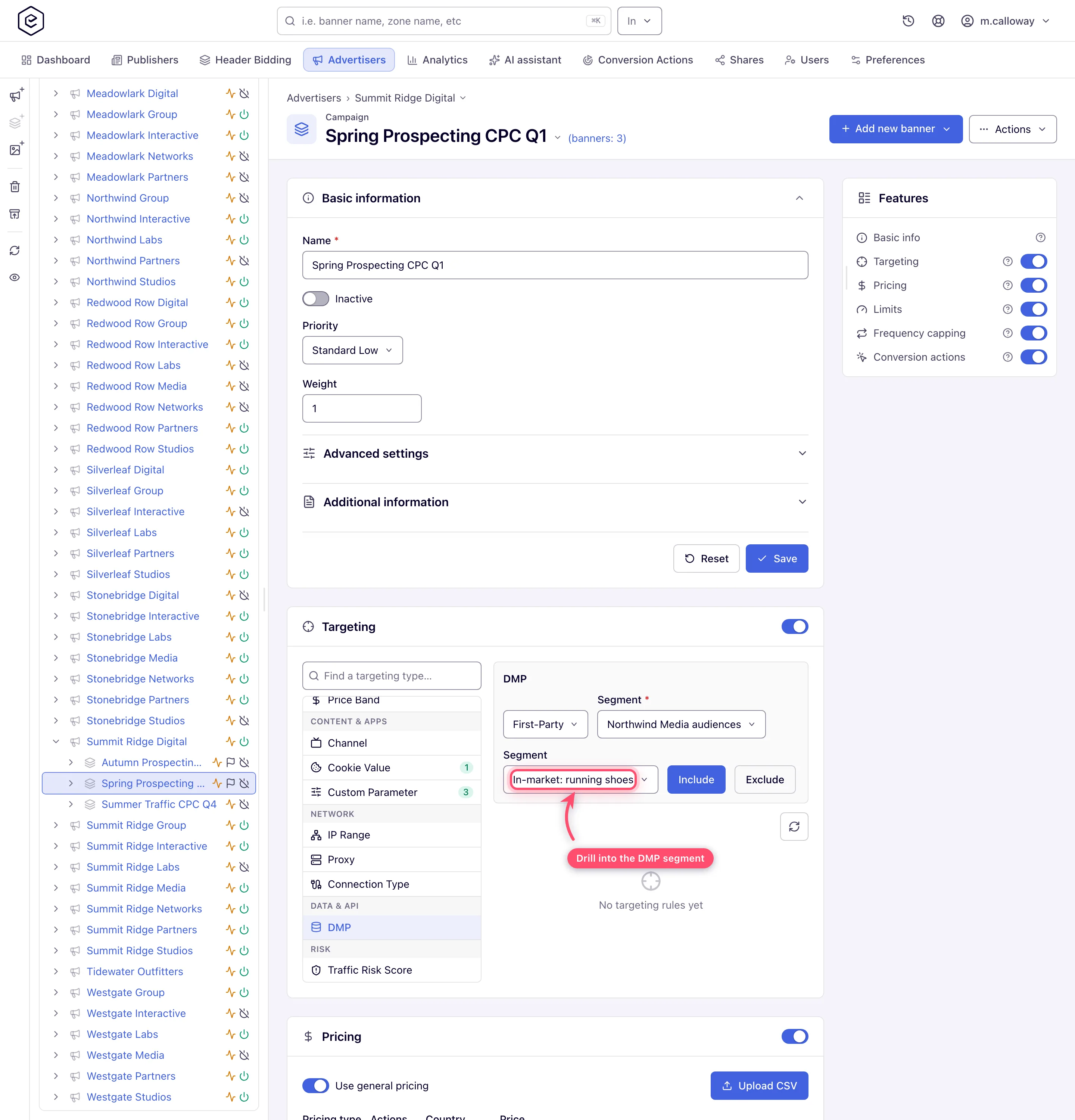
Open the campaign (or banner / advertiser) and its Targeting card; switch it on. Pick DMP in the dimension list. Select the provider, then drill down the segment levels — the deepest segment you pick is what the rule targets (dimension reference). Click Include. Repeat for more segments — several include rules of the same dimension mean “in any of these segments”.
3. Retarget users who clicked a banner (or saw an ad)
Run the Clicks Log (or
Impressions Log) report for the source campaign and the period you want, with the UUID
column, and export it (Report types). Turn the UUIDs
into an audience file — <uuid>,clicked-spring-sale per line — and put it in the FTP root.
Administrator step: add the segment clicked-spring-sale in Admin → Audience & analytics →
DMP audiences (step 1). On the retargeting campaign add a DMP rule: First-Party →
Clicked Spring Sale → Include. It starts matching after the next sync.
Caveats and exceptions
DMP and DSP demand
- Your audience rules still decide whether an OpenRTB banner may bid. Targeting rules are evaluated locally on every candidate, OpenRTB banners included, before any bid request is built, so a campaign your DMP or Cookie Value rules exclude never reaches the DSP. The rules are not forwarded: the DSP sees ordinary OpenRTB fields, not your segments, so programmatic buyers must bring their own audience data (details).
- An empty drill-down means no segments, not a broken page. The provider list holds the providers switched on for your role (First-Party DMP, DTScout DMP), not the ones configured under DMP settings, and segment levels load as you drill. If the provider list is empty, no provider is switched on for your role — ask your network manager; if a level is empty, no segments were imported at that level (your network administrator checks Admin → Audience & analytics → DMP audiences).
- Adding a rule identical to an existing one is silently skipped — re-adding the same segment neither errors nor duplicates.
The caveats that apply to every audience rule — privacy and consent, and the roles — are on Target audiences and retarget known users.
Not working?
The segment is empty, the drill-down shows nothing, or the DSP ignores it? The likely causes:
| Symptom | Likely cause | Check |
|---|---|---|
| The DSP still shows your excluded users | The traffic is DSP demand — audience rules decide whether the OpenRTB banner may bid, but are never forwarded to the DSP | Expected; the buyer brings its own audience data |
| The DMP provider list is empty | No provider is switched on for the role | Your network manager (role permissions) |
| A segment level is empty | No segments imported at that level | Admin → DMP audiences |
| Re-adding a segment does nothing | Identical rules are silently skipped | Expected |
The user-ID causes that every match depends on, and the audience-file causes, are on Target audiences and retarget known users.
Reference
The dimension: Targeting dimension reference; the report with the UUID column: Report types; the audience file format and the sync schedule: Upload a First-Party audience file (FTP).
