
Price an awareness campaign on CPM and cap exposures per person
The first stage of a brand flight — CPM pricing with per-country rows, and a frequency cap of 3 per day whose subject survives private browsing, with Flat to space exposures out and an advertiser-level cap across several campaigns.
What it is and why
An awareness buy is an impression deal, so the campaign is priced on CPM; and because the brief is “as many different people as possible, never bombard anyone”, the first control after the price is a frequency cap per person — with a subject that still counts the visitors whose browser keeps no cookie. This is the first stage of Run an awareness campaign with frequency control.
Example. Without a cap, 1,200,000 impressions on a news site can land 240,000 of them on the same 20,000 readers who reload all morning. With 3 impressions per 1 day and the subject User (cookie-based + server-side storage), each person meets the ad at most three times a day and the rest of the volume reaches new people.
Typical scenarios
| You want | Set | Where |
|---|---|---|
| At most 3 exposures per person per day, including private-browsing and Safari visitors | Frequency capping · By impressions · Amount 3 · Period 1 Day(s) · Subject User (cookie-based + server-side storage) | the campaign |
| The same person spaced out — about one exposure every 8 hours rather than three in one session | the same row with Flat ticked (3 per day flat = blocked for period ÷ amount) | the campaign |
| One cap across 3 campaigns of the brand running at once, say 6 per week in total | an advertiser-level Frequency cap, Amount 6, Period 1 Week(s), on top of each campaign’s own cap | the advertiser |
Step by step
Both cards are on the campaign; the Subject column needs server-side capping storage on your network and a role that may pick an IP subject — otherwise every cap you can create is cookie-only.
-
Price for impressions. On the campaign’s Pricing card pick CPM and set the Global row; add per-country rows if the deal prices markets differently (Configure pricing). Branding buys are impression deals — CPM also makes every report line directly comparable to the media plan.
-
Cap exposures per person. On the campaign, open Frequency capping and switch it on. The switch creates one empty row each for By impressions, By clicks and By conversions, at Amount 0, which restricts nothing. In the By impressions row set Amount to 3, Period to 1 and Period type to Day(s) — click a cell, type, press Enter. Each edit saves on its own; there is no Save button on this card. (Add creates a second cap, for example “10 per week” on top of “3 per day”.)
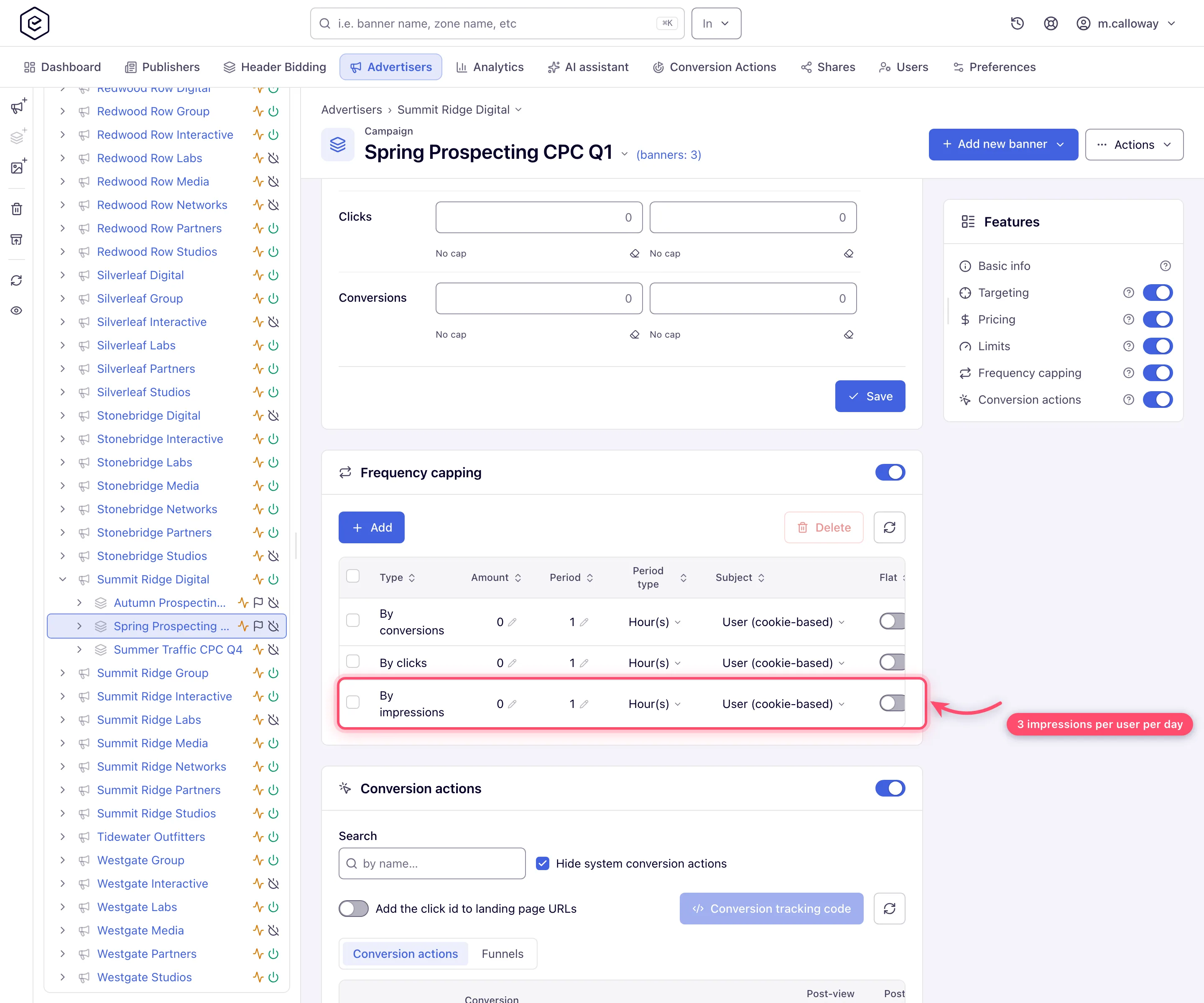
If the Subject column is shown, set the row to User (cookie-based + server-side storage). Plain cookie caps stop working where the browser does not keep the cookie: private browsing, Safari, Firefox, Brave, DuckDuckGo and iOS devices. The mixed subject falls back to a server-side counter for exactly those visitors (details). Tick Flat if the exposures should be spaced out: 3 per day flat means each impression blocks the visitor for
period ÷ amount— about 8 hours — instead of all three back-to-back in one session. A flat row keeps no counter, only a “blocked until” time.If the brand runs several campaigns at once and the cap must hold across all of them, add an advertiser-level frequency cap too (the advertiser’s card offers the Frequency kind only) — see the capping matrix.
Caveats and exceptions
Capping
- Cookie-only caps leak on private browsing. With subject User (cookie-based), an incognito visitor gets a fresh counter every session and can see the ad far more often than the cap says. Use the mixed subject. The Subject column appears only when your network has server-side capping storage on, IP capping (or L.E.S. IP capping) enabled, and your role may pick an IP subject, which no role can out of the box (ask your network administrator); where it is missing, new rows keep the default User (cookie-based) subject, while existing rows keep whatever subject they were created with, and the ad server still honours it.
- Switching the card off deletes the caps; counters are per visitor. Turning Frequency capping off deletes the cap rows, and turning it back on creates fresh empty ones at Amount 0. Counters already sitting in visitors’ cookies or in the server-side store are not cleared by any of this — they expire on their own schedule.
- Changes take up to 10 minutes. Changing an Amount reaches the ad server only with its next full rebuild (every 10 minutes), so raising a cap from 3 to 5 does not help a visitor already at 3 until then.
- The Flat checkbox spreads the cap, not the budget. For budget pacing use Even pacing on the Limits card — the two are independent.
The caveats that apply to the whole flight — the roles — are on Run an awareness campaign with frequency control.
Not working?
A visitor sees the ad far more often than the cap says? The likely causes:
| Symptom | Likely cause | Check |
|---|---|---|
| One visitor reports seeing the ad 10 times in a day | Subject is User (cookie-based) and the visitor is in private browsing / Safari / Firefox / Brave / iOS | Campaign → Frequency capping → Subject column; if the column is missing, server-side storage is off or the role cannot pick an IP subject |
| The cap row exists but nothing is restricted | Amount is still 0 (the state right after switching the card on) | Campaign → Frequency capping → Amount |
| Raised the cap from 3 to 5, visitors at 3 are still blocked | The ad server picks the change up at its next full rebuild (every 10 minutes) | Wait 10 minutes |
| All three exposures arrive in one session | Flat is off | Campaign → Frequency capping → Flat |
| The cap vanished | The card was switched off (deletes the rows) and on again (fresh rows at 0) | Campaign → Frequency capping |
The other stages of the flight are on Run an awareness campaign with frequency control.
Reference
Every subject, period and kind of cap: Set up frequency capping and the Capping matrix; the price: Configure pricing.
