
Split a brand flight by geo and device and hold the share of voice
Keep an awareness campaign inside the agreed country and device mix — one campaign with combined targeting, or one campaign per cell — and hold a 30 / 40 / 30 share of voice against other campaigns with weights inside one priority tier, verified on the Banners probability card.
What it is and why
The media plan fixes a geo and device mix and a share of voice against the other campaigns on the same inventory. Targeting rules hold the mix — in one campaign, or one campaign per cell when each cell has its own budget or creatives — and campaign Weight inside one priority tier holds the share. This is the second stage of Run an awareness campaign with frequency control.
Example. Germany, France and the Netherlands, desktop and mobile web only, is a Country rule with three countries plus a Device Format rule excluding Smart TV, combined with AND. A 30 % share against two other campaigns is weights 3 / 4 / 3 in the same tier, read back on a key placement’s Banners probability card.
Typical scenarios
| You want | Set | Where |
|---|---|---|
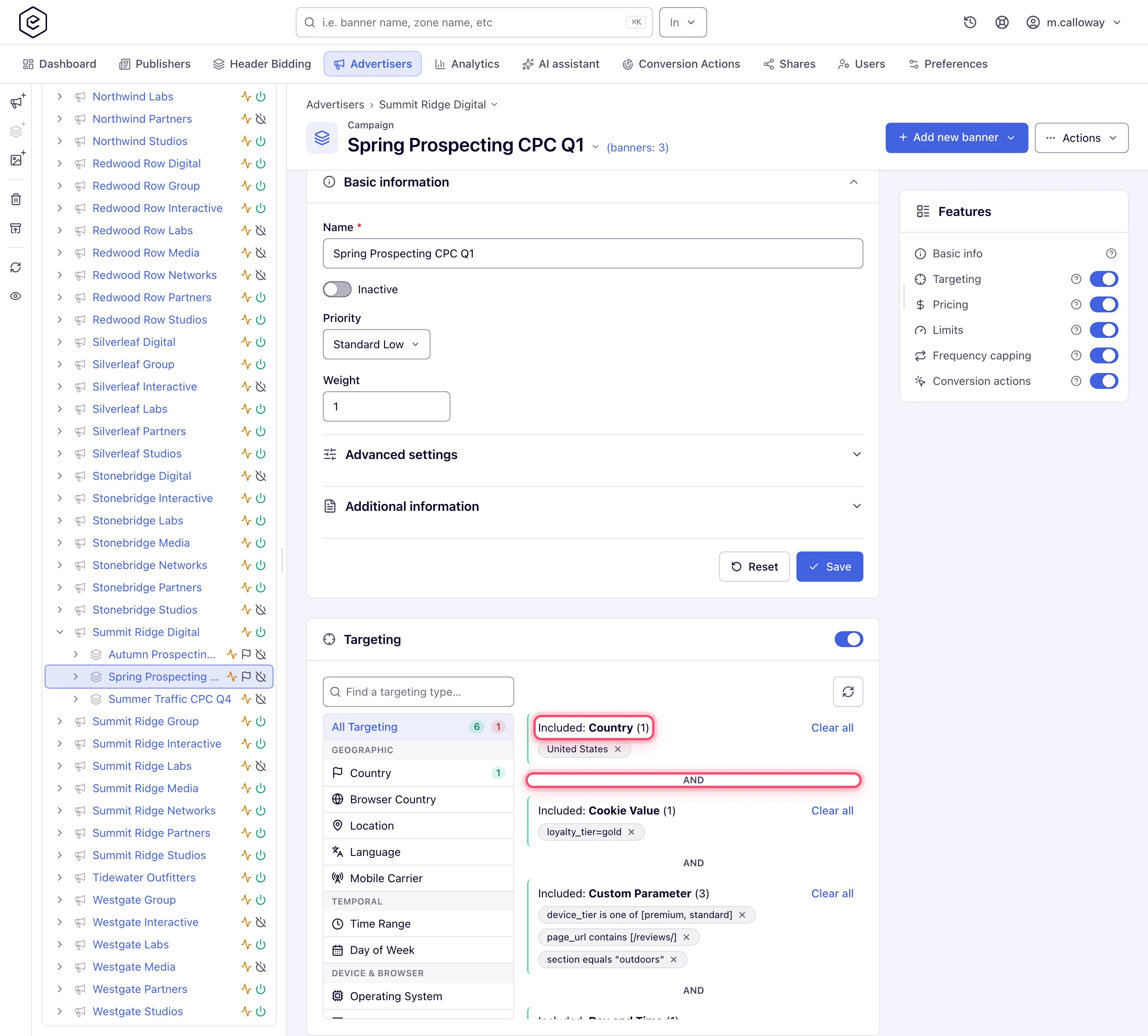
| DE / FR / NL, no Smart TV, one set of creatives | Country rule (3 countries) + Device Format rule (Smart TV, Exclude); groups combine with AND | the campaign’s Targeting card |
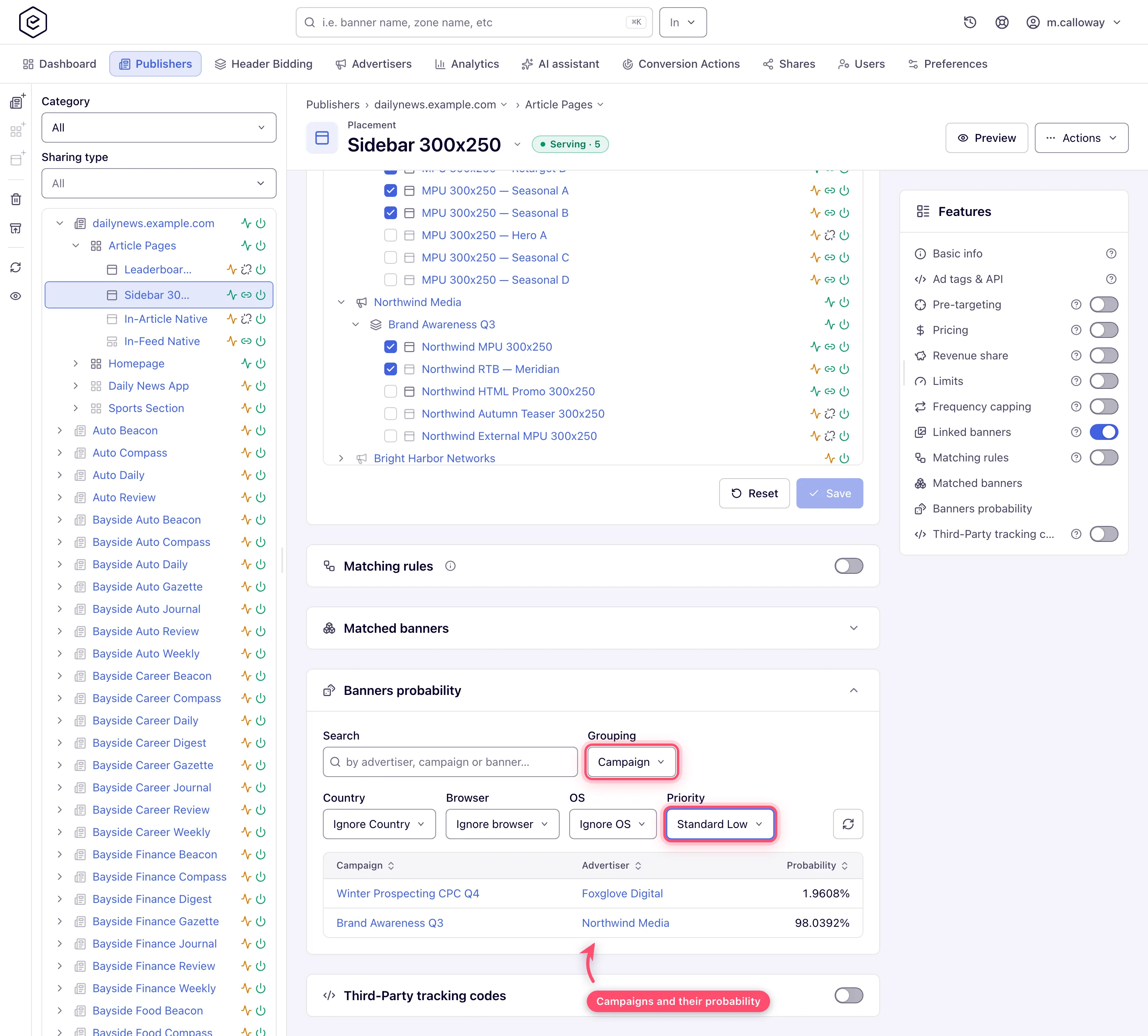
| 30 / 40 / 30 share against two campaigns on the same placements | the three campaigns in the same priority tier, weights 3 / 4 / 3 | each campaign’s Basic information |
Step by step
Targeting is set on the campaign; the share-of-voice check reads a placement’s Banners probability card.
-
Split by geo and device. Two patterns, pick per how different the splits really are:
-
One campaign, combined targeting — when the same creatives run everywhere: add a Country rule and a Device Format rule on the campaign’s Targeting card; groups of different dimensions combine with AND by default (Add targeting rules).
-
One campaign per cell — when each geo / device cell has its own budget, creatives or price: clone the campaign per cell (“Brand — DE mobile”, “Brand — DE desktop”) and give each its own targeting, limits and CPM rows. Separate campaigns also give you per-cell delivery lines in every report without extra grouping — which matters, because a General report cannot group by Device Format.
-
-
Hold the share of voice. Within one priority tier, traffic is split by campaign Weight — weight 2 gets roughly twice the share of weight 1, all else equal — as long as the network runs the default Manual Weighting algorithm (Optimize ad rotation). To hold a 30% share against two other campaigns, keep all three in the same priority tier and set weights 3 / 4 / 3 (or any same-ratio set). Verify the split on a key placement: Account → Publishers → … → placement → Banners probability, set Grouping to Campaign — the card computes each campaign’s serving probability for a simulated request. Leave its Priority filter on the default As served view, which shares the traffic out inside the top tier the way ad serving does.
Caveats and exceptions
Share of voice
- It only works inside one priority tier. Priority beats weight: a Premium campaign takes everything it is eligible for before any Standard campaign serves. If one competing campaign sits in a higher tier, no weight ratio will produce your 30 / 40 / 30 split. Align the tiers first.
- The eCPM algorithms replace the weighted draw with a price ranking — weights only steer the split under the default Manual Weighting algorithm.
- The probability panel simulates a generic visitor. It counts a banner or campaign whose limit is already reached (shown as NA), but it knows nothing about frequency capping — it cannot see an individual user’s counters — so a real visitor who hit a cap sees a different rotation than the panel shows. It also models only nine kinds of targeting and not the CTR or I2C optimizers. Its Ignore Priority view spreads probability across every tier at once; keep the default As served.
Targeting
- Switching a pair of groups from AND to OR is a role permission; ask your network administrator if the switch is missing.
The caveats that apply to the whole flight — the roles — are on Run an awareness campaign with frequency control.
Not working?
The split does not show in reports, or Smart TV still gets impressions? The likely causes:
| Symptom | Likely cause | Check |
|---|---|---|
| The 30 / 40 / 30 split does not show in reports | One campaign sits in a higher priority tier, or the network runs an eCPM algorithm | Each campaign → Basic information → Priority; Admin → optimization algorithm |
| Banners probability shows the split but real delivery differs | The panel ignores frequency caps and the CTR / I2C optimizers, and Ignore Priority spreads across tiers | Placement → Banners probability → Priority filter on As served |
| Smart TV traffic still gets impressions | The Device Format rule is missing or the groups were switched to OR | Campaign → Targeting card: Device Format group with Exclude, and between groups |
The other stages of the flight are on Run an awareness campaign with frequency control.
Reference
The rules and how groups combine: Add, edit, and remove targeting rules and the Targeting dimension reference; weights and algorithms: Optimize ad rotation.
