
Publish your ads.txt and app-ads.txt
Get the ads.txt (or app-ads.txt) lines for your site from your network, publish them at the root of your domain and confirm them with the nightly check or Re-check now — where the lines come from, what each check result means and how the live file is fetched and compared.
What it is and why
Your ads.txt has to authorise the network that sells your inventory, or buyers bid less or not
at all. The lines come from your network, and the site’s Supply chain block that shows them
(with Re-check now) needs the Site Supply Chain permission, which no stock role has — ask
your network manager for the lines and the check. The consent half of going live is on
Pass consent and privacy signals to the ad server.
Example. Buyers crawling https://example.de/ads.txt find
northwind-ads.example, 4831207, DIRECT — the network’s seller domain, the site’s seller ID and
the relationship — and keep bidding. The same pair is what they find in the network’s
sellers.json.
Typical scenarios
| You have | Do | Where |
|---|---|---|
| A new site going live | Publish the lines from the site’s Supply chain section at https://<root domain>/ads.txt, then press Re-check now — or ask your network manager to, if the block is not on your role | Account → Publishers → the site (the Site Supply Chain permission); your web server |
| An app | Publish app-ads.txt on the developer website listed on the store page | The developer website |
| A file you already publish for other sellers | Keep those lines and add the network’s block | https://<root domain>/ads.txt |
Step by step
-
Ask your network manager for your
ads.txtlines (orapp-ads.txtfor apps) and publish them at the root of your domain (see ads.txt and app-ads.txt). The network manager copies or downloads them from the Supply chain section of the site’s Basic info.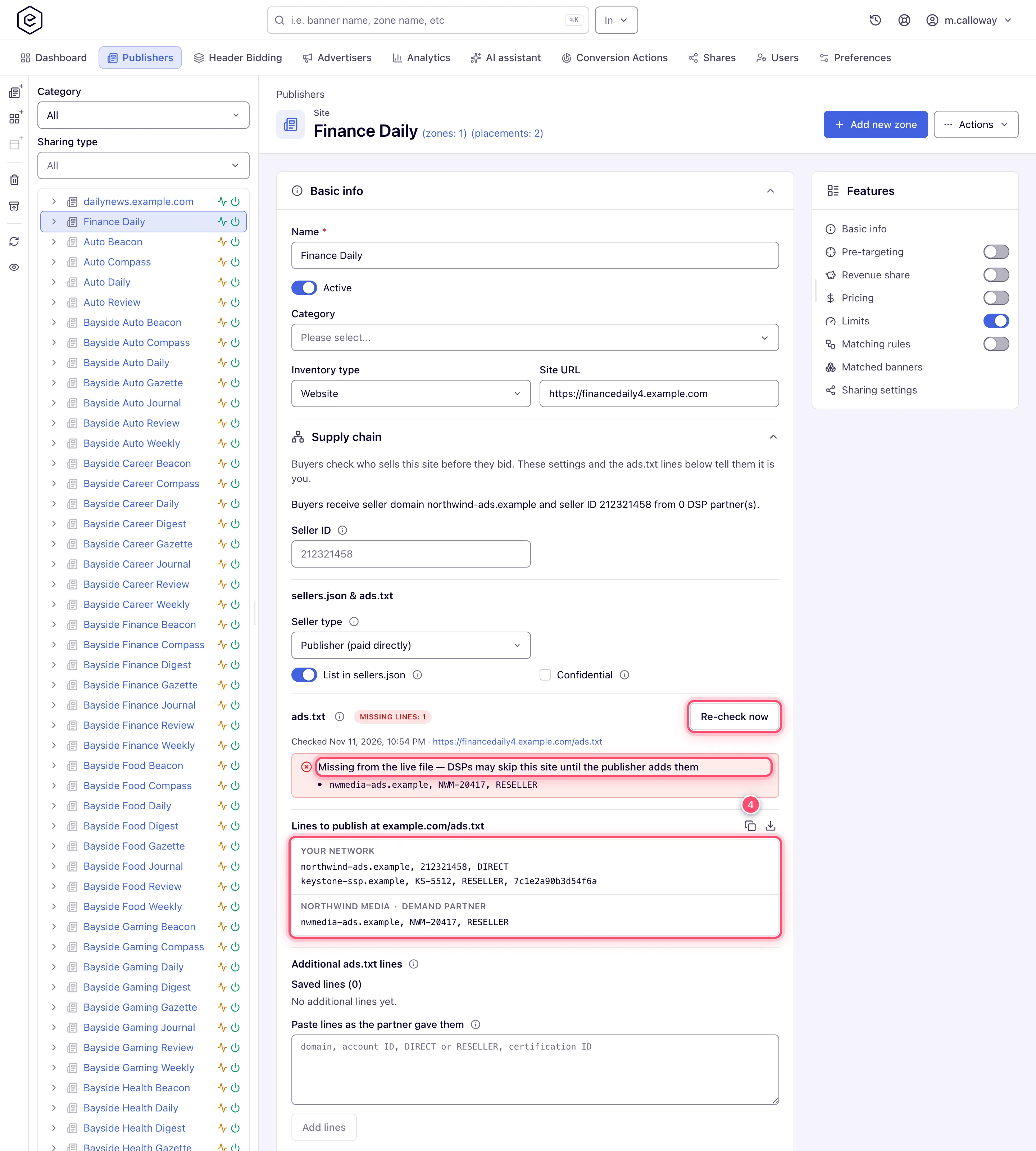
-
After publishing the file, press Re-check now on the site and confirm All lines present — or ask your network manager to, if the Supply chain block is not on your role.
ads.txt and app-ads.txt
Your ads.txt (or app-ads.txt for an app) tells buyers who may sell your inventory. The lines
come from your network:
- its own line — the network’s seller domain, your seller ID and
DIRECT(RESELLERwhen the network lists your site as an intermediary’s), the same pair buyers find in the network’ssellers.json(see Supply chain and sellers.json); - the lines of the ad systems it sells through — lines the network adds for every site, lines
added to your site alone (for example a header-bidding partner’s), and the lines of each demand
partner whose tag runs on your site (an exchange, another network’s ad tag, a DSP seat). Each is
that system’s domain, the account there and, usually,
RESELLER. An ordinary advertiser that only buys has no line: ads.txt lists sellers.
The network manager finds the exact lines in the Supply chain section of the site’s Basic
info (Account → Publishers → the site), grouped by why each line is needed, ready to copy or
download as one file. Worked examples:
Supply chain, sellers.json and ads.txt: setup by scenario.
Publish them at https://<your domain>/ads.txt — for an app, app-ads.txt on the developer
website listed in its store page, which is the Developer website of an app site — and keep
any lines you already have for other sellers.
The platform checks the live file every night — on a network where at least one role holds the Site Supply Chain permission (enabled or read-only), which is what shows the result — and the section shows the result:
| Result | What it means |
|---|---|
| All lines present | Every required line is in the file. |
| Missing lines: N | The file exists but lacks the lines listed under Missing from the live file — or has no line at all from the ad system of a header-bidding partner on your site. |
| File not found | No file at the root domain of the site URL — or the address answers an error, a web page instead of a text file, or a redirect chain the IAB rules do not accept. The card shows the reason. |
| Could not check | The site did not answer over HTTPS or HTTP, timed out, or its host — or a redirect it answered with — is not a public address. The card shows the reason. |
| No domain to check | The site has no URL to check. |
Re-check now (Site Supply Chain enabled) checks again within a few seconds — use it after publishing changes. A file is compared on its domain, account ID and relationship; letter case is ignored except in the account ID, and the certification ID and extra fields are not compared.
If your network resells your inventory through header bidding, these are the lines buyers check; a missing or outdated line makes buyers bid less or not at all. See Header bidding: what a publisher installs.
Caveats and exceptions
How the file is fetched. The check reads the root domain of the site URL
(news.sportsdaily.co.uk is checked at sportsdaily.co.uk), HTTPS first and HTTP only when
HTTPS cannot be reached. It follows redirects within that root domain plus one hop outside it,
as the IAB ads.txt 1.1 rules say, and reads the first 1 MB of the file. Sites sharing one domain
are fetched once per night and judged each against its own lines. A partner added later is not
flagged as missing until the next check — press Re-check now. The requests carry the user
agent Mozilla/5.0 (compatible; ads.txt check); bot protection that refuses it answers with an
error, which the section shows as File not found with the status code.
Who does what between publisher, network manager and administrator is on Privacy signals and ads.txt on your pages.
Not working?
- File not found although the file is there. Where:
https://<root domain>/ads.txtin a browser — a file on a subdomain is not read; your CDN or bot rules, if the status code shown is an error. - Missing lines: N right after publishing. Where: the result is from last night’s check — press Re-check now (Site Supply Chain enabled), or ask your network manager to.
- The check result is not shown at all. Where: the roles — no role on the network holds the Site Supply Chain permission, so the nightly check does not run; ask the administrator to grant it, enabled or read-only.
The full symptom table, consent and ads.txt together, is on Privacy signals and ads.txt on your pages.
Reference
The check’s fixed values (schedule, root domain, redirects, 1 MB, user agent) and the REST calls that read the lines and queue a re-check are on Options and fields. The network manager’s side — seller IDs, demand partners’ lines, the causes of each missing line — is on Supply chain, sellers.json and ads.txt: setup by scenario.
