
Set CPA pricing on a conversion action
Switch on the Pricing card of a conversion action, set the Global price per conversion, add per-country overrides by hand or from a CSV file and remove rows — step by step, with what a cleared Global row means and a fix-it checklist.
What it is and why
The Pricing card on a conversion action is the price per conversion the action is billed at, with a Global row for every country and optional per-country overrides. It is what a CPA campaign charges when the action converts; where it sits among the campaign’s own CPA price and the All actions row is on Pricing precedence. This page is the second stage of Create and edit conversion actions.
Example. The purchase action is priced at 18.00 per conversion on the Global row, with a Germany row at 22.50. A purchase from Germany bills 22.50; one from Portugal, which has no row of its own, bills the Global 18.00.
Typical scenarios
| You want | Set | Where |
|---|---|---|
| A purchase billed at 18.00 per conversion, 22.50 in Germany | Pricing card on, Global row 18.00, a Germany row 22.50 | the action’s edit page |
| Forty country prices at once | Upload a Country,Price file; a * country sets the Global price | the Pricing card |
| Countries without a row to fall through to the campaign’s own CPA price | Clear the Global cell to Not set | the Pricing card |
Step by step
Set CPA pricing
-
On the action’s edit page, switch the Pricing card on.
-
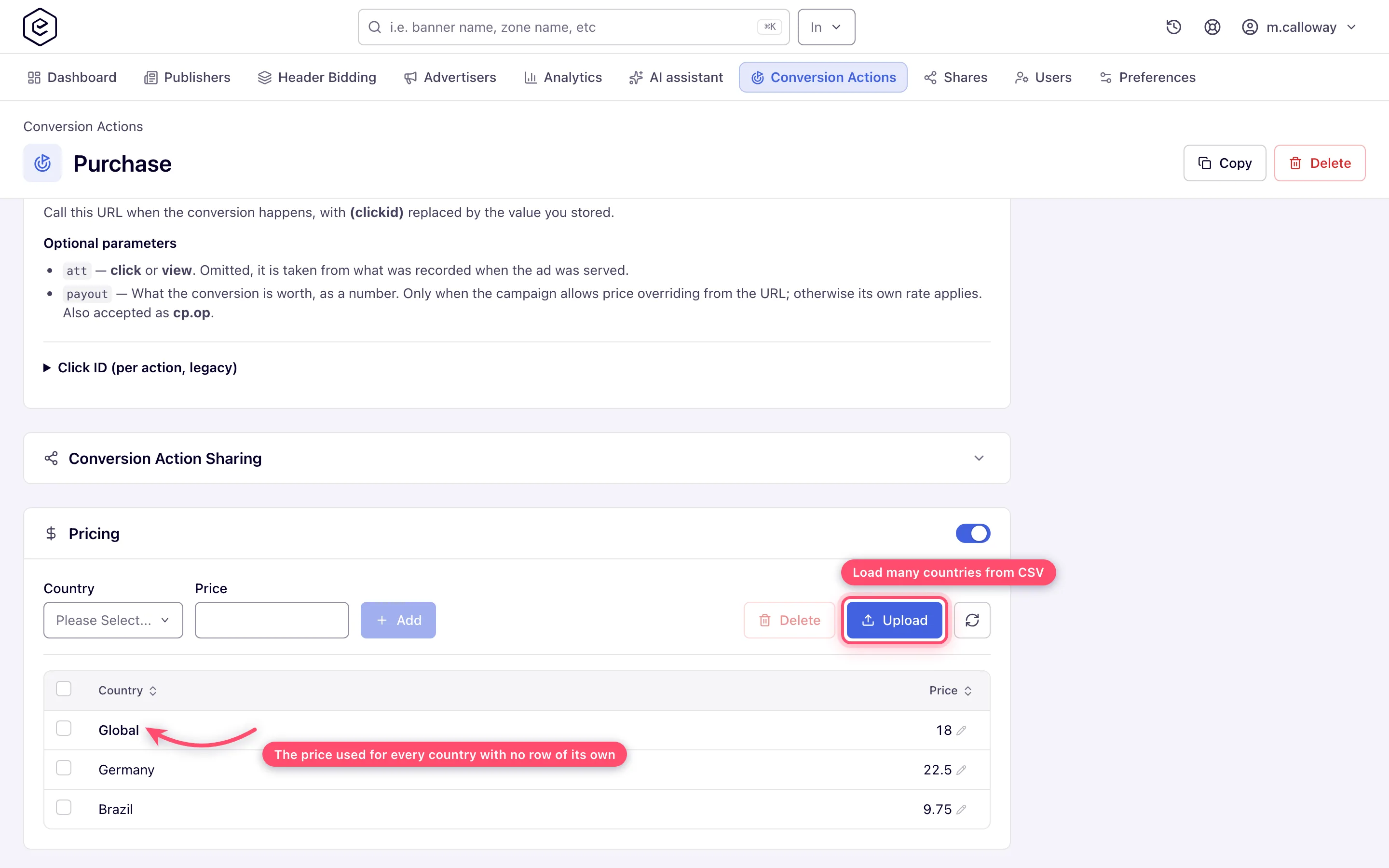
The grid always shows a Global row — the default price per conversion, and the row the ad server falls back to for any country without one of its own. Add per-country overrides with the Country + Price fields and Add.
-
Edit a price by clicking the cell. Upload takes a
.csvor.txtfile with aCountry,Priceheader (a*country sets the Global price) to load many rows at once. It adds and updates the countries in the file and leaves the others as they are. A line it cannot apply — an unknown country, a price that is not a number — is skipped and listed in the toast under The following warnings occurred during upload, and the rest of the file is still applied; a clean upload answers Done. -
To remove per-country rows, tick them and click Delete.
Next: Link a conversion action to a campaign.
Caveats and exceptions
Pricing
Clearing the Global row means Not set, not zero. Countries without a row of their own then
fall through to the next pricing rule instead of being priced at nothing. Type an explicit 0
if you do mean zero. Switching the whole Pricing card off erases the global price and
every per-country row.
The caveats that apply to every conversion action — who can do this, the attribution windows, system actions (which on a vCPM ad are billed only by their own price) and when a saved setting reaches ad serving — are on Create and edit conversion actions.
Not working?
| Symptom | Check | Where |
|---|---|---|
| Countries without a row are not priced at all | The Global row was cleared to Not set. Type 0 if you mean zero. | the Pricing card |
The other symptoms are on Create and edit conversion actions; which price is charged when the campaign, the action and the All actions row all have one is on Pricing precedence.
Reference
The Pricing card’s fields and the REST calls that set them are in the Conversion actions reference; the essentials are under Reference on the hub.
Related pages:
