
Read the audit trail in the Actions log
Find who changed what with the Actions log — open it, narrow it with the six filters, open a row's JSON payload and read the values a change replaced — with the caveats on masking, deleted users and what is not logged.
The Actions log answers “who changed this”: an audit trail of operations with the user, IP, date and the JSON payload — a change also carries the values it replaced. It is one of the tools on Review the actions log and troubleshooting log tasks; the request capture that answers “what did the ad server do” is on Capture ad requests with a troubleshooting log task.
Example. A campaign stopped serving outside Germany on Tuesday. The Actions log shows the
addTargetPost row at 14:02 by m.calloway, whose payload holds the new country target — and,
because the change came over the REST API, the before values it replaced.
Typical scenarios
| You want | Do | Where |
|---|---|---|
| Find who paused advertiser Summit Ridge Digital last week | Filter Method to the advertiser edit methods and Logged from / To to the week, then double-click the row for the payload — and, for a change made over the REST API, the MCP connector or the AI assistant, the before values it replaced | Actions log |
| Find every action from one office | Search by IP 203.0.113. — a substring matches the whole subnet | Actions log |
Step by step
-
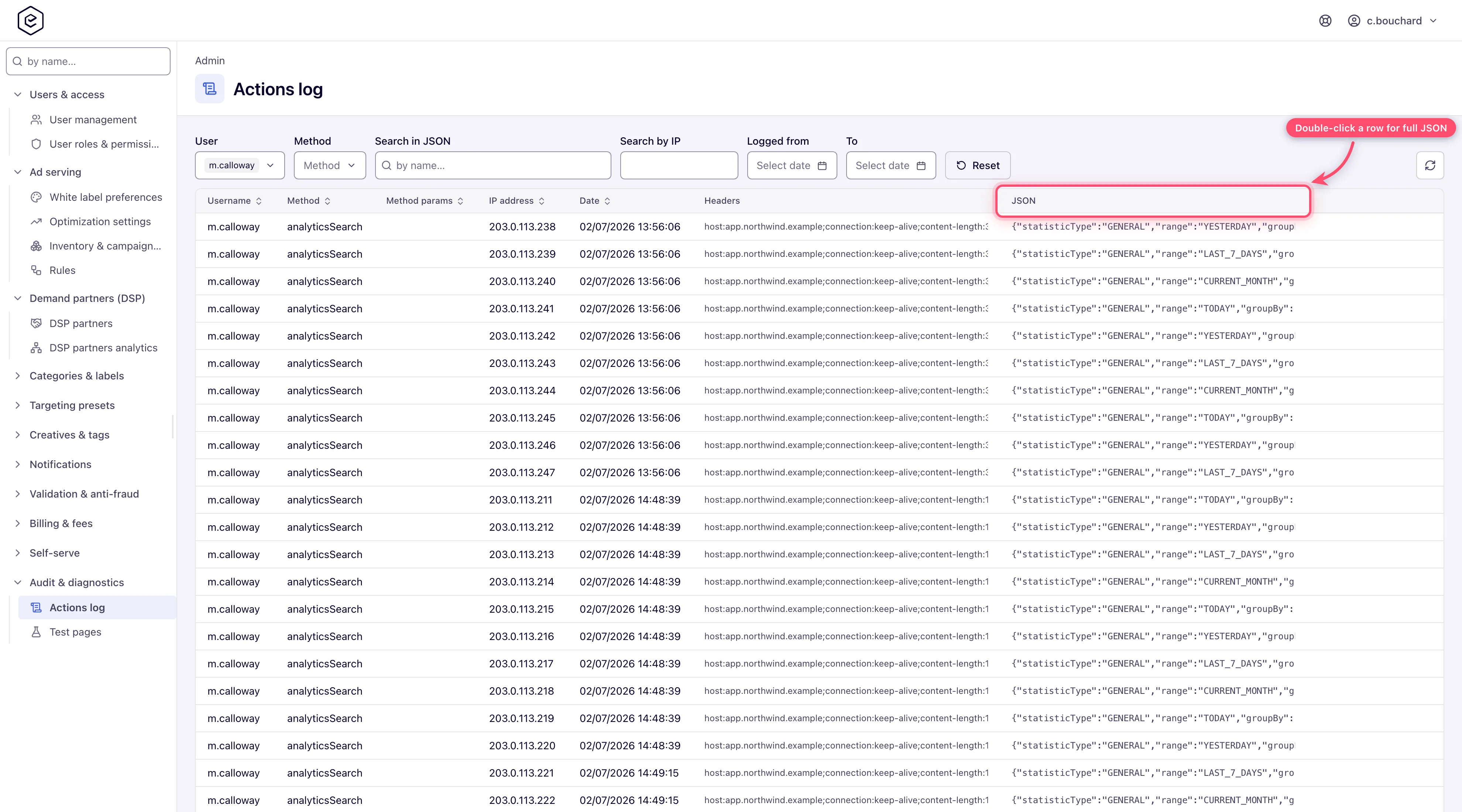
Open Admin → Audit & diagnostics → Actions log. The grid opens oldest first — click Date once to get the recent end.
-
Narrow with the six filters above the grid: User and Method are multi-selects built from the values already present in the log, Search in JSON and Search by IP are substring matches, Logged from / To bound the date. Reset clears all six.
-
Double-click a row to open the full JSON payload, pretty-printed; the grid’s JSON column shows only the first couple of lines. A row written by the REST API, the MCP connector or the AI assistant also carries the values the change replaced under
before; rows written by the console’s own pages and the classic forms (sourceUI) record the request, not what it overwrote.
Caveats and exceptions
- Most of what the platform does is not in the Actions log. Logging is opt-in per operation. Do not read a missing row as proof that nothing happened.
- Deleted users keep their rows, under the username they were written with; the User
filter lists existing accounts only, so those rows can no longer be selected by user — filter by
method, date or JSON instead. The user’s own
mine.dois gone with the account. - Credentials are masked, but the JSON column is still sensitive. Password and token
parameters (the CSRF token included) and the password, API-key and set/reset-password link
fields of a JSON body, at any depth, are stored as
***; so is a DSP partner’s analytics-sync Report API URL. Any other URL keeps everything but the credential it carries — atoken=,key=,apikey=,secret=orsignature=value and the password ofuser:password@show as***(a DSP bid URL reads…/rtb?ssp=epom&token=***; a macro placeholder such as{token}or$$TOKEN$$stays as typed). A banner’s row names its DSP partner by id and name only. Rows for sign-ins include the request’s cookies as parsed values, with the session and remember-me cookies as***. A row stored before a field was masked keeps the value in the database, but the grid andmine.doshow***. Grant Actions Log only to people you would trust with session data. - A masked or shortened value cannot be put back from
before. A write that sends***back — an undo through the AI assistant, the MCP connector, the REST API or the DSP partner form — is refused whole with Can’t be restored from the actions log, naming the field. The same for a value cut to fit, ending... [N characters cut]. Enter the real value, or leave the field out. - Every row records its source —
UI,REST_API,LEGACY_REST,MCP, orSYSTEMfor rows written outside a request (older rows readSYSTEM) — but the grid has no column or filter for it;mine.doreturns it.
Who can open the page, and the caveats that apply to every tool in this group, are on Review the actions log and troubleshooting log tasks.
Not working?
| Symptom | Check | Where |
|---|---|---|
| The action you know happened is not in the log | Logging is opt-in per operation — many leave no trace; or the grid is on the oldest page | Click Date; search by Method or Search in JSON |
| The User filter does not list the person | The account was deleted; rows survive under the old username | Filter by Method / date; Search in JSON for the name |
| Search in JSON finds nothing | Every whitespace-separated word must appear in the payload; try fewer words; credentials are *** and cannot be searched | The filter |
| An undo or re-save is refused with Can’t be restored from the actions log | The payload carries a masked *** or a ... [N characters cut] value; enter the real value or leave the field out | The named field |
The causes for the other tools in this group are on Review the actions log and troubleshooting log tasks.
Reference
Every column, every filter and the GET /rest-api/action-log/mine.do call:
Actions log on the hub.
