
Set a default code for unfilled requests
Paste a fallback tag into the placement's Default code so the ad server returns it when nothing fills the request, with the macros it substitutes, and set up a bottom-of-stack VAST tag for a video placement that has no default code — step by step, with the placement types that carry the field and a fix-it checklist.
What it is and why
Default code is the markup the ad server returns when nothing at all filled the request: the placement-level fallback, typically another ad source’s tag. It is separate from the daisy chain, which only orders the demand Epom already has, and from a banner passback, which hands an impression back from a tag Epom served. This page is one of the three stages of Set up daisy chaining and passbacks; it also covers the video case, where a placement has no default code and the fallback is set up as bottom-of-stack demand instead.
Example. A news site’s article MPU carries a backup network’s tag in Default code, with
$$RANDOM$$ as its cache-buster. When every linked banner is capped for a visitor, the Universal
JS tag receives that backup tag instead of a blank slot. The site’s pre-roll placement gets a
Backfill — Partner Video campaign on the House ads priority with a Third Party VAST tag
URL banner, which only receives the requests nothing above it could serve.
Typical scenarios
| You want | Set | Where |
|---|---|---|
| A backup network’s tag when nothing fills a site placement | The tag in Default code, with $$RANDOM$$ as cache-buster | placement → Basic info → Advanced settings |
| A fallback VAST tag on a video placement, which has no default code | A House ads campaign with a Third Party VAST/VPAID Tag URL banner, linked at the bottom of the stack | a backfill advertiser and campaign |
| The player to try several partners in turn | A VAST waterfall rather than one fallback | VAST waterfall across several networks |
Step by step
Set a default code for unfilled requests
-
On the same placement, open Basic info → Advanced settings (collapsed by default). Default code is there on Site, Mobile site and Non-standard site placements only, and only for a role holding Placement Default Code.
-
Paste your fallback markup into Default code. Epom substitutes macros into it before returning it, with the same processor as banner markup:
$$RANDOM$$and$$TIMESTAMP$$as cache-busters,$$PAGE_URL$$,$$COUNTRY$$,$$PLACEMENT_ID$$,$$CHANNEL$$, custom parameters and the rest of the request, page and placement set. No creative was chosen, so banner, campaign and advertiser macros and the click URLs come out empty; a recognised macro that cannot resolve is removed, an unrecognised token (a partner’s own[timestamp]) is left as written. See Macros.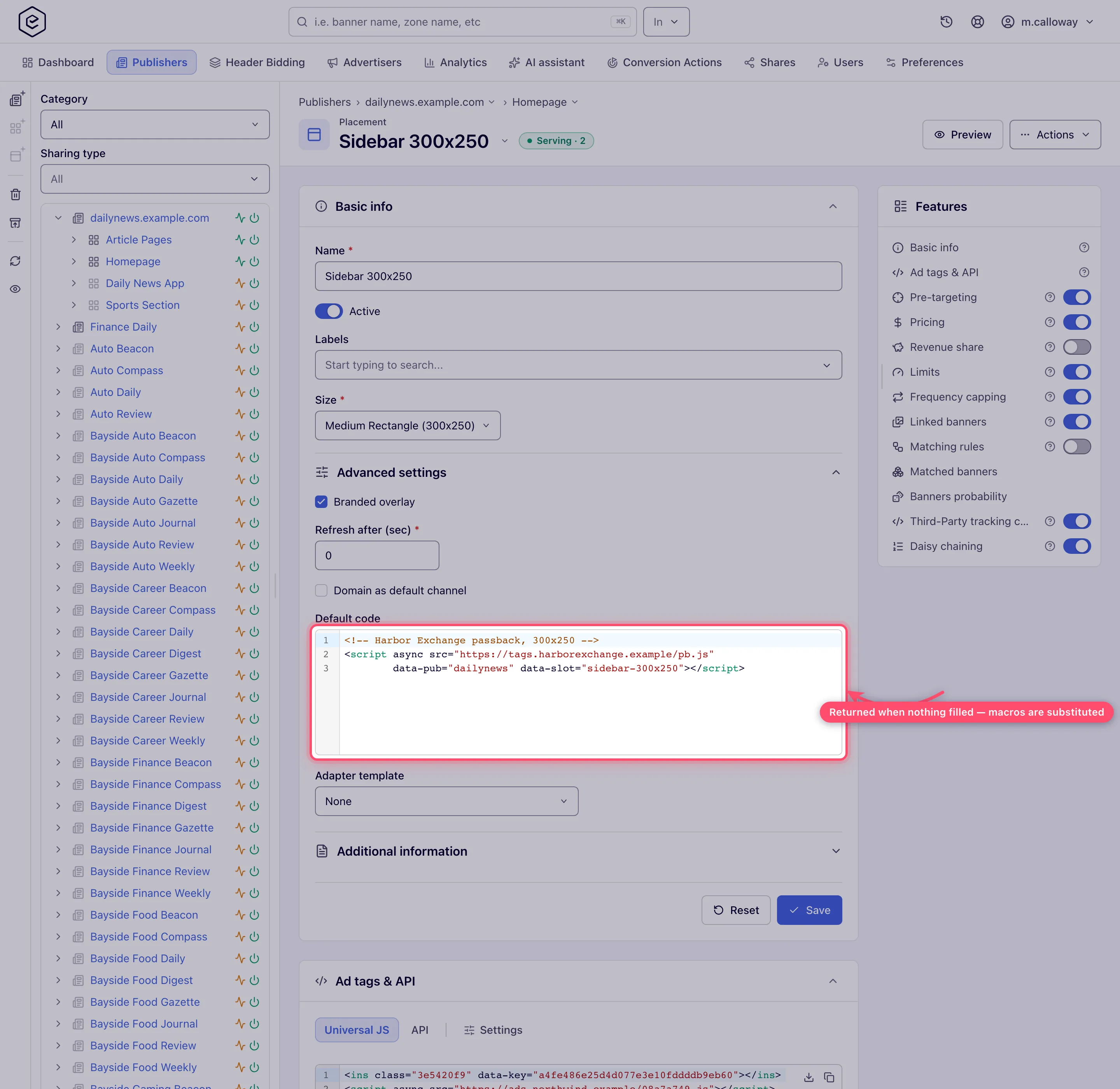
-
Click Save. Whether the code is ever returned depends on how the tag calls Epom — see When the default code is returned.
A fallback VAST tag for a video placement
A video placement has no Default code field, so a third-party VAST tag that should play “only when Epom has no ad” is set up as demand at the bottom of the stack:
- Create an advertiser and campaign for the fallback (for example Backfill — Partner Video) with delivery priority House ads or Non-guaranteed, below every campaign that should win first. Priority tiers are tried top-down, so this campaign only gets requests nothing above it could serve.
- Add a video banner of type Third Party VAST/VPAID Tag URL with the partner’s tag.
- Add the campaign’s targeting — for example only the countries the partner buys.
- Link the banner to the video placement.
The fallback’s impressions are counted and priced like any other banner’s — by its campaign’s Pricing card — so give it the price you agreed with the partner, or none for a pure house fill. To let the player try several partners in turn, see VAST waterfall across several networks.
Caveats and exceptions
Default code on other placement types. The console draws the field on Site, Mobile site
and Non-standard site placements only. A default code stored on another type anyway — the REST
API accepts defaultCode for a role holding Placement Default Code — is never returned for
an Application placement, never for a VAST/video request, and never from the
native JSON endpoint; a Video or Native placement only sees it on the request paths listed
under When the default code is returned.
Which request paths return the default code, why the CPM threshold does not “trigger a passback”, the auto-refresh on a no-fill and who can do this are on Set up daisy chaining and passbacks.
Not working?
| Symptom | Check | Where |
|---|---|---|
| The default code never fires | The request path does not carry it (Application, VAST, native JSON, overlay, API v4, S2S, unknown key); or the field is on a placement type that has none | When the default code is returned; the placement type |
| The default code fires but the backup tag is cached | No cache-buster in it | put $$RANDOM$$ or $$TIMESTAMP$$ in the tag |
The No ads column and a missing card are on Set up daisy chaining and passbacks; a slot that stays empty for other reasons is on Low fill rate.
Reference
The Default code field, the request paths that return it and the full list of reasons a
request ends without a banner are under
Fallback fields outside the card
on the hub and on Daisy chaining and passbacks reference;
the REST field defaultCode is under Over the API.
Related pages:
