
Custom ad units and sizes
Admin → Custom ad units & sizes is the catalogue every size dropdown in the platform draws from — add a size, decide which placement types and which side (inventory, campaigns) see it, and know why a size you added is not offered where you expected.
An ad unit is a named creative size — Leaderboard (728x90), Medium Rectangle (300x250). The catalogue under Admin → Creatives & tags → Custom ad units & sizes is what every size dropdown in the product is drawn from: the placement’s Size combo, the creative’s Ad unit combo, the header-bidding slot editor and the auto-placement template. Each unit says which placement types it fits and whether the supply side, the demand side or both may pick it.
Example. A publisher wants a 970×250 billboard above the fold. Add a unit Billboard (970x250), width 970, height 250, Site Placement ticked, Inventory side and Campaigns side on. From the next page load the network manager picks Billboard (970x250) on a new site placement, and the advertiser’s creative form offers it under Ad unit; a creative uploaded at that size matches the placement.
Typical scenarios
| You want | Set | Result |
|---|---|---|
| A new standard size on both sides | Title Billboard (970x250), 970 × 250, Site Placement, Inventory side + Campaigns side | Offered on site placements and on creatives |
| A size publishers may sell but advertisers should not pick directly | Campaigns side off | Placements offer it; the creative Ad unit combo does not |
| A mobile-only size | Tick Mobile Site Placement only | Never offered on a desktop Site Placement |
| A “whatever fits” slot on video players | A unit with Custom on and 0 × 0, Video Placement ticked (the shipped Custom Video Player) | The placement form shows manual width/height inputs instead |
| Retire a size nobody should pick | Untick every placement type (or delete it, if no live placement uses it) | A unit with no placement type appears nowhere |
Step by step
-
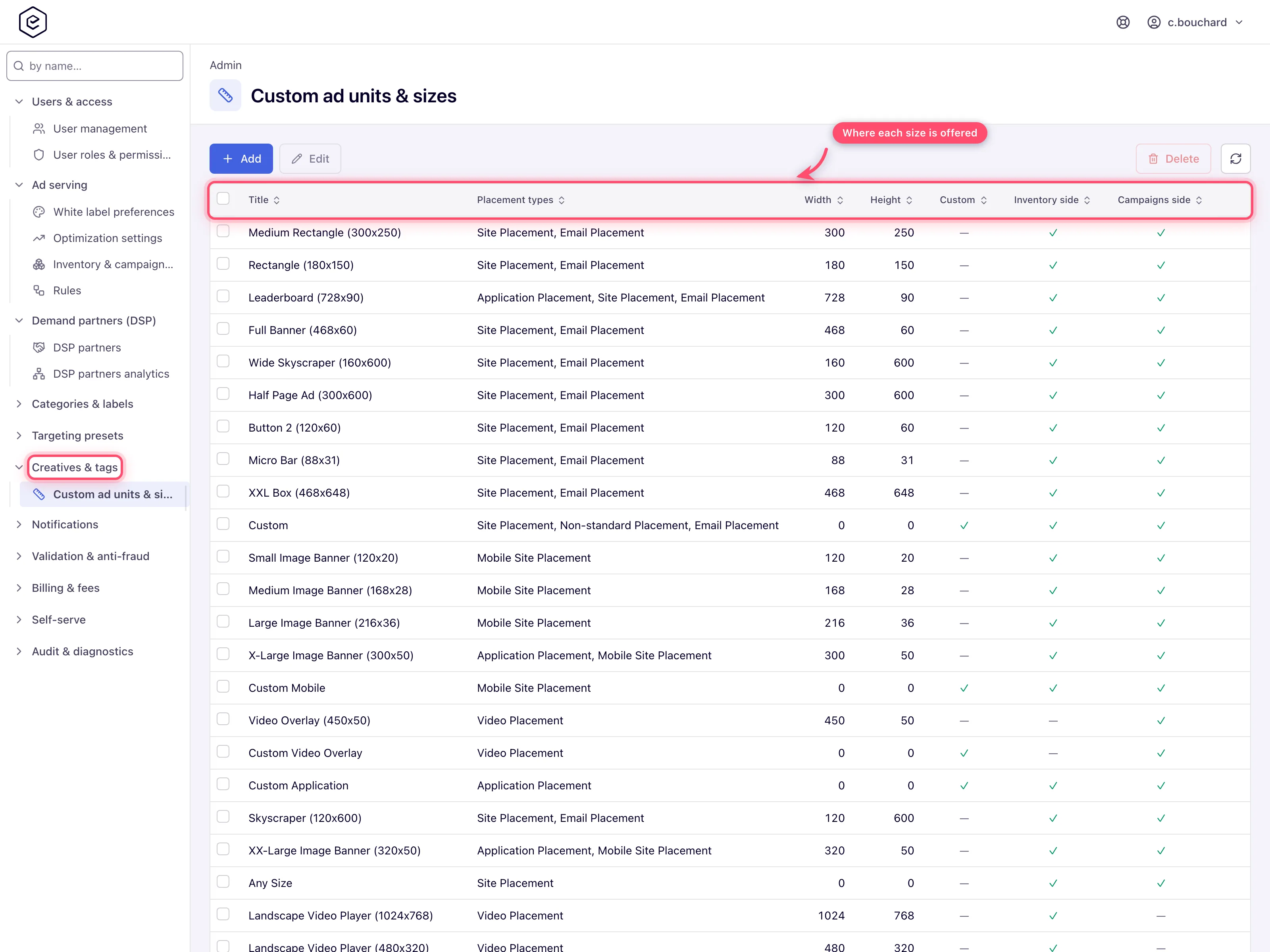
Open Admin → Creatives & tags → Custom ad units & sizes. The grid shows Title, Placement types, Width, Height, Custom, Inventory side and Campaigns side for every unit, the shipped catalogue included.
-
Click Add (or tick a row and Edit). Type the Title — the convention in the shipped catalogue is
Name (WxH)— and the Width and Height in pixels. -
Tick the Placement types the size fits, and leave Inventory side and Campaigns side ticked unless one side should not see it.
-
Save. The toast reads Done. The size is offered from the next page load wherever its placement types and sides say.
-
To remove a unit, tick it and click Delete. A size used by any non-deleted placement is refused — see the caveats.
Caveats and exceptions
-
Who can do this. An admin role with the Custom Ad Units & Sizes Admin UI permission. Opening the URL without it shows Record not found. Network managers, publishers and advertisers never see this page; they meet the result in their size dropdowns.
-
Where a size shows up is decided entirely here. Placement types plus the two side flags are the whole answer — there is no per-role tick-list that also has to be satisfied before a new size appears:
Where Needs Placement Size combo matching placement type + Inventory side Creative Ad unit combo, advertiser grid size filter matching placement type + Campaigns side Header-bidding slot editor Inventory side + a non-zero width and height, and a placement type that matches the slot’s kind Template test page Inventory side — and only for a Site-placement template; the page offers no size for any other type Auto placements Size combo matching placement type, and the unit must not be Custom -
A size with no placement type ticked appears nowhere at all. The lookup is driven entirely by the placement-type set, so an empty set matches no query.
-
Custom units are size-less placeholders. Picking one on a placement or a creative reveals manual width/height inputs rather than fixing the size. Each placement type conventionally has one — Custom, Custom Mobile, Custom Video Player, Custom Application. A custom unit is deliberately excluded from the Auto placements Size combo — a size-less unit cannot be an auto-placement template, even though the same unit is selectable on a hand-made placement of that type. (The header-bidding slot editor drops it too, for the different reason that it requires a non-zero width and height.)
-
Deleting a size used by any non-deleted placement is refused with Cannot delete size, it is used by not deleted placements. The check looks at placements only — a size used solely by creatives deletes without a warning, and those creatives lose their ad unit.
-
Any size (deprecated) is a legacy flag, not a convenience. It describes a placement slot, so every creative-side list — the creative form, the mass banner upload and the REST banner ad-unit list — drops units carrying it, whatever their Campaigns side box says. A creative given such a unit would be stored at 0×0 and match no placement. Do not set it on new units. The Auto placements size list is the one exception: it keeps the Any Size unit — see Other admin tools.
Not working?
| Symptom | Likely cause | Check |
|---|---|---|
| The new size is not in the placement’s Size combo | The placement’s type is not ticked, or Inventory side is off | Edit the unit → Placement types, Inventory side |
| The new size is not in the creative’s Ad unit combo | Campaigns side is off, the placement type does not match, or Any size (deprecated) is on | Edit the unit |
| The size is missing from the header-bidding slot editor | Width or height is 0, or the unit is Custom | Give it real dimensions |
| The size is missing from Auto placements | The unit is Custom | Pick a sized unit for the template |
| Delete is refused | A non-deleted placement still uses the size | Change those placements’ size first; a creative-only use does not block |
| A creative shows 0×0 | It was given a unit with Any size (deprecated) | Re-pick a real unit on the creative |
Reference
| Field | What it does |
|---|---|
| Title | The label shown in every size dropdown. Required, max 255 characters. Convention in the shipped catalogue is Name (WxH), e.g. Leaderboard (728x90). |
| Width / Height | Pixel dimensions, 0–3000 each. Left at 0 for a Custom unit, whose dimensions are typed per placement instead. |
| Custom | Marks the unit as a size-less placeholder. Picking it on a placement or a creative reveals manual width/height inputs rather than fixing the size. |
| Any size (deprecated) | Legacy wildcard flag. Do not set it on new units. Creative-side lists skip units carrying it — see the caveats. |
| Inventory side | Offer this size on the supply side — placements, header-bidding slots, template test pages. Ticked on a new unit. |
| Campaigns side | Offer this size on the demand side — creative Ad unit combos and the advertiser grid filters. Ticked on a new unit. |
| Placement types | Eight checkboxes: Site Placement, Mobile Site Placement, Non-standard Placement, Video Placement, Application Placement, Email Placement, Click-through Placement and Native Placement. A size is only offered on a placement of a ticked type. |
| Permission | Lets you |
|---|---|
| Custom Ad Units & Sizes (Admin UI) | Open the page, add, edit and delete units. |
Over the API, GET /rest-api/ad-units.do lists the ad units of each placement type — the same
catalogue the placement and banner endpoints size an entity with; see
Creative ad specs for the shipped catalogue.
Related
- Other admin tools — the other small admin pages and the shared routine
- Create a placement — placement types and sizes
- Creative ad specs — where the ad units in the Size combo come from
- Header bidding — the slot editor
