
Tune the validation settings
Decide which impressions, clicks and conversions count — each check Off, Monitor or Enforce — set the signature time windows and what click IDs carry, keep the IP and user-agent ban and white lists, and read the addresses the ad servers flagged.
Validation settings decide which impressions, clicks and conversions are counted as real. Every check is a selector with three modes — Off, Monitor (label what it catches, keep counting it) and Enforce (refuse it: out of the General report, the delivery limits and billing, counted under the Rejected columns with its reason). The page also holds the signature time windows, what click IDs carry, and the IP and user-agent ban and white lists. Everything is network-wide and applies from the moment you save; nothing reprocesses past data.
Example. Northwind Media suspects doubled impression pixels on a few sites. The network administrator sets Impression deduplication to Monitor on Monday; by Wednesday the Advanced report’s Duplicate impressions column shows 4.1 % of impressions network-wide, 19 % on one placement. She switches it to Enforce: from that minute the repeats are refused, Rejected impressions grows by the same amount, the General report and the advertisers’ bills drop by 4.1 %, and nothing older changes.
Typical scenarios
| You want | Set | Where |
|---|---|---|
| Find out what enforcing a check would remove, before removing anything | The check → Monitor; group the Advanced report by Rejection Reason, or read the Duplicate impressions / Duplicate clicks / Expired clicks columns (Extended view) | Validation settings; Analytics → Advanced |
| Stop paying for impression pixels that fire twice | Impression deduplication → Enforce | Impressions group |
| Refuse tampered or unsigned impression pixels | Impression signature check → Enforce (switch on outside peak hours, or via Monitor first) | Impressions group |
| Keep invalid clicks out of reports | Clicks validation → Enforce | Clicks group |
| Let a CTV stitcher’s late VAST impressions count for 2 hours instead of 5 | Video impression max age = 7200 | Impressions group |
| Block an address for good | Ban & white-listed IPs → Add, status BAN (45.129.14.0/24, a from-to range or one address) | The second tab |
| Stop a stitcher’s egress addresses from being auto-banned | Add its ranges with status WHITE-LIST | The second tab |
| Keep the visitor’s IP out of click IDs for privacy terms | User IP in click IDs → Left out | Click IDs group |
Step by step
-
Go to Admin → Validation & anti-fraud → Validation settings (the Validation Settings admin permission).
-
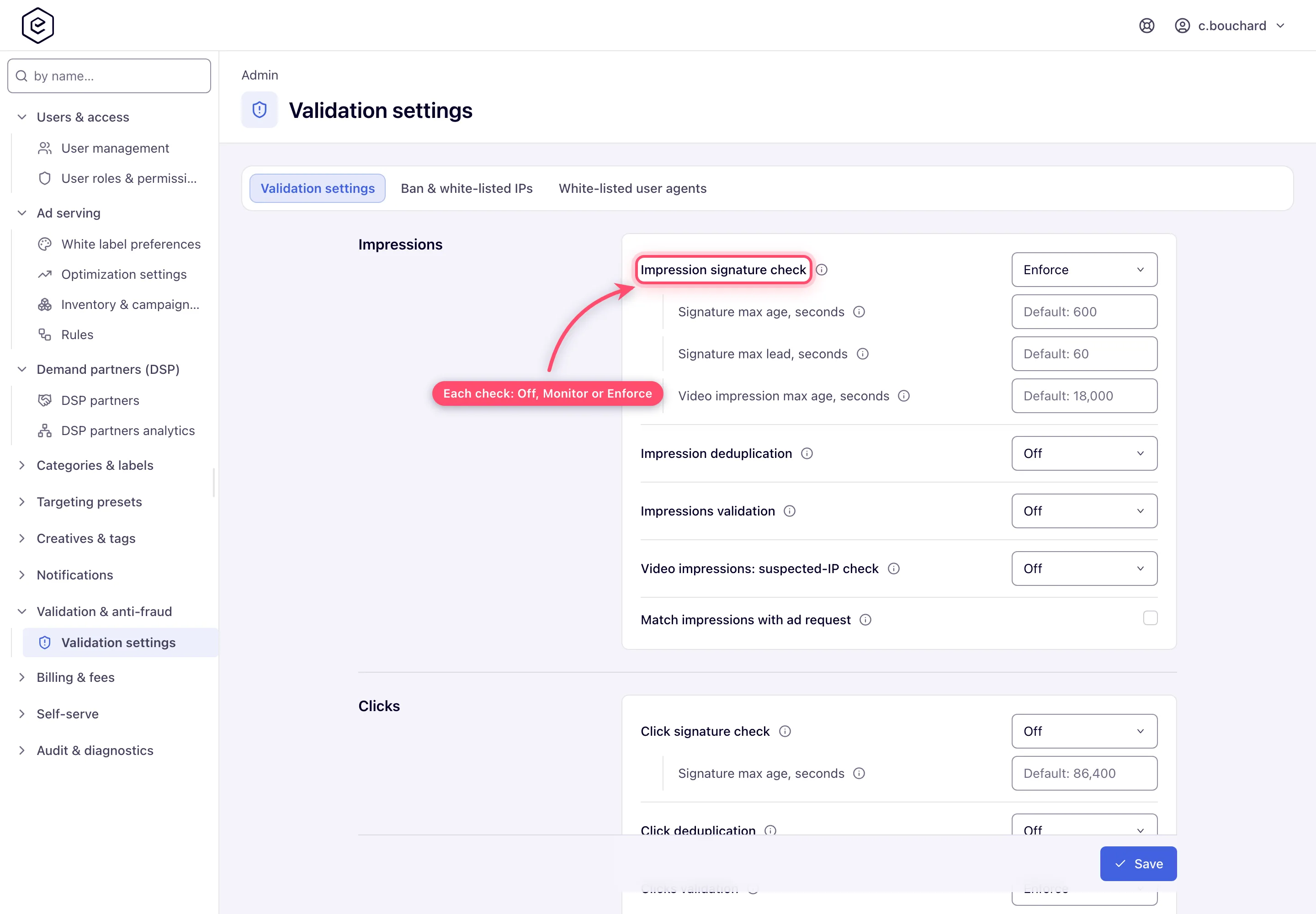
The settings are grouped by the event they act on — Impressions, Clicks, Conversions, Click IDs and All events — and the ⓘ beside each one says what it does. Each event lists its checks in the same order: signature, duplicates, fraud patterns, then matching with the ad request. Pick Off, Monitor or Enforce for each check, change a time window if you need to, and click Save. A green “Data saved.” toast confirms it. What every selector catches, its reason code and its default: Validation settings reference.
-
Maintain the addresses on the Ban & white-listed IPs tab. Columns are IP range, Count, Info and Status; Count is how often the ad servers have matched that entry since they last restarted, so it reads
0on a network that has not matched anything yet. Info is the location the address resolves to — its country code, followed by the mobile carrier where there is one, and for a range the location of each end; it reads-or—when the address has no known location (a private address, for example). Status shows BAN or WHITE-LIST; whitelisted ranges are never banned by impression-fraud detection and never blocked by the IP blacklist check. The tab has a search box, an Add button, CSV import, a Download CSV button, and Delete for selected rows. Enter single IPv4 addresses (45.129.14.7),from-toranges (45.129.14.0-45.129.14.255) or CIDR blocks (45.129.14.0/24).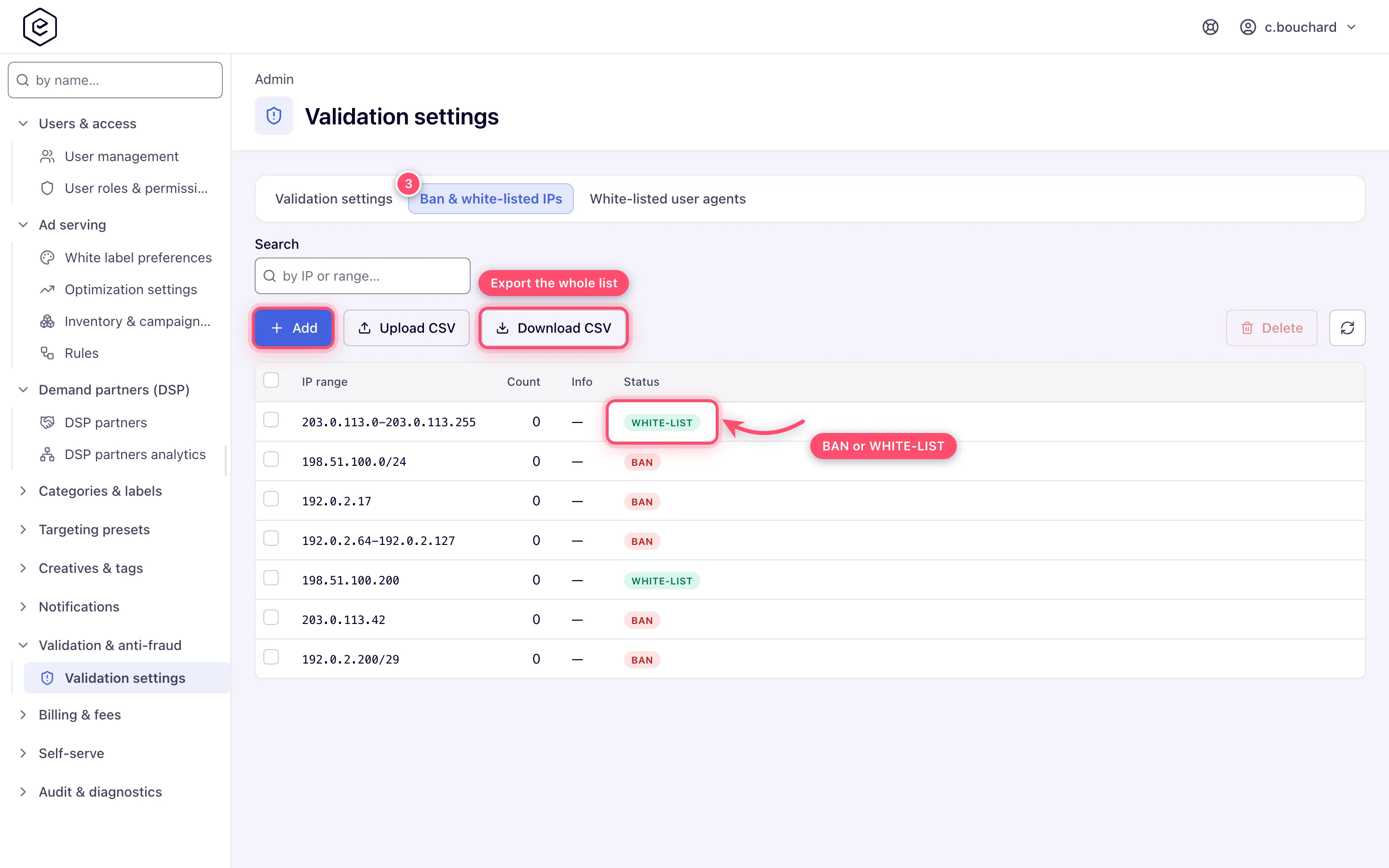
-
Maintain user agents on the White-listed user agents tab. Columns are User agent, Wildcard (✓ or —), Event, Placement type and Status — each entry applies to one event type and one placement type, so the same string may need several rows. This tab has Add, Delete and Refresh only: no search box and no CSV, so a long user-agent list has to be entered one row at a time.
-
Allow about a minute for a saved validation setting to reach the ad servers, and up to about ten minutes for a new IP-list entry: the ad servers reload that list every ten minutes.
See which addresses got flagged
The ad servers keep their own lists of the IP addresses they flagged for click fraud and invalid traffic. To see who was flagged, ask Epom support or your account manager.
Caveats and exceptions
- Monitor first. Monitor labels what a check catches with a Rejection Reason but the event still counts — it stays in the General report, the delivery limits and billing. Group the Advanced report by Rejection Reason, or read the Duplicate impressions, Duplicate clicks and Expired clicks columns in its Extended view (Preferences → Advanced analytics view; the Simple view has only the grouping), to see what enforcing would remove. Enforce is how the old ticked box behaved.
- Upgraded boxes keep their meaning. A box that was ticked before the upgrade comes up as Enforce, an unticked one as Off — nothing changes until you pick Monitor. The legacy admin page still shows these as boxes; ticking one there brings the check back in the mode it was last in. The three deduplication and click-signature selectors, and Video impressions: suspected-IP check, follow the ad-serving configuration (Off as shipped) until you pick a mode, and keep following it when you save the page without touching them.
- Validation changes billable counts network-wide and immediately. Switching a check to Enforce — or on stricter matching with the ad request — can visibly drop reported numbers; coordinate with billing before changing mid-month.
- Switching Impression signature check on refuses beacons rendered while it was off. A
beacon without the signature (
th) isINVALID_SIGNATURE, and beacons rendered while the check was Off carry none — for as long as such beacons keep arriving, which is up to the impression signature window for web beacons and up to the video window for VAST. Switch it on outside peak hours, or go through Monitor first. - Ads after the first in one VAST response (a pod or a repeat) are numbered, so their impressions and clicks are different ones, not duplicates. Which paths sign: reference.
- The signing key is a server setting. When Epom support changes it, links and beacons signed with the old key keep verifying for a day, while the old key is kept as the previous one.
- Each rotation is a new ad request with its own transaction id, unless the publisher passes
their own id in the tag (
data-trx-id), which every rotation keeps sending. Since release 153 the Unique view’s direct requests, impressions, clicks and conversions therefore count each rotation separately. - Shortening Signature max age also shortens how long a header-bidding quote is valid — the bid’s expiry is taken from the same window, so a bid rendered after it counts for nothing.
- Rejected events are counted, not thrown away — in the Advanced reports as Rejected impressions, Rejected clicks and Rejected conversions, and on the General report as the Conv. fraud column, which counts the rejected conversions whatever the report is grouped by. For conversions the rejection may be a duplicate, the IP blocklist, either per-IP time frame, or a capping/limit exclusion — the integrator’s response only distinguishes duplicates, and everything else is reported as OK. See Conversion actions and Invalid traffic and risk scoring.
- The user-agent list has no on/off switch — unlike the IP list it is live as soon as it has rows, and it keeps working even when Clicks validation is off. A user-agent whitelist hit is a strong override: it suppresses bot detection, the suspected-IP escalation and the missing-cookie click rejection. Each entry applies to one event type and one placement type, and matches the whole string unless you tick Wildcard. The user-agent blacklist on clicks is not part of Clicks validation — a click from a blacklisted user agent is refused whatever mode the selector is in.
- Both address tabs hold Ban and Whitelist rows despite their labels — the Status column is what distinguishes them, and a whitelist hit always wins.
- A CTV stitcher can get itself banned. A server-side ad insertion stitcher fires pixels for thousands of viewers from a handful of addresses. If it does not forward the viewer’s IP, impression-fraud detection bans those addresses and every ad request through the stitcher is blocked. Video impressions: suspected-IP check does not prevent that: it decides only whether the video impression itself counts, while the address is still tallied and banned. Whitelist the stitcher’s egress ranges — see Video placements.
- Flagged is not banned. An address the ad servers flagged for click fraud or invalid traffic is not on the ban list. To block it for good, add it on the Ban & white-listed IPs tab; to stop a legitimate address from being flagged, add it there with the WHITE-LIST status.
- Roles. Administrators work Validation settings from the admin sidebar with the Validation Settings permission. Network managers, publishers and advertisers never see the page; they see the effect in the Rejected columns of their reports.
Not working?
| Symptom | Check | Where |
|---|---|---|
| Impressions dropped sharply right after you switched Impression signature check on | Beacons rendered while it was Off carry no signature and are refused until they age out (the signature window for web, the video window for VAST). Go back to Monitor until peak hours pass. | Impressions group; the Advanced report’s Rejection Reason = INVALID_SIGNATURE |
| A duplicate or expired click still counts | Links rendered while the checks were Off carry no signature. | Clicks group; Epom support |
| A setting you saved has no visible effect | Up to a minute for a selector, up to ten minutes for an IP-list entry. Also: the three flags Match … with ad request reject nothing — they only mark the raw log. | — |
| A banned range still gets through | It is whitelisted on either tab (a whitelist hit always wins), or IP blacklist check is Off. | Both list tabs; All events group |
| Impressions validation in Monitor bans nobody | Expected: Monitor only labels; Enforce is what bans the worst addresses. It also needs IP blacklist check on. | Impressions group |
A video impression from a known-good stitcher is refused as SUSPECTED_IP | Video impressions: suspected-IP check is Enforce and the stitcher’s address was suspected. Whitelist its egress ranges; or keep the selector Off so video beacons count on their signature alone. | Impressions group; Ban & white-listed IPs |
| Every ad request through a stitcher is blocked | Impression-fraud detection banned its addresses. Whitelist the egress ranges. | Ban & white-listed IPs |
| Header-bidding bids started expiring | Signature max age (Impressions) was shortened; the bid expiry uses the same window. | Impressions group |
| The Rejection Reason is not the one you expected | An event two checks catch carries one reason: a refused event shows the check that refused it, a counted one the first check that labelled it; a repeated or expired click that also trips Clicks validation reads DUPLICATE / EXPIRED_CLICK, the more exact reason. | Reference |
| Duplicate S2S conversions are not refused | Conversion deduplication (S2S) is Off, or the conversion action’s own Reject duplicate conversions switch is off; the pixel path uses a separate server-side setting. | Conversions group; the conversion action |
A conversion postback is refused as SEQUENTIAL_CONVERSION | The user’s capping or a realtime limit already rules it out; an IP conversion cap is checked against the tracker’s address on S2S. | The action’s capping; the Conversions group |
| The IP is not in the click ID although the selector says Included | The network still mints the older click-ID format (a note under the selector says so), the visitor gave no consent (only the truncated address goes in), or the address is private, reserved or carrier-grade NAT. Existing click IDs keep what they were minted with. | Click IDs group |
| A whitelisted user agent is still flagged | Each row applies to one event type and one placement type, and matches the whole string unless Wildcard is ticked; add the missing combination. | White-listed user agents |
| The page is not in the sidebar | Your admin role lacks Validation Settings. | Admin → Users & access → Admin roles & permissions |
Reference
The essentials; every selector’s full description, its reason code and the signature table are in the Validation settings reference.
| Selector | Group | Catches | Default |
|---|---|---|---|
| Impression signature check | Impressions | A beacon whose signature is missing, forged or older than the signature windows | Enforce |
| Impression deduplication | Impressions | A second impression of the same render | follows configuration (Off) |
| Impressions validation | Impressions | Web impressions from an address with too many impressions or user agents; Enforce bans the worst addresses | Enforce |
| Video impressions: suspected-IP check | Impressions | A video impression from an address Impressions validation suspects | follows configuration (Off) |
| Click signature check | Clicks | A signed link that is forged, made for another ad request or older than the Clicks Signature max age | follows configuration (Off) |
| Click deduplication | Clicks | A second click on the same render | follows configuration (Off) |
| Clicks validation | Clicks | Fraudulent clicks: no user cookie where one is expected, too many clicks from one address or user; also the IP blacklist on clicks | Enforce |
| Conversion deduplication (S2S) | Conversions | Duplicate server-to-server conversions, for actions with Reject duplicate conversions on | Off |
| Do not record the same user sequential conversions | Conversions | A conversion the user’s capping or a realtime limit already rules out | Off |
| Conversion per IP time frame | Conversions | A conversion caught by one of the two per-IP windows on its action | Enforce |
| Match impressions / clicks / conversions with ad request | each group | Only stamps a marker on the raw record; rejects nothing | Off |
| IP blacklist check | All events | Impressions, clicks, conversions and passbacks from a banned address; whitelisted ranges pass | Enforce |
| Time window | Group | Default | Allowed |
|---|---|---|---|
| Signature max age | Impressions | 600 s (10 min) | 30 – 3,600 |
| Signature max lead | Impressions | 60 s | 0 – 600 |
| Video impression max age | Impressions | 18,000 s (5 h) | 60 – 86,400 |
| Signature max age | Clicks | 86,400 s (24 h) | 60 – 2,592,000 (30 days) |
| Click IDs selector | Default | Carries |
|---|---|---|
| Ad request ID in click IDs | Included | The ad request’s transaction ID, used by conversion deduplication |
| User IP in click IDs | Left out | The visitor’s IP (truncated without consent), for actions that judge S2S postbacks by the visitor |
| Permission | Lets you |
|---|---|
| Validation Settings (admin) | Open the page, change every selector, window and list |
