
Keep your ads off named domains and apps
Block the domains and app bundles your ads must not show on — a Domain or App Package Exclude rule per value for a handful, a preset list targeted by one Preset Domains or Preset App Packages rule for hundreds — and what a domain rule does and does not match.
What it is and why
Domain and app-package rules gate the inventory context a creative runs in, and an Exclude rule is a hard filter: a brand stays off the sites and apps you name, or a publisher refuses demand pointed at certain contexts. For a long list, a preset group maintained once by the administrator keeps every rule that references it current. This is the second layer of Use case: brand safety with category rules, domain lists and advertiser blocks.
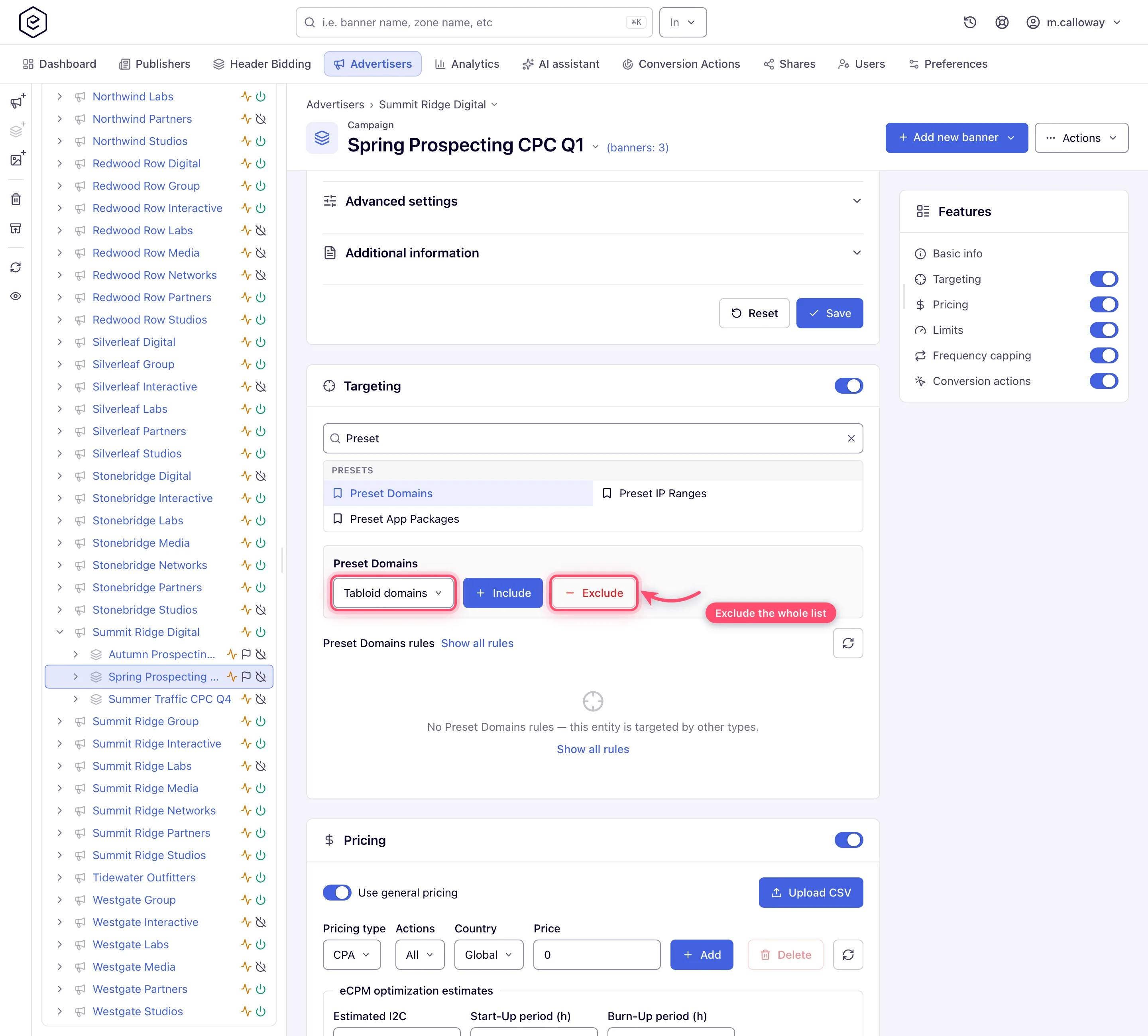
Example. The advertisers who asked to stay off tabloid-style domains get one Preset Domains rule set to Exclude against the list Tabloid domains — 40 domains today, and every domain the administrator adds to the list later, without touching the campaigns.
Typical scenarios
| You want to avoid… | Use | Does it stop demand? | Lives in |
|---|---|---|---|
| Your brand’s ads on 40 named tabloid domains or a dozen app bundles | Domain / App-package lists (one rule per value, or a preset list) | Yes | Targeting / Pre-targeting cards |
Step by step
One Exclude rule per value for a few; a preset list for a real blocklist.
If you don’t want your ads to show on particular sites or apps, block those domains or app bundles with an Exclude rule. Category rules steer pairing; domain and app-package rules gate the inventory context a creative runs in. Use them on the demand side to keep a brand off named sites and apps, or on the supply side to refuse demand pointed at certain contexts.
-
A handful of values: open the entity’s Targeting (demand) or Pre-targeting (supply) card and add a Domain or App Package rule with Exclude — one value per rule (Channel accepts a comma / semicolon list in one click).
-
Hundreds of values (a real blocklist): have your network administrator build a preset group once — a named domain or app-package list — then target the whole list with a single Preset Domains / Preset App Packages rule set to Exclude. Updating the list later updates every rule that references it (Preset groups).
Caveats and exceptions
Domain and app-package lists
- “Advertiser domains”: Epom’s domain rules match the inventory domain a request comes
from, not a landing-page domain declared by a bidder. For programmatic demand, the network
manager can additionally send blocked categories to DSPs — the Blocked IAB category field on
the OpenRTB card (called RTB configuration on a placement), sent as
bcatin bid requests. That is a request the DSP may ignore, not a filter: Epom never checks the creative that comes back. See Keep unwanted ad categories off your inventory and The three category systems. - A preset rule stores a reference to the group, not a copy — emptying or repurposing the group instantly changes every entity that targets it. Check what uses a list before clearing it.
- Each rule type is switched on per role. Demand-side Channel is on for the stock Network Manager role; demand-side Domains is off for every stock role, and so are the supply-side Domains, App Package and both Preset rules. The stock Advertiser role has neither Domains nor Channel. A type missing from the card’s Add list has to be switched on for your role — ask your network manager.
The caveats that apply to every layer — what none of the four controls can do, competitive separation and the roles — are on Use case: brand safety with category rules, domain lists and advertiser blocks.
Not working?
An ad showed on a blocked domain, or the rule type is missing? The likely causes:
| Symptom | Likely cause | Check |
|---|---|---|
| A DSP creative in a blocked IAB category rendered | bcat is advisory; the DSP ignored it | Block the DSP partner’s banner by name from Banners probability |
| A brand’s ad showed on a domain in the blocklist | The rule matched the landing-page domain by mistake, or the preset list was emptied / repurposed | Domain rules match the inventory domain; Admin → preset group → what uses it |
| No Domain / App Package / Preset type in the card’s Add list | The type is off for the role (off for every stock role on the supply side) | Admin → Users and roles → Targeting / Pre-targeting permissions |
The other layers, and the verification step, are on Use case: brand safety with category rules, domain lists and advertiser blocks.
Reference
The preset lists: Preset groups — domains, IP ranges, app packages; what bcat does for DSP demand:
Keep unwanted ad categories off your inventory. Which permission each control needs is in the reference table of the use case.
Related
- Use case: brand safety with category rules, domain lists and advertiser blocks
- Block a named advertiser, campaign or banner from your inventory
- Steer automatic pairing with a category rule
- Preset groups — domains, IP ranges, app packages
- Keep unwanted ad categories off your inventory
- Targeting dimension reference
Related pages
- Use case: brand safety with category rules, domain lists and advertiser blocks
- Block a named advertiser, campaign or banner from your inventory
- Steer automatic pairing with a category rule
- Preset groups — domains, IP ranges, app packages
- Keep unwanted ad categories off your inventory
- Targeting dimension reference
