
Supply chain and sellers.json
How the network names itself and each publisher to buyers — the seller domain, the per-site seller ID, the supply chain sent to DSPs and header-bidding buyers, and the sellers.json file buyers check them against.
Buyers check who is selling them an impression. The bid request carries a supply chain: the
domain of the company that sells the impression and its ID for the publisher. The buyer then opens
https://<that domain>/sellers.json and looks the ID up. If the two do not match, or there is no
file to check, many buyers bid less or skip the impression. This page explains where those values come from
and how to publish the file.
Who this is for
Network managers and administrators who sell their publishers’ inventory to DSPs or through header bidding. If you only run direct campaigns, nothing here is needed.
Prerequisites
-
Access to Admin → White Label to set the seller domain and switch the file on.
-
The right to edit the site, for its Seller ID. Anyone who can edit the site can change it, at every level of the Site Supply Chain permission, as before sellers.json existed: header-bidding tags read it too.
-
The Site Supply Chain (sellers.json, ads.txt / app-ads.txt) permission on your role, for everything else in the section. The permission is off for every role until an administrator grants it (Admin → Admin roles & permissions):
Level What it allows Enabled See and change Seller type, List in sellers.json and Confidential, and the site’s Additional ads.txt lines; list or unlist sites from the sites grid Read-only See those fields, the site’s ads.txt block and the sellers.json grid column; they are locked, and their sellers.json & ads.txt group shows Read-only beside its heading. The seller ID stays editable Disabled Only the seller ID is shown; no column; the REST API leaves schainSellerType,schainConfidentialandsellersJsonListedout of a site and ignores them on update
Steps
- Set your seller domain. In White Label → Supply chain, enter Seller domain:
your own domain as buyers know it, for example
adnetwork.example. Left empty, the installation’s own domain is used instead. - Point that domain at the platform.
sellers.jsonis served from the root of every domain the platform answers on, so the seller domain must resolve to it (the same way your console or ad-serving domain does). - Tell your DSP partners, then switch on Publish sellers.json. Switching it on also changes the supply chain in your OpenRTB bid requests (see Where each value is used), so a partner that matches on the old values needs to know first. Optionally fill sellers.json contact address, and Legal name in sellers.json for the sites you sell yourself. The contact e-mail is the Email from Company info.
- Opt your sites in one by one. No site is listed until you turn on List in sellers.json
in the Supply chain section of its Basic info card — new and existing sites start with it
off, so test and internal sites never reach the file. For many sites at once, tick them in the sites grid
(Account → Publishers, Sites level) and press List in sellers.json or Remove from
sellers.json; the optional sellers.json column shows which sites are listed. In the same
section:
- Seller ID: leave it empty to use the generated ID shown greyed out in the
field. Fill it in only if you already told buyers a different ID. Sites given the same ID are
one seller:
sellers.jsonlists that ID once, and as confidential if any of those sites is. - Seller type: Publisher when you pay the site’s owner directly (the usual case), Intermediary when the site is itself a reseller, Both when it is both. On an Intermediary site, bid requests mark the supply chain incomplete unless the ad tag passes the chain of the seller before you (see below).
- Confidential, beside the switch: lists the site by its seller ID and
seller type only, without the seller’s name or domain (
is_confidential: 1). Available once the site is listed. On a site with masked inventory it shows ticked and locked, with Masked inventory is always listed as confidential under it.
- Seller ID: leave it empty to use the generated ID shown greyed out in the
field. Fill it in only if you already told buyers a different ID. Sites given the same ID are
one seller:
- Check the file. Open
https://<your seller domain>/sellers.json. Saving the White Label page rebuilds it at once on the server you saved on; every other change, and every other server, follows within about five minutes.
Where each value is used
| Value | Bid requests to DSPs, sellers.json off | Bid requests to DSPs, sellers.json on | Header-bidding tags | sellers.json |
|---|---|---|---|---|
Seller domain (asi) | The installation domain | Seller domain. Empty: the installation domain | Seller domain only. Empty: no chain | The file’s own location |
Seller ID (sid) | The generated ID | The site’s seller ID. Empty: the generated ID | The site’s seller ID only. Empty: no chain | seller_id |
Publisher ID (site.publisher.id, app.publisher.id) | The generated ID | The same as sid | — | — |
In both modes a DSP partner’s Seller domain override (asi) replaces the seller domain for that
partner (a banner’s own override wins over it). site.publisher.id (or app.publisher.id) is always the same ID as
the chain’s sid, so a buyer that checks ads.txt against the publisher ID and one that checks it against the chain
find the same line.
Bid requests switch only once you publish sellers.json, so a network that never turns the file on keeps sending exactly what it sent before: a buyer has nothing to check new values against. Turning it on is the moment the chain starts naming what the file lists. The supply chain goes into bid requests only to DSP partners with Send supply chain switched on, unless a banner overrides it either way (see DSP partners). Your node names you as the seller. What comes before it depends on the ad request:
- The tag passes a chain in the
schainparameter (IAB form1.0,1!asi,sid,hp,…, as a stitcher such as SpringServe sends it) and the site’s Seller type is Intermediary or Both: its nodes come first, your node is added at the end, and itscompleteflag is kept. A chain that already ends with your node gets your node in place of that copy, not a second one. On a Publisher site a chain on the tag is ignored: nobody sells before you there, and anyone can add a parameter to a tag. - No chain on the tag: your node alone, with
complete: 1— orcomplete: 0when the site’s Seller type is Intermediary, because a seller before you exists and is not named.
A malformed chain, or a stitcher macro left unfilled, counts as no chain.
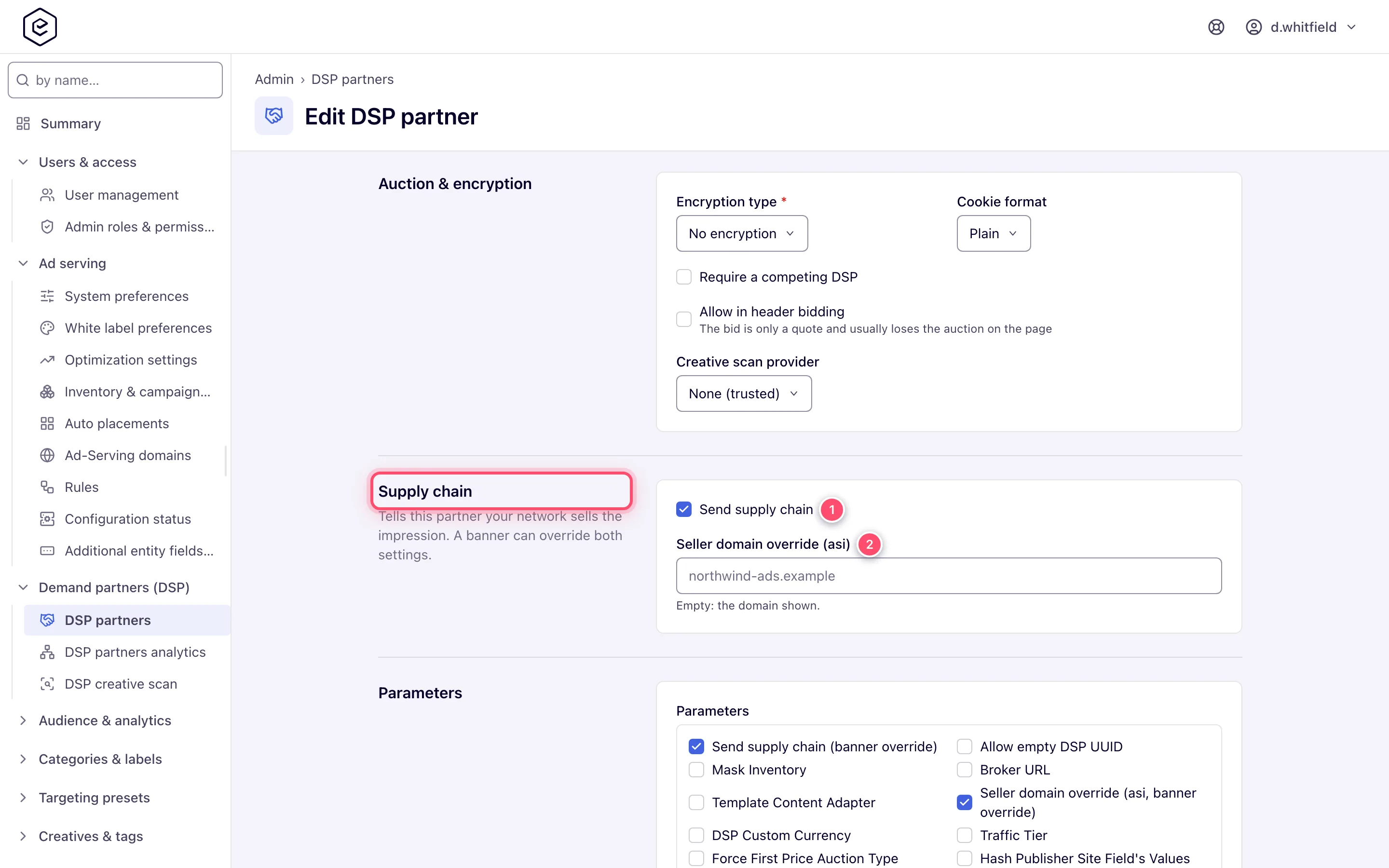
Header-bidding tags add a node only when you fill in both the seller domain and the site’s seller
ID. There, buyers may pay the publisher directly while you are paid a fee to serve. The IAB
specification forbids a company that is outside the payment flow from appearing in the chain, so
filling both is how you say that you resell (see
Header bidding settings). The tag’s
chain is your node alone and follows the same rule as a bid request without a chain on the tag:
complete: 1, or complete: 0 when the site’s Seller type is Intermediary — a
header-bidding tag has no way to pass the chain of the seller before you.
What the file contains
{
  "contact_email": "ops@adnetwork.example",
  "contact_address": "1 Example Street, Springfield",
  "version": "1.0",
  "sellers": [
    { "seller_id": "4831207", "is_confidential": 0, "seller_type": "PUBLISHER",
      "name": "Sports Daily Media Ltd", "domain": "sportsdaily.example" },
    { "seller_id": "nw-8", "is_confidential": 1, "seller_type": "INTERMEDIARY" }
  ]
}- name is who the network pays for the site: the company of the site’s owner, or the owner’s first and last name when no company is set. An owner with neither is listed as confidential.
- domain is the site owner’s business domain: the registrable root domain of the site URL
(
https://www.news.sportsdaily.co.uk/latestgivessportsdaily.co.uk). The IAB specification asks for a domain from every seller with a web presence, so when the public-suffix list does not know the URL’s suffix (a private or very new one) the host is used as it is, without a leadingwww.:https://www.sportsdaily.example/newsgivessportsdaily.example. An IP address,localhost, or an app whose URL is not a website has no domain. - Sites the network sells itself — nobody owns them, or the network’s admin user does — carry Legal name in sellers.json (the White Label company name when empty) and your seller domain.
- Masked inventory is always listed as confidential, whatever its own flag says: the site already hides who the publisher is from every buyer. Its Confidential box shows ticked and locked; the site’s own flag is kept, and applies again if masking is switched off.
- Only active, non-deleted sites with List in sellers.json turned on are listed. With the file
switched on and no site listed, it is still a valid file with an empty
sellerslist. - With Publish sellers.json off, the address answers 404 Not Found.
- A server that has just started answers 503 Service Unavailable with
Retry-After: 60until it has built the file once, so a crawler retries rather than caching “no file”.
Corner cases and gotchas
Corner case: the file is public by design: every site you tick is published. Mark a site Confidential to hide its name and domain while keeping it verifiable.
Corner case: with sellers.json on, the supply chain in bid requests does not depend on the tick — a DSP still gets the site’s seller ID. Tick every site you sell to DSPs with the chain switched on, or buyers that check
sellers.jsonwill not find it.
Corner case: switching Publish sellers.json on or off changes the
asiandsidof every bid request that carries a supply chain, on the next minute’s settings refresh. A DSP partner that keys anything on the old values sees new ones from then on.
Corner case: changing a site’s seller ID changes it everywhere at once: bid requests (with sellers.json on), header-bidding tags and the file. Buyers that cached the old ID see a mismatch until they re-crawl, and the publisher’s
ads.txtline must change too — the site’s Supply chain section shows the new line and whether the live file has it. Avoid renaming IDs that are in use.
Corner case: a header-bidding partner sells the site under its own ad system, not under yours, so it is not in your
sellers.jsonand its line in the publisher’sads.txtcomes from the partner. The site’s ads.txt block lists each partner of the site’s active tags under Header-bidding partners; a partner that is not an advertiser has its line pasted into the site’s Additional ads.txt lines (see setup by scenario).
Corner case: a seller ID you fill in by hand changes, once sellers.json is published, what DSPs receive as
site.publisher.idtoo, not only the chain. A DSP that keyed a block list or a deal on the old generated ID no longer recognises the site — tell your DSP partners before you set one on a site they already buy.
Corner case: a failed rebuild keeps serving the previous file rather than an empty one. An empty
sellers.jsonwould make every publisher look unauthorised at once. Serving the file never reads the database: it comes from memory, rebuilt every five minutes.
Per-role notes
- Admin: the seller domain, the on/off switch and the legal name are installation-wide White Label settings.
- Network manager: the seller ID is per site, with the site’s edit rights; listing, type and confidentiality are per site, behind the Site Supply Chain permission. Masked shares neither show nor change them — not from the console, not through the API.
- Publisher: nothing to do here. Your
ads.txtlines name the network’s seller domain and your seller ID (see Privacy signals and ads.txt).
