
Watch for fraud and reconcile against the partner
Keep CPA numbers honest — the validation settings and Traffic Quality that catch fake conversions, the Conversions Log as dispute evidence, and the report that splits every action into post-click and post-view columns and explains the conversions the partner claims but you never credited.
What it is and why
Performance pricing attracts fake conversions, and even honest partners count differently than the ad server does. This page covers the administrator’s fraud controls and the report that settles the month: conversions split per action and per attribution type, with the expired-window columns that usually explain the gap. It is the last stage of Run a CPA offer with affiliate postbacks.
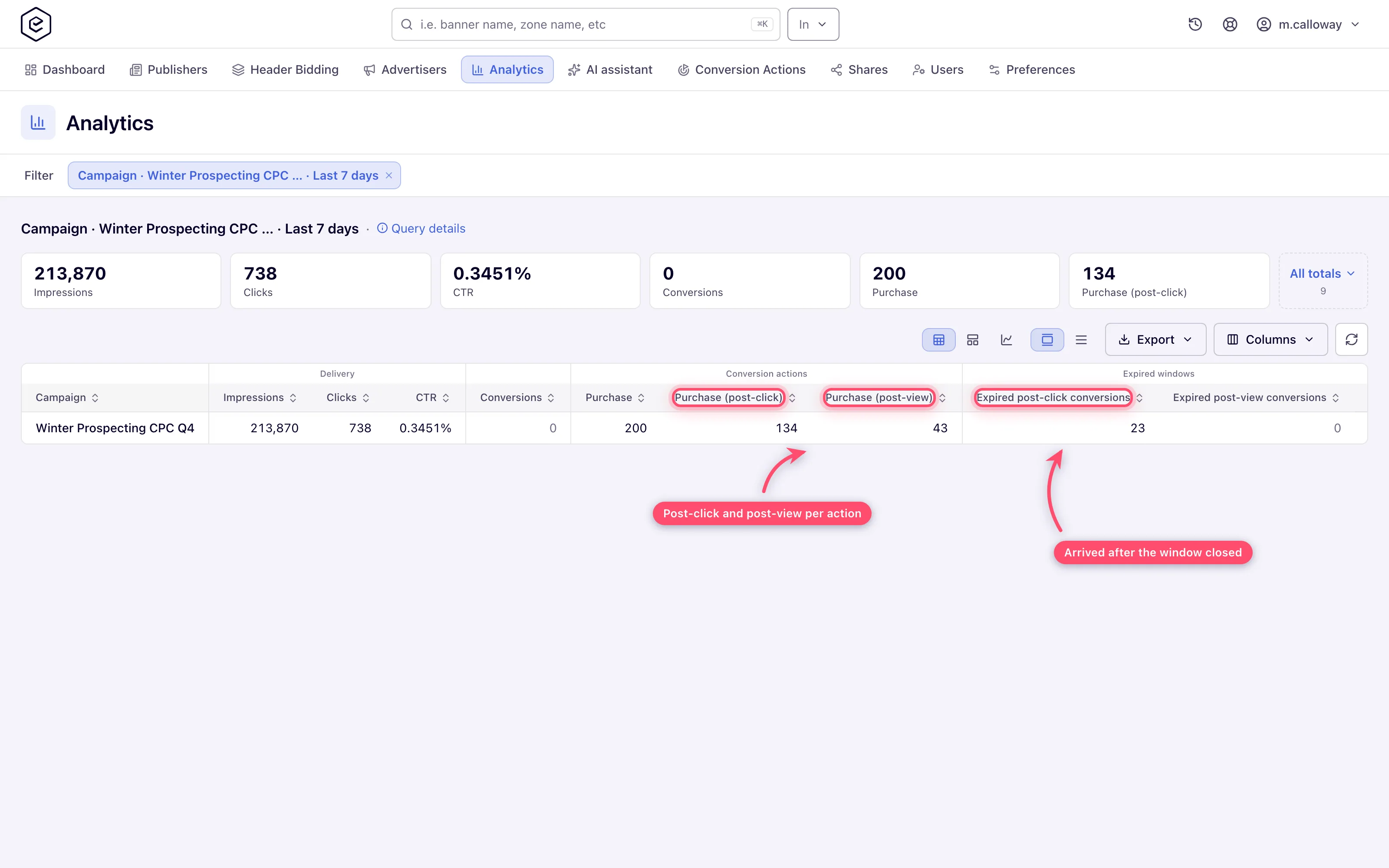
Example. At month end the report splits Install into Post-click / Post-view columns, and the Expired post-click conversions column explains the 40 installs the partner claims that arrived after day 7 — not credited, not charged.
Typical scenarios
| You want | Set | Where |
|---|---|---|
| $4.00 per install, 7 days after the click, views not credited | action: Post-click window 7 Days, Post-view window 0; Pricing Global 4.00; campaign Pricing CPA + Use general pricing | Conversion Actions; campaign → Pricing |
| A Registration → First deposit funnel read left to right | report with Split columns by → Conversion action (+ Attribution type) | Account → Analytics |
Step by step
The fraud screens are in the admin area; the report runs from Account → Analytics.
-
Watch for fraud (administrator side). Performance pricing attracts fake conversions. The administrator toolkit (Moderate banners, sites and traffic quality):
- Admin → Validation & anti-fraud → Validation settings — Conversion deduplication (S2S), Do not record the same user sequential conversions, Conversion per IP time frame and Clicks validation, among other checkboxes.
- Account → Traffic Quality — the invalid-traffic share and status of each placement; a placement suddenly producing conversions with an Act status is a blocking candidate.
- The Conversions Log report with IP / referrer columns is your dispute evidence — keep Detailed conversion log on for the action.
-
Report and reconcile. Run a report with the Conversions column grouped by Campaign / Banner / Placement, or set Split columns by → Conversion action for per-action columns — that is how a funnel (Registration → First deposit) reads left to right. To settle what the click actually bought, add Split columns by → Attribution type: every conversion metric splits into a post-click and a post-view arm, so a partner claiming credit for post-view conversions can be answered with a number. Pick Conversion action and Attribution type together and each funnel step reads as Total / Post-click / Post-view. Numbers rarely match the partner’s tracker to the unit — attribution windows, duplicate filtering and validation all remove events. The Expired windows columns show conversions that arrived after the action’s click or view lookback window closed: they were not credited, and they are frequently the whole discrepancy. See Analytics discrepancies before escalating.
Caveats and exceptions
Reports
- The Conversions Log report type is not in the stock roles — ask your network manager (or, as a network manager, your network administrator) — and the action needs Detailed conversion log on for the row to exist.
- The Traffic Quality tab is off for every role by default.
The caveats that apply to the whole offer — the roles — are on Run a CPA offer with affiliate postbacks.
Not working?
The numbers do not match the partner’s tracker? The likely cause:
| Symptom | Likely cause | Check |
|---|---|---|
| The partner claims conversions you do not see | They arrived after the window with Apply attribution window to server-to-server conversions on | Report → Expired post-click / post-view conversions columns; align the window with the partner’s latency |
Role and permission symptoms, and the other stages, are on Run a CPA offer with affiliate postbacks.
Reference
The validation checkboxes and the Traffic Quality tab: Moderate banners, sites and traffic quality; the report columns: Report types and Analytics discrepancies.
