
Let a third-party tag pass the impression back
Enable passback functionality on a Code or Template banner, copy the generated Banner passback code snippet for the partner's no-fill branch — or the $$PASSBACK_INFO$$ macro for tag and redirect flows — so Epom drops that banner and re-selects — step by step, with the re-selection cap and a fix-it checklist.
What it is and why
A banner passback works the other way round from a default code: it lets a third-party tag that Epom served hand the impression back, so Epom drops that banner for the request and serves the next one. Use it when Epom serves a Code or Template banner that hands the slot to another ad source, and you want the impression back if that source declines it. This page is one of the three stages of Set up daisy chaining and passbacks.
Example. A news site’s article MPU chain tries two direct campaigns, then a partner’s HTML tag, then two house ads. When the partner has no fill, their tag runs the Banner passback code snippet on its no-fill branch; Epom excludes the partner banner for that request, writes a passback record and re-selects — a house ad serves instead of a blank slot.
Typical scenarios
| You want | Set | Where |
|---|---|---|
| A partner’s HTML tag that gives the impression back when they have no fill | Enable passback functionality on that banner; the generated snippet on the partner’s no-fill branch | the banner’s Basic information |
| The same for a partner whose fallback is a redirect URL, not a script | $$PASSBACK_INFO$$ (or $$PASSBACK_INFO_ESC$$) in the fallback URL | the banner’s markup |
| A page served from the second of two AJAX invocation-code domains | Pick that domain in the Domain picker above the snippet before copying | the banner’s Basic information |
Step by step
-
Open the banner (Account → Advertisers → advertiser → campaign → banner). The option appears only for a Code banner on a Standard / Non-standard / Mobile site placement, or a Template banner on a Standard / Non-standard site placement — and only for a role holding the Ajax invocation-code permission of that placement type, on a network with an AJAX invocation-code domain configured.
-
Tick Enable passback functionality and save.
-
Reopen the saved banner. A Banner passback code: block appears with a one-line
<script>snippet; the ⓘ beside its label says to put it where the creative has nothing to show, and that it works with the Universal JS tag only. On a network with more than one AJAX invocation-code domain, a Domain picker above the block rebuilds the snippet for the domain the page’s Universal JS tag is served from (the first is preselected); the choice only changes the snippet you copy, nothing is saved with the banner.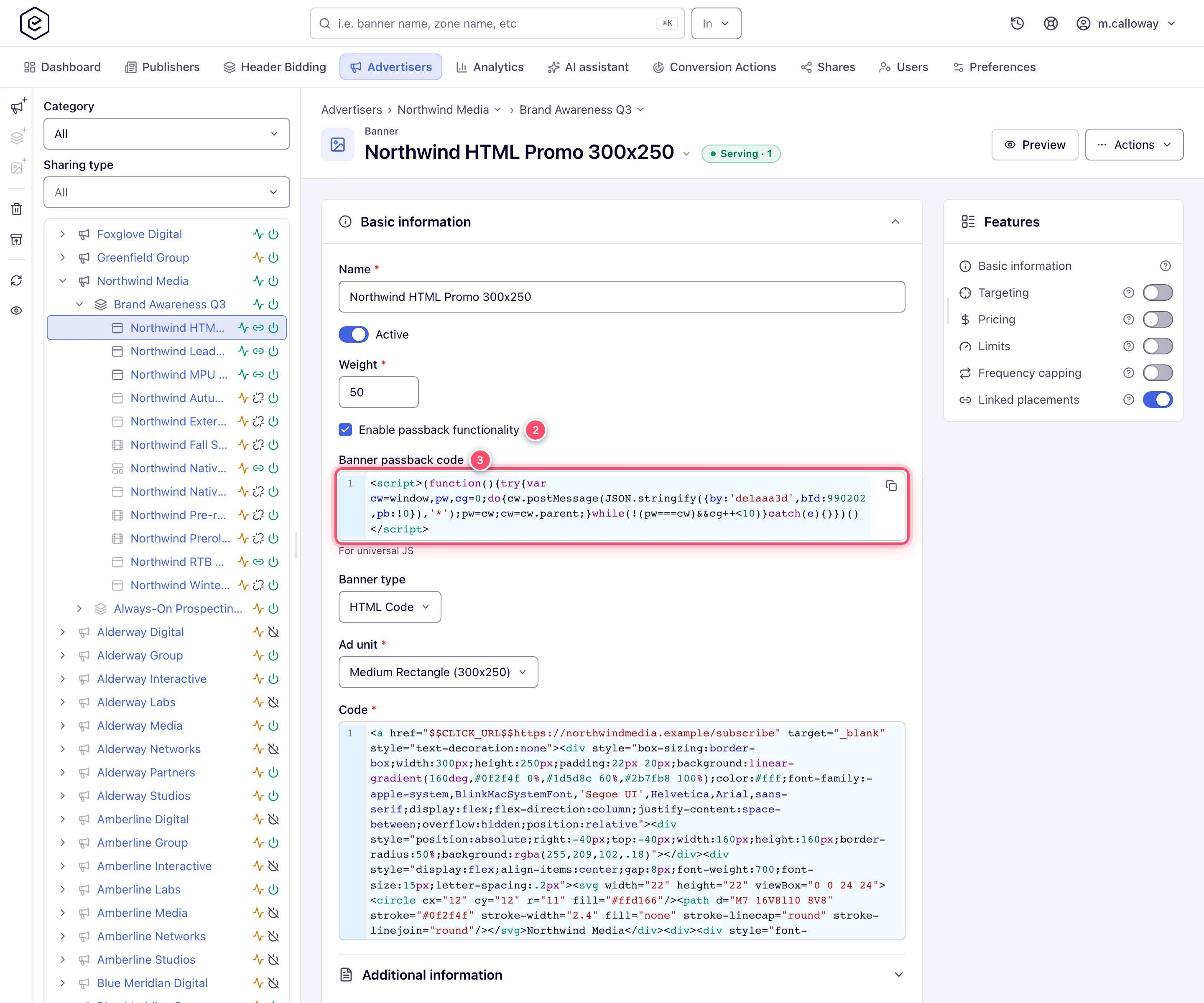
-
Give that snippet to the third party, to run on their no-fill branch. For tag and redirect flows that cannot post a message, put the
$$PASSBACK_INFO$$(or$$PASSBACK_INFO_ESC$$) macro in the fallback URL instead.
When a request arrives carrying that passback value, Epom excludes the named banner from selection for this request, writes a passback log record for it, and re-runs banner selection. What the snippet sends and how the macro expands: reference.
Caveats and exceptions
Passbacks are re-selections, with a cap. When the banner Epom picked cannot produce a usable response, the request drops it and re-selects — at most the larger of the placement’s deprecated Third-Party lookup limit and the chain’s Lookup depth times. Raising the chain’s depth silently raises that cap too; passback logging is suppressed on the retries so one passback is not counted twice; RTB (OpenRTB DSP) banners are never retried this way, except on Native placements. A passback from a blacklisted address is recorded as fraud and excluded from the impression subtraction, so the original impression stands. Details, the cases that still trigger a re-selection and how to read the per-reason counts: reference.
Who can do this, how the chain is walked and when the default code is returned are on Set up daisy chaining and passbacks.
Not working?
| Symptom | Check | Where |
|---|---|---|
| The passback option is missing on the banner | Not a Code/Template banner on a site-type placement; or no Ajax invocation-code permission; or no AJAX domain configured | the banner type and placement type; Admin → Users & access |
| The passback snippet does nothing | The page uses an iframe tag or a redirect flow — postMessage needs the Universal JS tag; use $$PASSBACK_INFO$$ in the fallback URL instead | the page’s tag |
| The passback fires but the impression is still counted | It arrived from a blacklisted address and was recorded as fraud; or it could not be matched to an impression | the Advanced report’s passback columns |
| Fewer passbacks counted than the partner sent | Retries within one request suppress duplicate logging; rejected ones have no matching impression | the Advanced report |
The No ads column and a missing Daisy chaining card are on Set up daisy chaining and passbacks; a Google Ad Manager tag as the partner is on Google (GPT) passback tags.
Reference
The passback option, the snippet and the $$PASSBACK_INFO$$ macro are under
Fallback fields outside the card
on the hub; how a passback is counted and paid, and the re-selection cap, are on
Daisy chaining and passbacks reference.
Related pages:
