
Order a placement's demand into a daisy chain
Switch on the Daisy chaining card of a placement, set the lookup depth, the per-visitor view and rotate counts and the priority tiers, pick Banner or Campaign mode and reorder the chain — step by step, with what the switch and the Type change delete, how the chain re-syncs with the placement's links and a fix-it checklist.
What it is and why
Daisy chaining turns the demand already linked to a placement into a fixed waterfall instead of a weighted rotation: every request tries position 1 first, then position 2, and so on. It brings in no new demand and has nothing to do with third-party tags — the placement-level fallback is the default code, and a tag handing the impression back is a banner passback. This page is the main path of Set up daisy chaining and passbacks.
Example. A news site’s article MPU has five linked banners: two direct campaigns, a partner’s HTML tag and two house ads. With daisy chaining on, every request tries Direct A first, then Direct B, then the partner tag; the house ads are pushed to the end while anything else is available. With View 1-N per banner at 3, each visitor sees Direct A three times before the chain moves them down to Direct B.
Typical scenarios
| You want | Set | Where |
|---|---|---|
| A guaranteed direct deal always wins over a partner tag, which wins over house ads | Daisy chaining on, Type Banner, the direct banner at position 1 | the placement’s Daisy chaining card |
| Each visitor sees the top banner 3 times, then moves down the chain | View 1-N per banner ticked, count 3 | the same card |
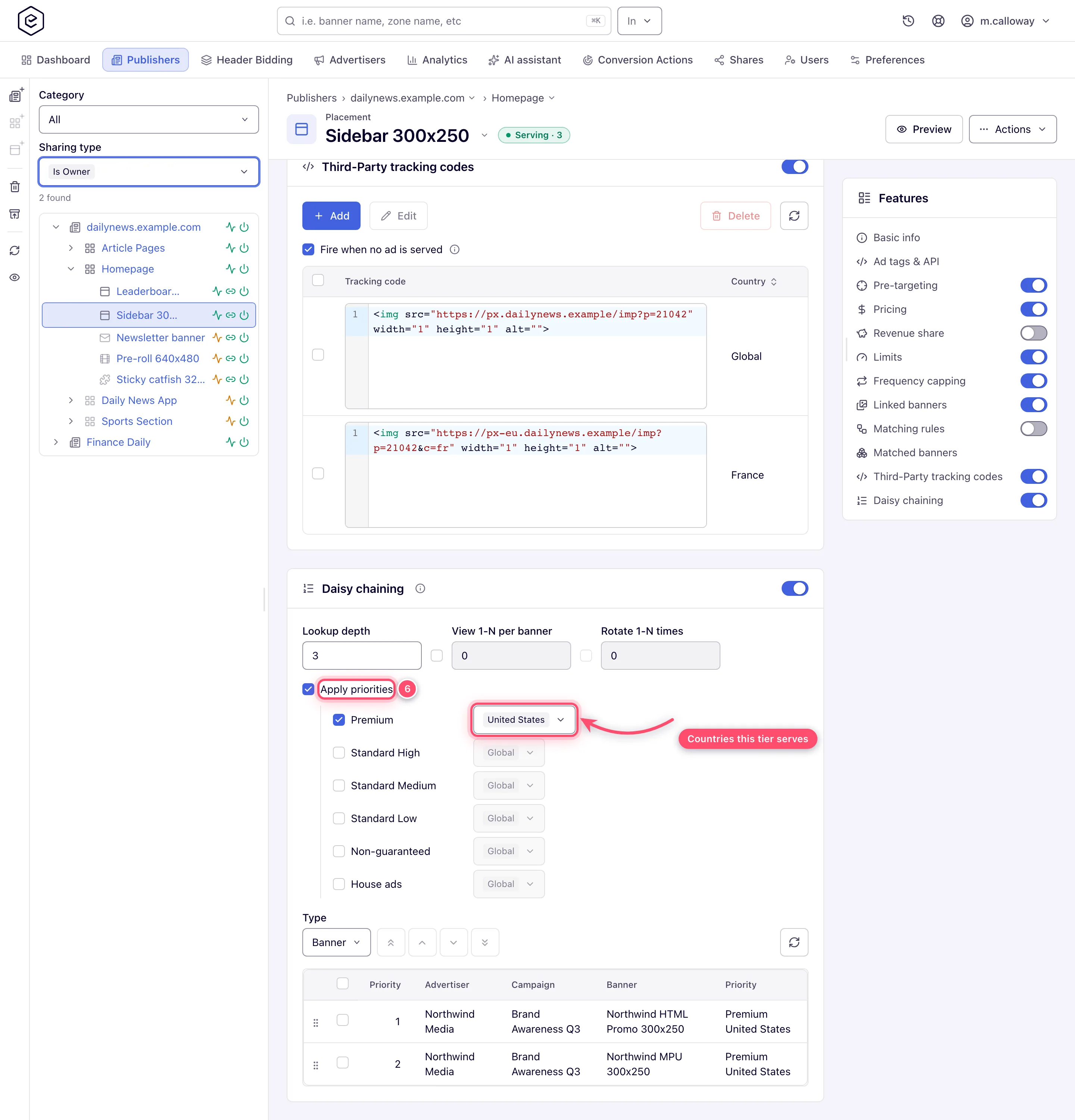
| Premium campaigns only for US visitors, Standard tiers worldwide | Apply priorities ticked, Premium tier with country US, the others * | the same card |
Step by step
-
Go to Account → Publishers → site → zone → placement and find the Daisy chaining card near the bottom of the page. The placement must be saved and already have banners linked: daisy chaining orders what is linked, it cannot add demand.
-
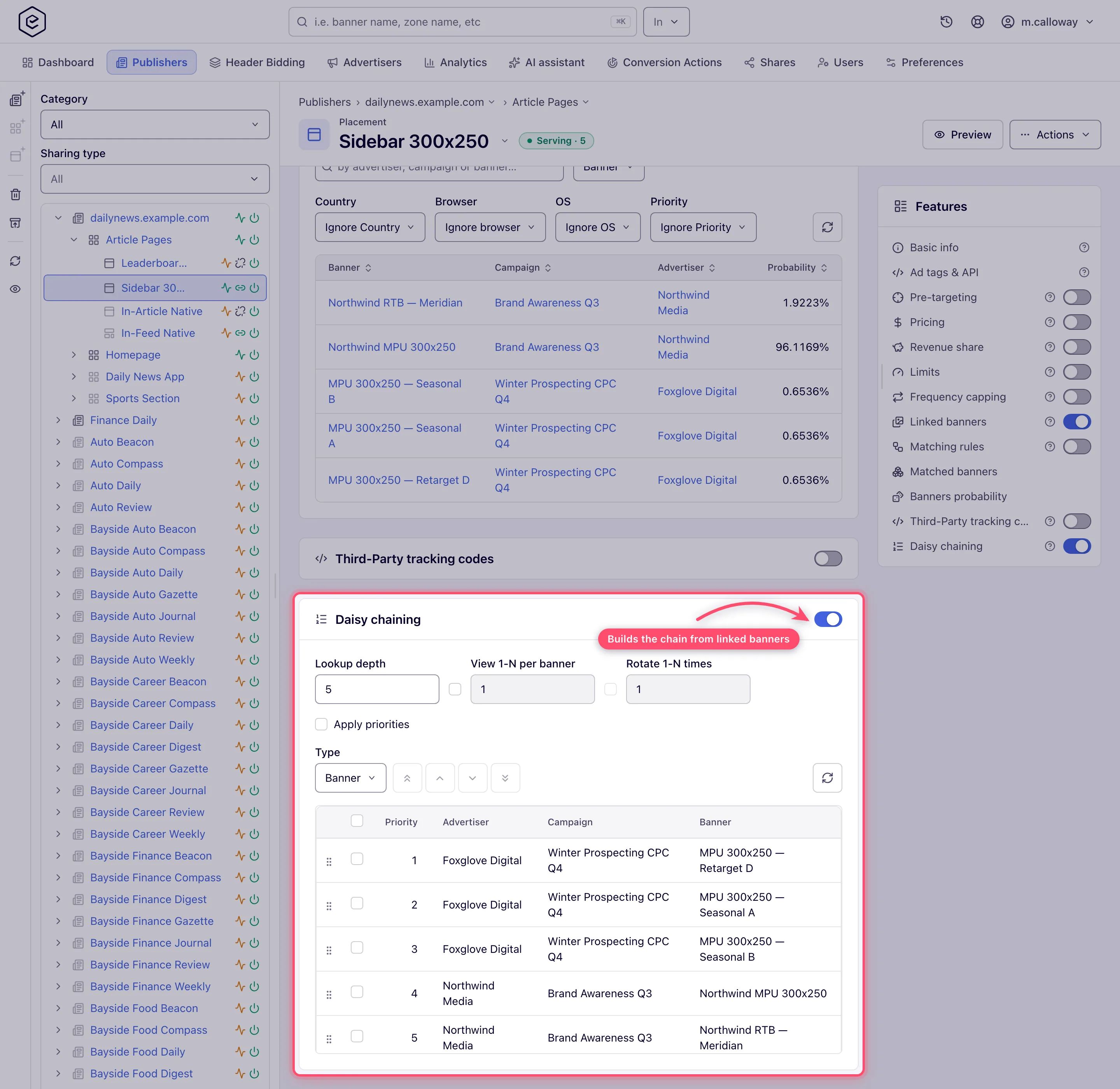
Turn the card’s switch on. The placement starts in Banner mode and the chain is populated for you from the banners already linked to the placement — one row per active banner whose campaign and advertiser are also active. You do not build the chain by hand.
-
Set Lookup depth. A new chain starts at the network’s default — 5 unless your network administrator changed it under Admin → Ad serving → Inventory & campaigns settings → Daisy chaining lookup depth. This is how many excluded chain entries the server may step over before giving up on the chain, not how many entries are tried — see How the chain is walked.
-
Optional: tick the checkbox next to View 1-N per banner (or per campaign) and set a count, to show each entry N times to the same visitor before moving down. The number field is disabled until you tick the box.
-
Optional: with view-per-entity on, tick Rotate 1-N times and set a count. Read the caveat first — this control limits cycling rather than enabling it.
-
Optional: tick Apply priorities to group the chain by delivery priority and give each tier its own country list.
-
Pick the chain Type — Banner (individual banners) or Campaign (whole campaigns). Changing it asks “Selected order will be lost. Are you sure you want to proceed?”, and the warning is literal: the rows of the other kind are deleted and the chain is rebuilt from scratch in link order.
-
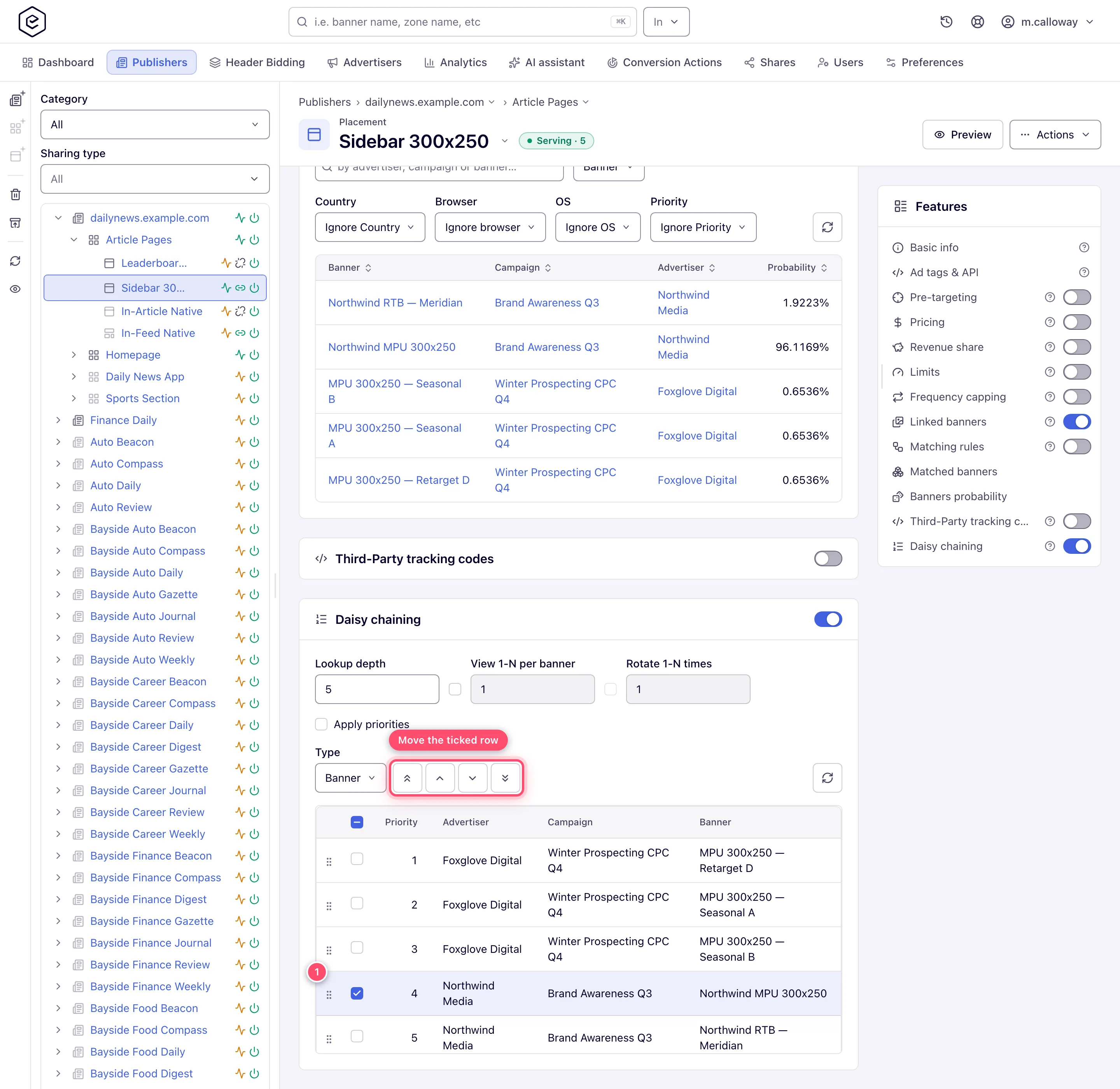
Reorder: tick a row first, then use Top / Up / Down / Bottom; the arrows stay greyed out until exactly one row is selected. You can also drag a row to a new position. Position 1 is tried first.
There is no card-level Save button. Every control posts on change (or on blur for the number fields), and a failure surfaces as an error toast.
Caveats and exceptions
“Rotate 1-N times” limits cycling, it does not enable it. With view-per-entity on and Rotate off, an exhausted chain restarts from the top every time, indefinitely. With Rotate on and a count of N, the chain restarts only N−1 times; after that the last view-limited entry is put back into play and keeps serving to that visitor. If you wanted “stop after N passes”, this is not that control. The view and rotate counts were not range-checked before release 153, so an older chain can hold 0 or a negative number; ad serving treats any count below 1 as 1, the stored value does not block saving the placement, and the card shows it as stored until you set a new count.
The switch deletes everything. Disabling daisy chaining removes the placement’s chaining record, and with it the order, the lookup depth, the view/rotate settings and the priority filters, after a confirmation. Turning it back on starts from a fresh auto-populated chain in Banner mode, even if it was in Campaign mode before. Switching Type likewise deletes the rows of the other kind and rebuilds in link order — switching back does not restore what you had. Unticking Apply priorities removes every per-tier country record, and the next sync then deletes every chain row whose country is not Global; re-ticking gives you all six tiers enabled worldwide again, not the lists you had.
The chain follows the placement’s links, not your edits. Every time the card loads the chain is re-synced: newly linked active banners are appended at the bottom, and rows whose banner was unlinked, deactivated, or whose campaign or advertiser was deactivated are deleted. A link change does the same from either side — the placement’s banner list, the banner’s own placements (console, API or MCP), auto-linking or a bulk upload. A banner that is switched off when the chain is synced is left out, and switching it on does not add it; it joins at the next sync (open the card or change a link).
A chain with no rows serves nothing. With Apply priorities off, the chain takes every request even when it lists nothing — every chained banner unlinked or switched off, or none active when the card was switched on. The placement then serves no banner at all; the serving check reports it as a blocker (“the placement serves only its daisy chain… and the creative is not in it”) and the banner probability panel gives no banner a share. Link an active banner, open the card so it re-syncs, or switch daisy chaining off. With Apply priorities on, an empty Banner chain hands the request back to ordinary selection.
Groups in the grid and groups for the arrows differ. With Apply priorities on, the grid groups rows by delivery priority and country, but the arrows only refuse to cross a priority boundary — two rows in the same tier with different countries look like separate groups and can still be swapped.
Who can do this, how the chain is walked on every request, and when the default code is returned are on Set up daisy chaining and passbacks.
Not working?
| Symptom | Check | Where |
|---|---|---|
| The chain is on but the placement serves nothing | The chain has no rows (banners unlinked / switched off / none active at switch-on) and Apply priorities is off | the grid; link an active banner or open the card to re-sync |
| The chain is ignored and banners rotate as before | Lookup depth exhausted: the top entries are capped, limited or mistargeted and the walk gave up | raise Lookup depth, or fix the top entries |
| A newly switched-on banner is not in the chain | It was off at the last sync; it joins at the next | open the card, or change a link |
| Every visitor sees position 1 on every request | View-per-entity counts live in a placement cookie; private windows and callers without cookies never advance | the caller; expected for cookieless traffic |
| Visitors’ positions reset | You changed a daisy-chaining setting — the cookie hash changed | expected |
| House ads never serve while a direct banner is capped for a visitor | Expected: house ads come back only when nothing else is left for that visitor | the chain |
| The arrows stay grey | Exactly one row must be ticked | tick one row |
| The arrows refuse to move a row | It would cross a priority tier | the tier grouping |
A missing card and the No ads column are on Set up daisy chaining and passbacks.
Reference
Every control of the card, with its values and default, is in the Reference on the hub and in full on Daisy chaining and passbacks reference; the REST calls are under Over the API.
Related pages:
- Set up daisy chaining and passbacks
- Set a default code for unfilled requests
- Let a third-party tag pass the impression back
- Daisy chaining and passbacks reference
- Optimize ad rotation — what the placement does when daisy chaining is off
- Delivery controls overview
