
Template banners
Render a rich-media template your network prepared — interstitial, catfish bar, interscroller, native block — from the properties you fill in per banner, including file uploads, From link and the Media library, and what to do when the Template list is empty.
A Template banner renders a rich-media template your network prepared — interstitial, catfish bar, interscroller, native block — from the properties you fill in per banner: artwork, click URL, numbers, files. It is valid on Site, Non-standard, Mobile site and Application placements. The templates themselves are authored in Templates; the other markup type, HTML Code banners, serves markup you paste.
Example. For a seasonal catfish bar, Northwind Media’s campaign uses a Template banner: pick the network’s Catfish template, upload the 970×90 artwork and the click URL into its properties, and the template does the rest.
Typical scenarios
| You want | Set | Where |
|---|---|---|
| A catfish bar, interstitial or interscroller built by your network | Banner type Template → pick the template → fill its properties (artwork, URL, numbers) | Add new banner → Site / Non-standard / Mobile site / Application |
| An HTML5 ZIP creative | A Template whose property is a ZIP upload — HTML5 ZIP creatives | Template properties |
| The artwork already in the Media Library | Media library on an HTML5 ZIP property; From link for a file hosted elsewhere | Template properties |
Step by step
Template
-
Add new banner → the placement type. Template is valid on Site, Non-standard, Mobile site and Application placements — not Video, not Email, not Native.
-
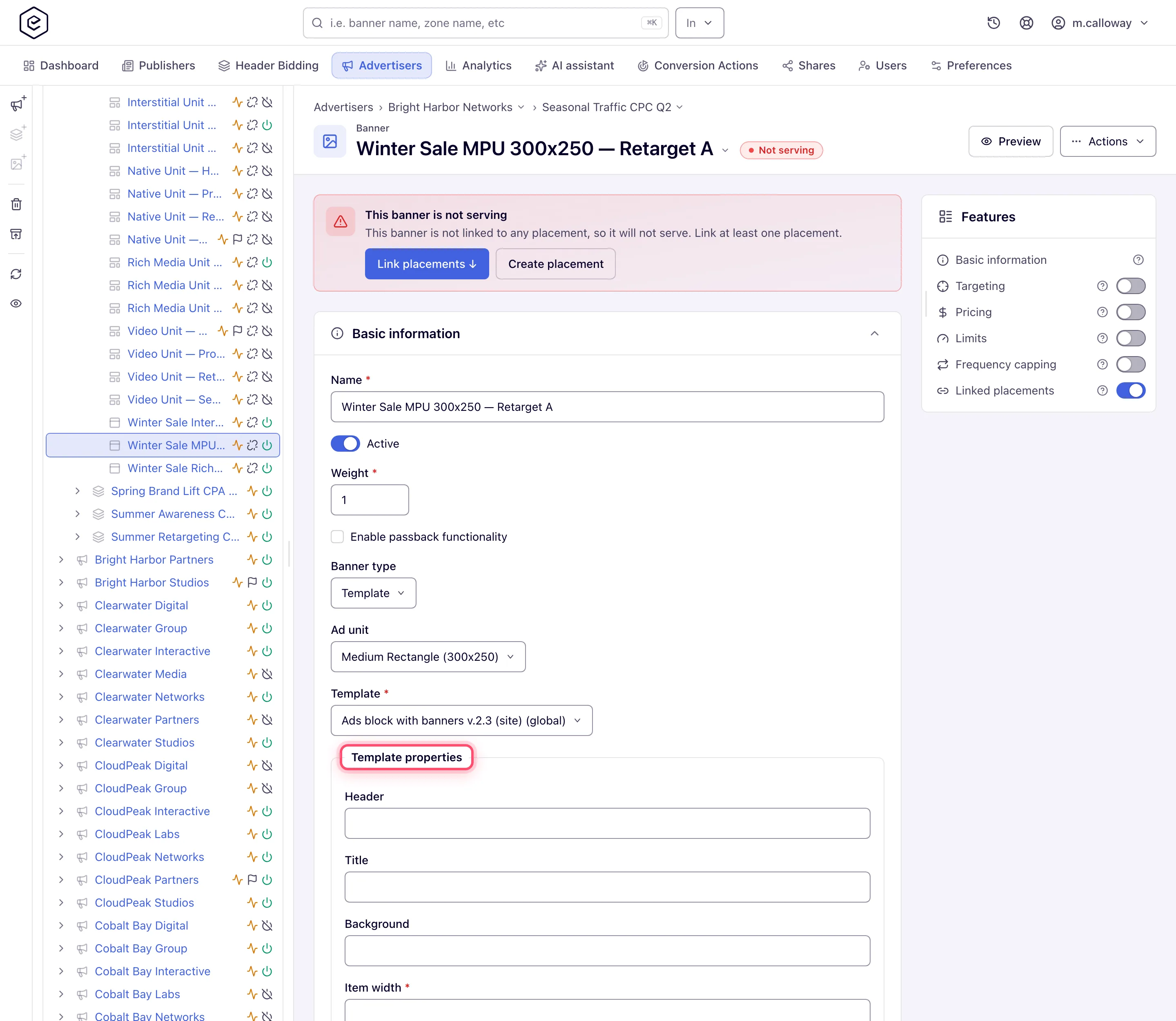
Set Banner type to Template, then pick a Template. Required. The list holds the templates enabled for that placement type — and can come back empty on Mobile site and Application (see caveats).
-
Fill in Template properties. The fields come from the template itself: text, numbers with their own min/max, dropdowns, checkboxes and file uploads (including HTML5 ZIP bundles — HTML5 ZIP creatives). A file field can also take a link (From link): the file is downloaded once when you save and stored as if uploaded. An HTML5 ZIP field can also take a ZIP from the Media Library (Media library). Links typed into text fields are never downloaded.
-
Pick the Ad unit where shown. For Template banners it is never required.
-
On Site and Non-standard placements, optionally enable passback — see Set up passback.
-
Save, then Preview.
Caveats and exceptions
Template is offered where no template may be enabled. On Mobile site and Application placements you can reach a form with a required Template field and an empty list, and the banner cannot be saved. Check the catalog first.
Template URL properties are validated as URLs. A reserved documentation domain like
something.example is rejected with Must be a valid URL; the banner’s own click URL is not
validated that way, so the same address can be fine in one field and refused in the other.
The caveats that apply to both markup types — who can do this, the Ad unit rules per placement, what switching the type and saving deletes — are on HTML code and Template banners.
Not working?
| Symptom | Check | Where |
|---|---|---|
| Template combo is empty | No template enabled for this placement type | Templates: enable one for the type |
| No Template in the Banner type combo | Stock Advertiser role; the network manager grants Template banners | User roles & permissions |
| Must be a valid URL on a template property | URL properties are validated; the click URL field is not | Use a real, resolvable address |
| Save fails on a required property | A template property marked required is empty | Template properties |
The rest of the list — passback, the type switch, a creative that renders in Preview but not on the page — is on HTML code and Template banners.
Reference
Which placements take a Template banner and which fields each asks for: What each placement asks for and Options and fields.
