
Upstream macro presets
Keep the server-side ad insertion stitchers a video placement can name — MediaTailor, Google DAI, SpringServe, FreeWheel, Publica, Brightcove, IAB — and the macro each fills into every tag parameter, so a publisher pastes a tag the stitcher can fill as it is; add a stitcher by hand or read its macros from documentation or a tag URL with Fill from document.
A video placement served behind server-side ad insertion names its stitcher under
Server-side ad insertion (SSAI), and the ad server builds the placement’s tags with that
stitcher’s macros — ip={{DEVICE_IP}}, us_privacy={{US_PRIVACY}} — so the publisher pastes a
tag the stitcher can fill as it is. Admin → Creatives & tags → Upstream macro presets is
where those stitchers and their macros live: one field per tag parameter the ad server reads,
holding the upstream’s macro for it. The network starts with seven built-in presets — IAB
standard macros, Google Ad Manager DAI, AWS Elemental MediaTailor, SpringServe (Magnite),
Brightcove SSAI (VOD), FreeWheel and Publica.
Example. A CTV publisher moves to a stitcher the list does not have. You paste the tag
template its support sent —
…?ip={{DEVICE_IP}}&ua={{DEVICE_UA}}&us_privacy={{US_PRIVACY}}&cb={{CACHEBUSTER}} — into
Fill from document → Text, press Read, and the form fills clientIp, clientUa and
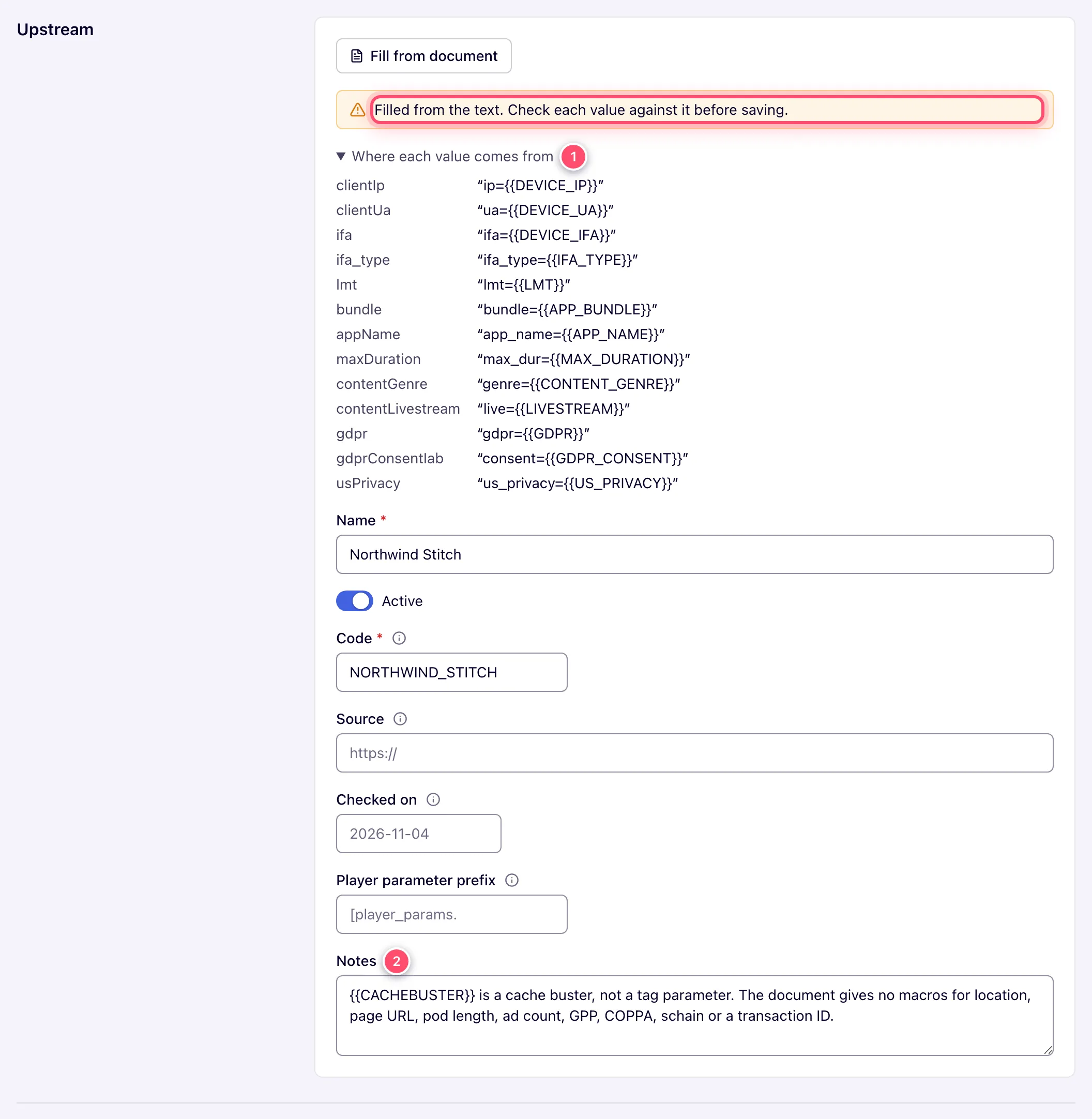
usPrivacy with those three macros, puts the cache buster in Notes (it is no tag parameter)
and proposes a name and a code. Save; the network manager now picks the new stitcher on the
placement, and the placement’s SSAI macros table shows the three macros in the tag it builds.
Typical scenarios
| You want | Do | Where |
|---|---|---|
| A new stitcher from its macro documentation | Add from document with the documentation page link or PDF → Read → check → Save | List toolbar |
| A new stitcher from a tag URL the publisher already uses | Add → Fill from document → Text, paste the URL → Read | Edit form |
A macro corrected on a built-in preset (say {{US_PRIVACY}} → {{USP}}) | Edit the field under Privacy, Save; placements set to it show the new macro from now on | Edit form |
| Macros the player must pass marked as such | Set Player parameter prefix ([player_params. for MediaTailor); the placement’s table marks those rows Your player passes this to … | Edit form |
| A stitcher nobody should pick any more | Untick Active — there is no delete; placements already set to it keep it | Edit form |
Step by step
-
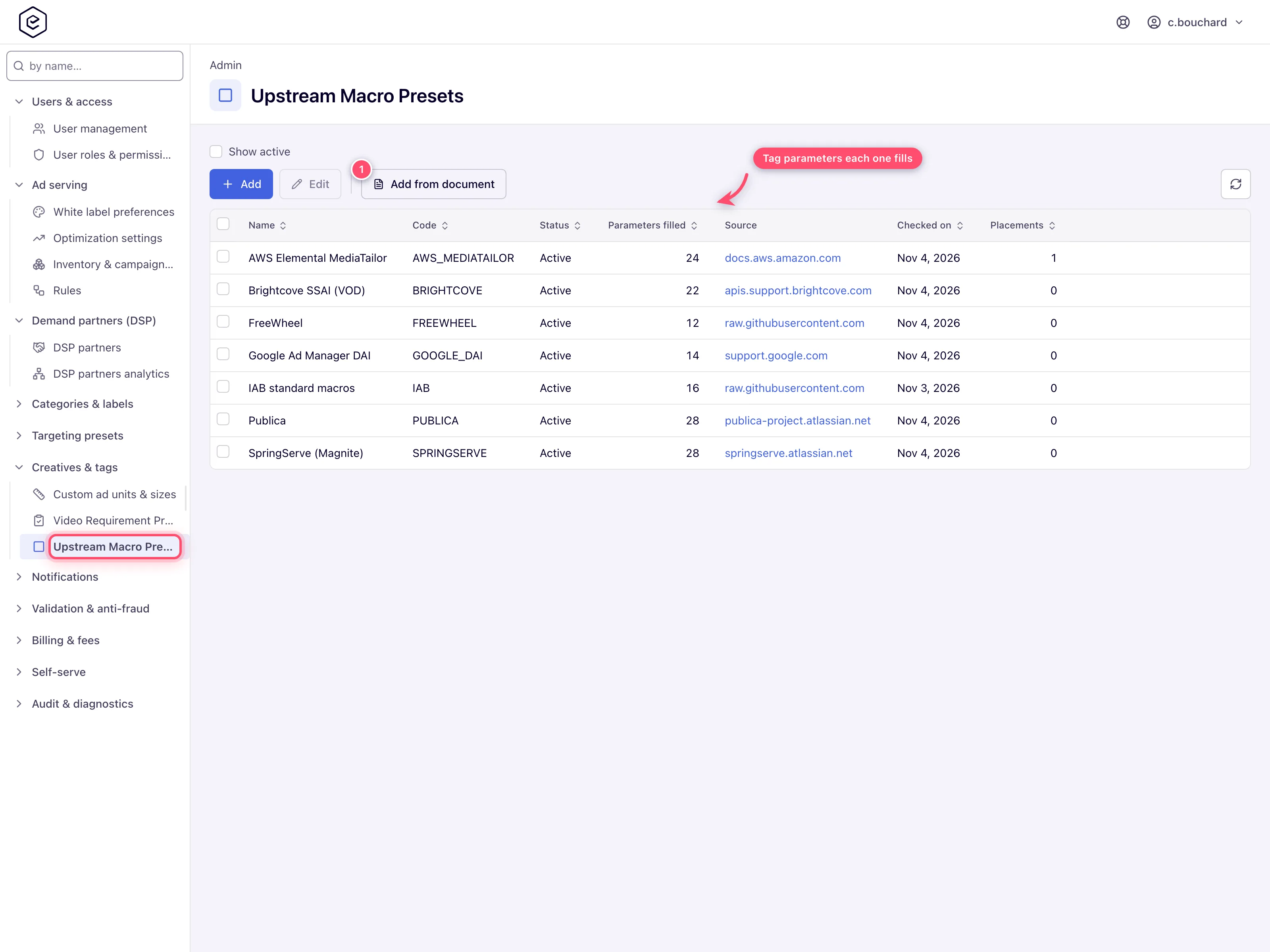
Open Admin → Creatives & tags → Upstream macro presets. The grid shows each preset’s Name, Code, Status, Parameters filled, Source, Checked on and Placements — how many live video placements use it. Show active hides the inactive ones.
-
Click Add and fill in Name, Code, Source, Checked on, Player parameter prefix, Notes, and under Device, App and page, Player and ad break, Content, Privacy and Supply chain the upstream’s macro for each tag parameter it fills (see Reference) — or press Fill from document, give the documentation as a File, a Link or pasted Text (a macro list, or simply a VAST tag URL), and press Read. Above the fields, Where each value comes from quotes the passage behind each macro and Read but not filled lists what a preset cannot hold. Nothing is saved yet — check each macro.
-
Save. A value the server refuses is named under the field it belongs to. The preset is now offered in every video placement’s SSAI picker, and a placement set to it shows the macros in its SSAI macros table.
-
To change a preset later, edit it and Save; to retire one, untick Active.
Caveats and exceptions
- Who can do this. An admin role with the Upstream Macro Presets Admin UI permission; release 154 gives it to every role that holds Video Requirement Presets. Network managers never manage presets — they pick one per video placement, from the active ones.
- Saving changes the tags built from now on, not tags already pasted. Saving a preset changes the macros every placement set to it shows and the tags it builds from then on — but not a tag a publisher has already pasted into the stitcher; that one is copied again.
- The ad servers never read this list. A request is understood by its parameter names whichever preset built the tag, and a stitcher that leaves a macro unfilled sends it back literally, which the ad server treats as no value.
- There is no delete. A preset is retired by unticking Active: a placement already set to it keeps it, still lists it in its picker and still builds its tags with it; no other placement is offered it. A built-in preset keeps its code; for one you add the code must be unused.
- Fill from document fills only the ad server’s own tag parameters. A macro the stitcher
documents for something the ad server does not read — a cache buster, a timestamp, the
player’s width — goes to Notes, never into a field. It fills a field only from what the
document states: a parameter it has no macro for is left as it was, not guessed from another
stitcher’s syntax — so reading a short tag template into an existing preset only changes the
macros it names. It recognises an upstream’s own names (
ip=,uip=anddevice_ip=all land onclientIp) and copies the macro exactly as written. On a new preset it also fills the name and a code made from it (an existing preset keeps both), the date the document carries, the link it was read from as Source, and the Player parameter prefix when some macros only carry what the player passes. A document that lists macros for several upstreams (one table per stitcher) asks which one to fill; Add from document on the list turns each one you tick into its own preset, one Save after another (Upstream 2 of 3 says where you are). - Fill from document costs AI budget and has size limits — the same as for video requirement presets: it needs an Anthropic API key (yours, the network’s or the platform’s; see AI assistant), each reading is billed like an AI assistant reply against the same monthly allowance, and a File is a PDF up to 20 MB, an image up to 5 MB or a text/HTML file up to 2 MB; a Link is downloaded up to 2 MB from the public internet only. A page that builds its content in the browser downloads empty — save it as a PDF or paste its text. A document too long for one answer, or one the model declines, is reported and billed all the same.
Not working?
| Symptom | Likely cause | Check |
|---|---|---|
| The page is missing, or the URL shows Record not found. | Your admin role lacks Upstream Macro Presets | Users and roles |
| The placement’s SSAI picker does not offer the preset | It is Inactive | Edit → Active |
The stitcher sends {{US_PRIVACY}} back literally | The stitcher does not know that macro; the ad server reads it as no value | Correct the macro under Privacy from the stitcher’s documentation |
| A tag the publisher pasted still carries the old macro | Saving changes tags built from now on only | Copy the tag from the placement again |
| A row in the placement’s table says Your player passes this to … | Expected: the macro starts with the Player parameter prefix, so the stitcher fills it only from what the player hands it | The publisher’s player integration |
| Save refuses a macro | It has a space or &, or is over 256 characters | The message under the field |
| Save refuses the code | Not a letter first, over 64 characters, or already taken | Pick another code |
| Fill from document left a field empty | The document says nothing about that parameter; it is never guessed | Fill it by hand from the stitcher’s docs |
| Fill from document put a macro in Notes | It is not a tag parameter the ad server reads (cache buster, player width) | Nothing to do |
| Fill from document is not shown / greyed out | No Anthropic API key / the monthly allowance is spent | AI assistant |
Reference
| Field | What it does |
|---|---|
| Name | The upstream as the placement’s picker lists it. Required; up to 128 characters. |
| Active | Whether placements are offered the preset. On for a new preset. |
| Code | How placements, the API and the MCP tools name the preset — a letter, then letters, digits and underscores, up to 64; stored in upper case. A built-in preset keeps its code; for one you add it must be unused. |
| Source | The upstream’s macro documentation the values come from (http:// or https://). |
| Checked on | The day you checked that documentation — YYYY-MM-DD, or YYYY-MM. |
| Player parameter prefix | The start of the macros the upstream fills only from values the publisher’s player hands it, such as [player_params. for MediaTailor. The placement’s SSAI table marks those rows Your player passes this to …, because the stitcher sends them empty when the player does not. |
| Notes | What the documentation says that the macros cannot express. Up to 2,000 characters. |
| Device, App and page, Player and ad break, Content, Privacy, Supply chain | One field per tag parameter the ad server reads — clientIp, clientUa, ifa, ifa_type, lmt, dnt, latitude, longitude; bundle, appName, appStoreUrl, requestUrl, o (the page domain); maxDuration, maxPodDuration, maxAds; contentGenre, contentRating, contentLivestream, contentLanguage; gdpr, gdprConsentIab, usPrivacy, gpp, gppSid, coppa; schain — holding the upstream’s macro for it, e.g. {{US_PRIVACY}}. A macro has no spaces or & and is at most 256 characters; a blank field leaves that parameter out of the tag. |
| Permission | Lets you |
|---|---|
| Upstream Macro Presets (Admin UI) | Open the page; add, edit and deactivate presets; read documents with Fill from document. |
Over the API
GET /rest-api/upstream-macro-presets lists the presets with usedBy per preset and
parameters, every tag parameter a preset can fill with its group (?active=true is the list
placements are offered); GET …/upstream-macro-presets/{presetId} reads one by its id or its
code. POST …/upstream-macro-presets adds one (code, name and macros are needed; a code
already taken answers 409), and POST …/upstream-macro-presets/{presetId} changes only the
fields sent — a sent macros replaces the whole map, and {"active": false} retires the preset.
Invalid values come back per field in errors (code, name, macros.clientIp, …), and fields
that cannot be set — builtIn, usedBy — are listed in ignoredFields.
POST …/upstream-macro-presets/from-document reads the upstream’s macro documentation — exactly
one of file (multipart), url or text — and answers upstreams (at most 10, with total
and more as for video specs), each with the fields a create accepts (name, a code made from
it, source, asOf, notes, playerParamPrefix, macros) plus quotes and notApplied; it
saves nothing, and GET on the same path answers available / reason and the size limits.
Reading needs only a signed-in user; every change and every document reading needs the
Upstream Macro Presets admin permission, and whoami reports it as
may.upstreamMacroPresets. A placement names its preset by code: ssaiStitcher on
POST /rest-api/placements/update/video and on the MCP placement_create tool.
Related
- Video placements — where a placement picks its preset and shows the macros
- Other admin tools — the other small admin pages
- Video requirement presets — the other Fill-from-document tool
- AI assistant — the key and allowance Fill from document uses
