
Analytics discrepancies against a partner's numbers
Why Epom and an advertiser's tracker, a publisher's counter, an SSP or a DSP count different impressions, clicks or conversions — time zones, metric definitions, the counting moment, filtered traffic, attribution windows and method, clicks lost before the landing page, viewable vs served and ad blockers — with the check for each.
A detail page of Analytics discrepancies, which has the 60-second check, the cause table, the discrepancy checklist, the advertiser-side vs publisher-side question and what to send support. This page holds the checks for a gap between Epom and a third party — an advertiser’s tracker or ad server, a publisher’s page-view counter, an SSP or a DSP. What each counter counts and when is on What each analytics counter counts and when; reports that disagree with each other or come back empty are on Reports that disagree or come back empty.
Symptom: my numbers don’t match a third party’s
Compare like with like, in this order:
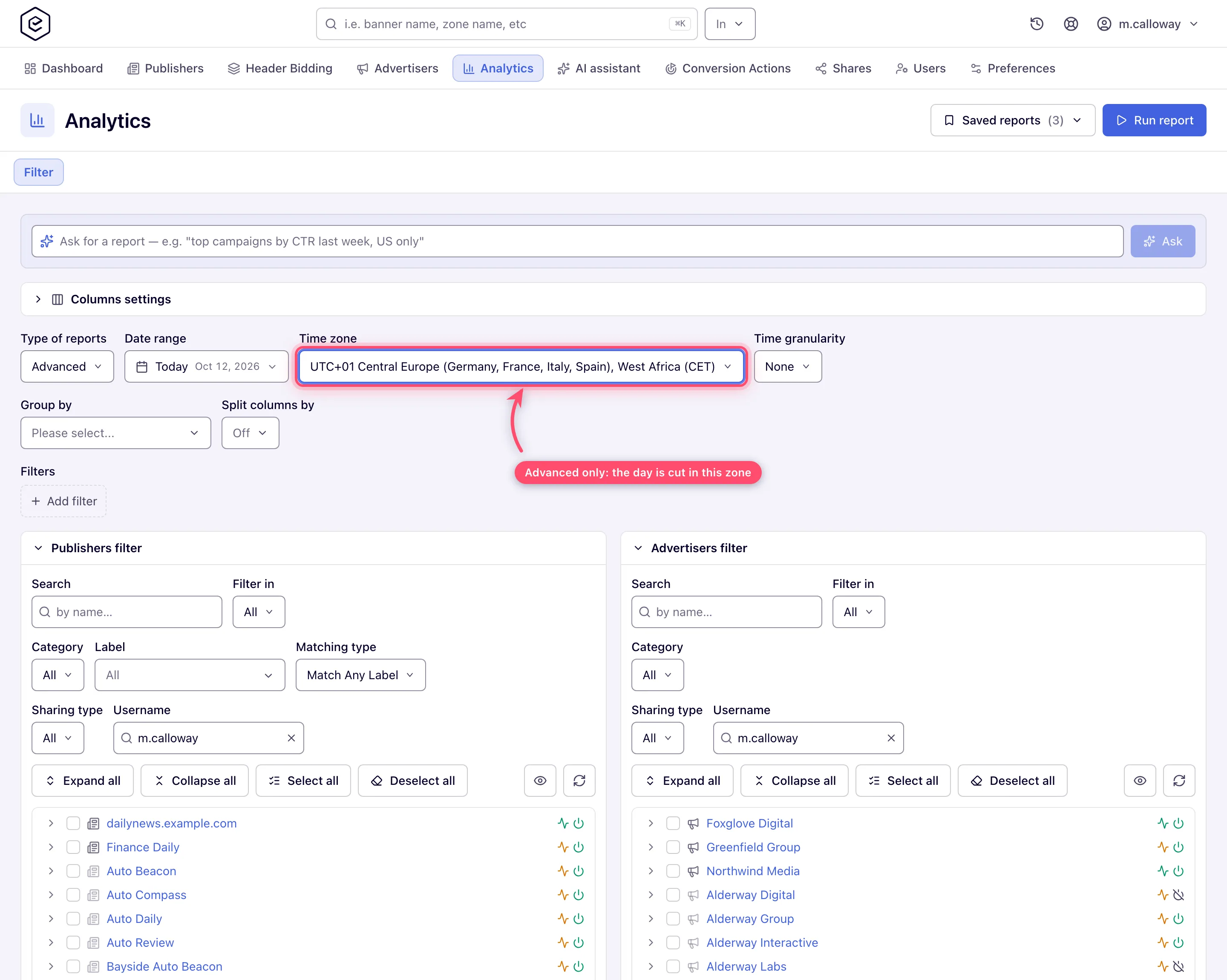
- Time zones. Only the Advanced report has its own Time zone selector; the
General report and the dashboards bucket rows in the network’s time zone — UTC unless your
network has been set to another zone — see Which time zone do reports use?. A
partner reporting in another zone counts the same events on different calendar days —
the gap concentrates around midnight and evens out over a week. Check: rerun as an
Advanced report with the partner’s time zone selected (Advanced is an administrator-granted
report type — ask your network administrator if it is not in your Type of reports list).
- Metric definitions. Make sure both sides count the same event:
- Requests (ad requests received) ≥ Impressions (delivered and registered ads). A partner’s “ad calls” usually maps to Requests, not Impressions.
- A tag-in-tag chain counts an impression at every hop it passes; each system counts its own hop.
- Net vs Gross revenue (before/after revenue share), and Charges vs Revenue vs Profit are different columns — compare the partner’s “revenue” against the right one.
- Conversions counts real conversions only: VAST playback and viewability events (system conversions) no longer count in Conversions, I2C or CCR, though their money is still summed into Net and Gross. Group by Conversion action or Attribution type to see them.
- Counting moment. An impression is registered when the impression beacon in the served markup is requested (for pops and templates that record their own impressions, when the ad is served), not when the creative renders or becomes viewable; systems that count on render or viewability will read lower on slow pages and in-app traffic.
- Filtered traffic. A beacon request from a bot, from a blacklisted IP or user agent, or
with an invalid signature is not counted as an impression (the checks are set under Admin →
Validation & anti-fraud → Validation settings), and a request whose user agent is a known crawler
gets no ad at all. The check reads both a list of exact user agents and the product tokens the
current crawlers carry (
Googlebot,bingbot,meta-externalagent,GPTBot,ClaudeBot,Applebot,Bytespiderand others), so a crawler riding inside a full browser user agent with a rolling Chrome version is recognised. Behind that list, the device-detection service names the crawler it sees, and a request from a search engine, AI crawler, SEO or link-preview bot, uptime monitor or security scanner it names gets no ad either. Mail image proxies, the HTTP libraries of real apps, Prebid Server and ad-verification crawlers are only counted for the operator and keep receiving ads; a crawler that none of these checks refuses is counted like a visitor. The raw Impressions / Clicks Log reports offer a Validation filter (on networks that store invalid records) — compare valid-only against valid+invalid to size this effect. A third party that counts those requests will read higher. - Conversion windows. Conversions attribute within the action’s post-view and post-click windows, to the moment defined by the attribution — a partner using a different window or attributing to conversion time instead of click time reports different daily totals. Check the action’s windows under Account → Conversion Actions, and add the Expired post-click conversions / Expired post-view conversions columns to see how many of the partner’s conversions matched an ad event that was already outside your window.
- Attribution method. Partners that count only click-based (or only view-based) conversions will not match your combined total. Compare their number against the Post-click conversions / Post-view conversions split columns (or group by Attribution Type) instead of the total — self-reported and legacy conversions sit in the Unattributed bucket, unless the action’s Default attribution type puts them in the click or view arm instead. Check that setting before reading a split as measured truth: it is what whoever set up the action declared about the integration, not something the ad server observed.
- Ad blockers and privacy modes suppress third-party pixels asymmetrically: whichever side’s beacon is blocked undercounts.
Symptom: the advertiser’s tracker counts far fewer clicks than Epom
Epom counts a click when the visitor hits the click redirect, before the landing page starts loading; the tracker counts when its own code on the landing page runs. Everything between the two is lost to the tracker only:
- Landing pages that load slowly or redirect several times — visitors close the tab first.
- Clicks Epom counted but the tracker rejected — the tracker’s own bot or duplicate filter.
- A wrong or empty click URL — a banner whose clickable link is empty or points somewhere else sends the click through Epom and nowhere useful; a third-party tag that does not use the click macro is the opposite case and loses clicks in Epom — see Click tracking with third-party tags.
- Accidental clicks on formats that cover content (sticky, branding, interstitial) inflate Epom clicks and rarely reach a landing page.
Check: group a General report by Placement and Banner, and compare clicks per placement with the tracker’s visits by sub-source. One placement with a far higher CTR than the rest is usually the cause. The Clicks Log shows the IP, user agent and referer of each click.
Symptom: conversions stopped arriving (the tracker shows registrations, Epom shows none)
Work along the path the conversion travels:
- The tracker’s postback is still enabled and still points at your Epom S2S URL — a disabled postback or a changed event mapping in the tracker is the most common cause.
- The click id reaches the tracker. The landing URL must still carry the click macro after the last edit of the banner; without it the tracker has nothing to send back.
- The conversion action is still switched on for the campaign (its Conversion actions card), and its attribution windows still cover the delay between click and conversion.
- Epom received the call — send a test conversion and read why it did not count, see Test a conversion and Read why a pixel did not count.
Symptom: Epom impressions are higher than the partner’s viewable impressions
An Epom impression means the ad’s code ran on the page; it says nothing about whether the ad was seen. A partner counting viewable impressions — 50% of the ad on screen for a set time — will always be lower, most of all on long pages and below-the-fold slots. For video, Epom can measure viewability itself and report it as conversion-action columns (Split columns by → Viewability), see Viewability and Open Measurement. Compare the partner’s viewable count with those columns, not with Impressions.
Symptom: ad blockers — would my own serving domain help?
Requests an ad blocker stops never reach Epom, so they appear on neither side as an Epom request or impression — but a publisher’s page-view counter or an advertiser’s tag may still see the visit. Blockers work from lists of domains and URL patterns: a dedicated serving domain helps only until it lands on such a list, and does nothing for the creative’s own domains (an advertiser’s or DSP’s assets, trackers and VAST files), which are blocked regardless of where the tag came from. Your network’s serving domains are chosen per placement under Ad Tags & API → Settings → Domain.
Related
- Analytics discrepancies — the 60-second check, the cause table, the discrepancy checklist and what to send support
- What each analytics counter counts and when
- Reports that disagree or come back empty
- Fix click tracking on third-party ad tags
- Report types — freshness and gating
- Conversion actions
