
DSP partners: fields, parameters and currency reference
Every field of the DSP partner form with its default and range, the sixteen partner types, the fourteen per-creative parameters, the partners grid, currency pricing in full — rates, locking, how a bid in another currency is priced, what is refused and alerted on — and every corner case of the form.
Reference for Configure DSP partners: the form field by field, the partner types and per-creative parameters, the partners grid, currency pricing in full, and every corner case of the form.
Options and fields
Field order below is the order on screen. A * in the UI marks a required field.
| Field | Default | Notes |
|---|---|---|
| Name | — | Required. Free text. |
| Type | Custom DSP Endpoint | Pre-built types add partner-specific request quirks; Custom DSP Endpoint is plain OpenRTB. Full list below. |
| URL | — | Required. Bid endpoint. The form refuses more than 2,000 characters. |
| Pricing model | CPM | CPM = impression-based, win price booked per thousand; CPC = click-based; CPI = impression-based, win price booked per impression. A delivery event that does not match the model books zero. |
| Wrap click-through | off | Retargets the links in the partner’s banner creative through the ad server, so a click is counted before the user is passed to the partner’s own click tracker. Needed for CPC partners — see the corner cases. |
| Active | on | An active partner is offered on every OpenRTB banner and receives bid requests. Deactivating stops both. Shows greyed with an Inactive badge in the grid. |
| Timeout | 300 | Milliseconds, 1–30000. Bids arriving later are discarded. |
| Win notice timeout | blank = 5 s | Milliseconds, 0–60000, for the win and loss notices (nurl, lurl) — not for the bid. The notice is sent after the auction is decided, so it is not on the ad request’s critical path and may be far longer than the bid Timeout: a partner whose notice endpoint is slower than its bid endpoint no longer loses notices to the bid budget. The value bounds both the whole request and the wait for an answer, so values above 5 s take effect too. Blank uses the platform default of 5,000 ms — what notices always had — and 0 leaves the shared HTTP client’s own, also 5 s. A notice that runs out of time is dropped, and the partner never hears that it won or lost. |
| Max QPS | blank = unlimited | Cap on bid requests per second across your whole network. 0 blocks the partner outright (the grid renders it as Blocked); blank renders as Unlimited. The enforced ceiling carries a 10% tolerance factor. |
| Protocol ver. | 2.5 | 2.2, 2.3.1, 2.4, 2.5, 2.6. Sent in the x-openrtb-version header; 2.5 adds banner.format, 2.6 moves schain to source.schain. |
| Native protocol version | 1.1 | 1.0, 1.1, 1.2. |
| Wrap native request | on | Wraps the native object in the outgoing request. |
| Wrap native response | on | Expects the partner’s native response wrapped. |
| Gzip bid request | off | Compresses the outgoing bid-request body and sends Content-Encoding: gzip. Opt-in per partner — not every bidder accepts a compressed body. Gzipped bid responses are accepted from every partner regardless of this flag. |
| Shortname | — | Lowercase a-z and 0-9, max 64. Required as soon as user sync or custom-data processing is enabled; drives the derived cookie names. |
| Enable user sync | off | Reveals the read-only User sync cookie name and User sync URL. |
| Enable custom data processing | off | Reveals the read-only Custom data cookie name. |
| Encryption type | No encryption | No encryption, Base 64, Blowfish. Encrypts the cleared price substituted into the winner’s markup. See the corner case on Base 64. |
| Cookie format | Plain | Plain or Base 64. Stored on the partner, but it does not decide how buyeruid is decoded — see the corner case. |
| Require a competing DSP | off | Does not change any price. It withdraws the partner from auctions where its banner would be the only DSP candidate, i.e. where there is no second price to clear at. Second-price clearing is a per-banner setting, not this one. |
| Allow in header bidding | off | Lets this partner be asked for a slot sold through header bidding. A header-bidding call is a price quote — the bid still has to win the page’s own auction, and usually does not — so a partner is asked only once you have agreed it may be. The platform-wide switch has to be on as well, and a partner on a CPC or CPI pricing model is never asked because it cannot honestly quote a CPM. |
| Send supply chain (Supply chain) | off | Bid requests to this partner name your network as the seller: source.schain on OpenRTB 2.6, source.ext.schain on earlier versions, with your node — your Seller domain and the site’s Seller ID once sellers.json is published, the installation domain and the generated publisher id until then. A banner’s Send supply chain parameter overrides it. |
| Seller domain override (asi) (Supply chain) | — | The seller domain this partner’s supply chain names instead of your White Label Seller domain (shown as the placeholder). A domain only — http:// or a path is refused. A banner’s own override wins. |
| Creative scan provider | None (trusted) | Providers not set up for your network show (not configured) and cannot be selected; the server refuses the save even if one is submitted anyway. |
| Currency (Currency) | USD | The currency floors are sent in, and that a bid without cur is read in; a bid naming another currency is converted at the rate held for it. Every currency some country issues is offered, common ones first; one without a fetched rate is marked so and is refused on save unless a contractual rate is entered. If the server does not fetch rates at all, the card says so. |
| Contractual rate (Currency) | blank = fetched rate | Units of the currency per US dollar agreed with the partner. Greater than zero, with at most 12 digits before the decimal point and 12 after it. Ignored, and cleared, for USD. |
| Enable analytics sync | off | Epom WL DSP only. Requires Sync sides, Metrics to sync and Report API URL. |
| Sync sides | — | Publisher, Advertiser. |
| Metrics to sync | — | Impressions, Money. |
| Report API URL | — | The partner’s report endpoint, e.g. https://api.example.com/sspanalytics/endpoint/metrics/{key}/{StartDate(yyyyMMdd)}/{EndDate(yyyyMMdd)}. |
Type — one generic option plus sixteen pre-built integrations: Custom DSP Endpoint, TrafficStars, ExoClick, DoubleImpact, ZeroPark, TrafficHaus, ReachEffect, Evadav, TrafficPartner, Topple, Kadam, Epom WL DSP, TwinRed, TrafficHunt, HilltopAds, Galaksion, RollerAds.
Parameters
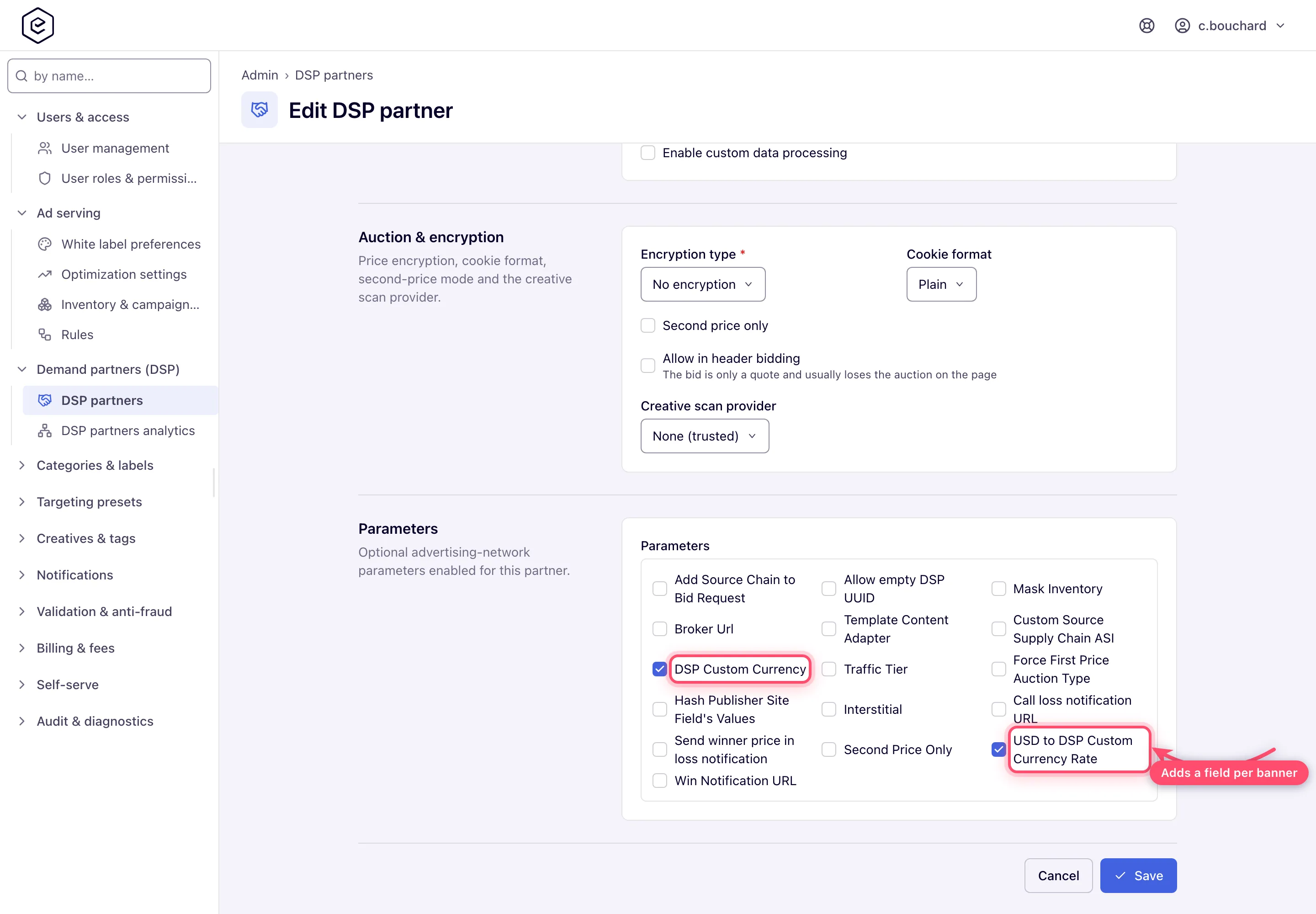
Every parameter ticked here becomes a field on each OpenRTB banner that points at this partner; the value lives on the banner, not here. Parameters marked value required below block the banner’s save until they are filled.
| Parameter | Value required | What it is for |
|---|---|---|
| Send supply chain (banner override) | no (empty) | Banner override of the partner’s Send supply chain: As the DSP partner (empty), On or Off. Banners saved before this setting existed follow the partner. The classic banner page offers the same three choices. |
| Allow empty DSP UUID | no (default off) | Lets the request go out without a matched buyer ID. |
| Broker Url | yes | Broker endpoint used instead of the plain bid URL. |
| Call loss notification URL | no (default off) | Calls the partner’s lurl when its bid loses. |
| Seller domain override (asi, banner override) | no | Banner override of the seller domain this partner’s supply chain names. Empty: the partner’s Seller domain override, else the White Label Seller domain. A different domain makes buyers look for the site in that domain’s sellers.json — the form warns. See Supply chain and sellers.json. |
| Force First Price Auction Type | no (default on) | Clears at first price for this creative. |
| Hash Publisher Site Field’s Values | no (default off) | Hashes publisher/site identifiers in the request. |
| Interstitial | no (default off) | Marks the impression as interstitial. |
| Mask Inventory | no (default Selected) | Masks inventory identifiers. |
| Second Price Only | no (default off) | Per-banner equivalent of the partner-level flag. |
| Send winner price in loss notification | no (default off) | Includes the winning price in the lurl call. |
| Template Content Adapter | no | Content-adapter template applied to the response. |
| Traffic Tier | no (default Mixed) | Routes the creative by traffic quality instead of describing it to the partner: Mixed (all traffic) takes everything, Verified (non-proxy) is dropped from the auction for a request with a proxy/VPN signal or a browser time zone that disagrees with the IP country, and Unverified (proxy only) is dropped for every request that looks verified. |
| Win Notification URL | yes | The partner’s nurl, used when its bid carries none. Sent only to an http(s) URL on a public address. |
The creative-level DSP Custom Currency and USD to DSP Custom Currency Rate parameters of earlier releases were removed in release 155: a creative no longer carries a currency or a rate, and a partner with no Currency set is quoted in USD.
The partners grid
The list shows Name, Status, Type, URL, Pricing model, Timeout, QPS, Max QPS and Protocol ver.. Name, URL, Timeout, QPS and Max QPS are sortable; the other columns are not.
QPS and Max QPS are different things. Max QPS is the cap you set. QPS is measured — the ad servers write their observed requests-per-second back to the partner row about once a minute, for the whole network. It is read-only and appears nowhere on the edit form.
Toolbar: a by name… search, Add, Edit, Force sync, SSP bidding optimization, and, on the right, Delete and refresh. The grid selects one partner at a time (ticking another moves the tick), and Edit, Delete and Force sync act on that one. Force sync runs an out-of-band analytics pull for the selected partner instead of waiting for the scheduled cycle; it is enabled only when that partner has analytics sync on, and it blocks until the pull finishes (about half a minute with Money synced, longer when the partner throttles requests), then reports that the analytics sync was triggered and the rows were updated.
Who can pick a partner: any user whose role grants OpenRTB gets every active partner on the banner form; partners are not assigned per role.
Private marketplace (PMP) deals: deal terms with a DSP partner are not set on this form — deal IDs are attached on the demand side when configuring OpenRTB banners/campaigns against the partner.
What this form does not control
Two things network administrators reasonably expect to find here are not on it, and knowing where they actually live saves a support ticket:
| Knob | Where it is set | Notes |
|---|---|---|
| Bid floor | Banner → placement → site → banner pricing → campaign pricing → site CPM threshold, first non-zero wins | There is no per-partner bid floor anywhere in the product. The resolved floor is an eCPM for the request’s country and is written onto every impression of the bid request. A country-less request gets a floor of zero. |
| Revenue share | Placement, then site (per-advertiser and per-campaign overrides beat the blanket value) | Revenue share is a publisher-side split of the gross a delivery earned. Nothing takes a margin off DSP spend as such. |
| Currency | The Currency card of this form; USD unless set | See below. |
Currency in full
The ad server accounts in USD — prices, floors, revenue and reports are dollars — and a partner
may still be quoted in its own currency: pick it in the Currency card of the partner form
(see step 6). Requests to that partner then carry cur,
imp.bidfloorcur and every PMP deal’s bidfloorcur in that currency, with the floors converted
at its rate.
The rate is the partner’s Contractual rate when one is entered, and otherwise a published reference rate. Every ad server fetches them itself, every three hours: the European Central Bank’s for the currencies it publishes, and Frankfurter’s only for the ones it does not (PEN, TWD, AED…). Fetching is on out of the box on every network; it needs no configuration. A currency the ECB publishes is never priced from Frankfurter, even while the ECB cannot be reached.
The rate is locked for the day: UTC day D is priced with the latest fixing dated before D, so Thursday is priced with Wednesday’s ECB fixing from its first minute to its last, on every server, and the rate behind any day’s spend can be looked up in the ECB’s published history. A rate stays in use for seven days from its own date, so a weekend, Easter or a provider outage changes nothing; each server keeps its last rates on disk, so a restart while a provider is down does not lose them either. A server starting with nothing on disk calls both sources at once and waits a few seconds at most before it starts serving; until its first answer arrives it holds no fetched rate, so a partner that needs one is not asked.
A bid that comes back is priced by the currency its response names:
- no
cur— the currency the request asked for; USD— taken as dollars, unconverted, even from a partner asked in its own currency;- the partner’s currency — converted to USD at the rate the request was quoted at, its contractual rate when it has one;
- any other currency the server holds a rate for — converted to USD at that day’s rate,
whether the partner has a Currency of its own or none. A partner asked in USD, with no
floor, that bids 1 EUR has the euro converted at the day’s ECB rate, and the bid is treated
like any other. Because the partner was quoted its floor in another currency, each such
response is counted, raises the
DspBidsInOtherCurrencywarning, and a WARN a minute names the partner and the currency. If the partner always bids in that currency, set it as its Currency, so its floors go out in it too; - a currency no rate is held for — none published, or the last one more than seven days old — or something that is not a currency at all: refused as an invalid response and counted as an unpriced amount. It is never read as dollars.
Once in USD, every bid is held against the floor in USD: a bid worth less than the floor once converted loses, and a second-price win never clears below it.
Win and loss notices answer in the currency of the bid. ${AUCTION_PRICE} is the clearing
price converted back at the rate that priced the bid, so a first-price win reads exactly what
was bid; ${AUCTION_CURRENCY} names that currency; ${AUCTION_MBR} divides one by the other in
the same units.
When no rate can be had — the currency has none fetched and the partner no contractual rate, or
the fetched rate is more than seven days old — the partner is not asked at all, because
neither its floor nor its bid could be priced. Every such request is counted and alerted on — an
ERROR in the log once a minute per cause, and the adserver_currency_unpriced_amounts_total
counter behind a Prometheus alert. The form refuses to set a currency without a rate, or to
switch such a partner on, for the same reason.
Corner case — what pages and what does not. Only our own breakage pages: a rate that went stale or is unreadable (
stale_rate,bad_rate) on any path, and a DSP partner whose currency has no rate (no_rateon a DSP request). A publisher’s header-bidding floor or fill in a real currency that no provider publishes raisesHbCurrencyWithoutRate, a warning for account managers to follow up in working hours, and is logged as a WARN rather than an ERROR. A code that is not an ISO 4217 currency at all is counted under oneinvalidbucket per path, with one WARN a minute and without repeating what was sent, because anyone can put anything in a header-bidding floor or fill beacon. A DSP partner that bids in a real currency no rate is held for (no_rateon a DSP response), or in something that is not a currency, raises theCurrencyRefusedFromPartnerwarning: those bids are refused. A bid in a currency that does have a rate is never refused for itscur; when that is not the currency the request asked for, it raises theDspBidsInOtherCurrencywarning instead.
The rates a server holds, where each came from, how old it is and how its last calls to the ECB
and Frankfurter went are a read-only JSON answer at /admin/currency-rates.do, for an admin who
may manage DSP partners. Its fetchEnabled says whether that server fetches at all, and
fetchOffReason says why not. Every server fetches — production, staging, dev and QA alike; only
an automated test run never calls the providers. A server with fetching switched off
(fetchEnabled in currency-rates-config) says so in one INFO line at startup, its rates age
out from the snapshot it last wrote, and the partner’s Currency card says that rate fetching
is disabled on this server.
Corner case — a server that cannot reach the providers. A server with no outbound HTTPS to
www.ecb.europa.euandapi.frankfurter.devstill reportsfetchEnabled: true, but behaves as if fetching were off: it prices with contractual rates and whatever its snapshot holds, and every other currency is marked No fetched rate. Each provider’s first failure is one WARN in the log; it is retried after a minute, then two, four and so on up to every three hours, and the next failures are logged at DEBUG until it answers again.lastErrorundersourcesin/admin/currency-rates.doshows why the last call failed.
The currency is the partner’s alone. The creative-level DSP Custom Currency and USD to DSP Custom Currency Rate parameters of earlier releases were removed in release 155: a creative no longer carries a currency or a rate, and a partner with no Currency set is quoted in USD.
Corner cases and gotchas
Note: Save refuses a partner without a Name or without a URL and marks the empty field — a partner with no bid endpoint would be offered on every OpenRTB banner and never bid. Existing partners without a name or URL still load; fill both in when you next edit one.
Corner case: ticking a parameter changes every banner that already points at this partner, not just new ones. Turning on Win Notification URL or Broker Url — the two that require a value — makes each of those banners fail validation on its next save until someone fills the new field in. Agree the parameter set before creatives are built, or expect to revisit them.
Corner case: Require a competing DSP does not make the partner pay second price. It removes the partner from any auction where its banner would be the only DSP candidate — an opt-out of no-competition auctions. What actually clears at second price is a per-banner setting plus the Force First Price Auction Type parameter. Ticking this expecting a pricing change gets you less delivery and the same prices.
Corner case: Encryption type → Base 64 encodes the cleared price with the URL-safe Base64 alphabet (
-and_instead of+and/, with=padding), so1.25arrives asMS4yNQ==. Unlike Blowfish it applies only where the partner asks for it with${AUCTION_PRICE:B64}; a bare${AUCTION_PRICE}still receives the plain price.
Corner case: Cookie format is stored on the partner but is not what decides how the sync cookie is decoded into
buyeruid. The partner’s User sync URL stores the user ID exactly as the partner’s macro sends it, and that value is passed on as it is; only a cookie that carries its own format marker (|BASE64) is decoded, by that marker. Changing this dropdown will not fix a partner whose buyer IDs come through garbled.
Corner case: the user-sync cookie name and URL are derived from the shortname. Changing the shortname later silently changes both — any sync pixel the partner already deployed keeps writing the old cookie and matching stops.
Corner case: selecting a creative scan provider only takes effect if that provider is set up for your network (a server-side setting Epom support manages). Unconfigured providers are visible but disabled in the dropdown, and a save that names one anyway is refused (creativeScanProvider: This scan provider is not configured …) rather than stored — so the form cannot point a partner at a dead scanner. A partner whose provider was set up when it was chosen and later stopped being set up keeps the setting; scanning for that partner then stops altogether.
Corner case: Gzip bid request is a one-way agreement — the ad server does not fall back to an uncompressed body if the bidder rejects the compressed one. A partner that answers with 400s or stops bidding right after you tick it does not support gzipped requests; untick it. Response decompression is separate and always on for every partner, so leaving the flag off costs nothing on the response side.
Corner case: Timeout is also a round budget, not only a per-call allowance. The value is sent to the partner as
tmaxminus the time already spent in this auction round, and a partner whose turn comes with 10 ms or less left is skipped without a request. The ad server then waits up to the partner’s full Timeout, counted from the moment it sends, for the answer; a reply that misses it is counted as a timeout and cannot win. A separate, non-configurable one-second connect timeout caps any partner timeout above 1000 ms whenever the connection is cold.
Corner case: on a header-bidding bid the round also ends with the bid’s own time budget — the caller’s
tmax, capped at the ad server’s header-bidding default and less a reserve kept for the round trip. Thetmaxsent to the partner and the wait for its answer are both cut to what is left of that budget, never lengthened by it, so a partner whose Timeout outlasts the page’s auction is skipped or counted as a timeout instead of holding the bid back. Ordinary ad requests keep the full Timeout.
Corner case: Max QPS = 0 is not “no limit” — it blocks the partner completely, and the grid says Blocked. Leave the field empty for unlimited.
Corner case: a CPC partner earns on clicks, but a bid response links straight to the partner’s own click tracker, so by default the ad server never sees the click — clicks stay at zero and no revenue is recorded for the impressions served. Wrap click-through is what closes that gap. Leave it off for CPM and CPI partners, where the impression is the billable event and the setting changes nothing.
Corner case: Wrap click-through only rewrites quoted
hreflinks on<a>tags in HTML banner markup. Native creatives and VASTClickThroughnodes are never wrapped at all, so a CPC partner delivering native or video records no clicks whatever this setting says. Within HTML it also cannot reach links built by JavaScript, links inside a third-party iframe, unquotedhref=, or relative URLs. When nothing matches, the reason is recorded in the troubleshooting log for the request and the impression still serves.
Corner case: unticking every entry in a multi-select (Parameters, analytics sides/metrics) is saved as an empty set — it does not fall back to the previous selection.
Corner case: the Analytics sync card exists only while the partner type is Epom WL DSP. Switching the type away hides the card, and its settings are not sent on save; the server also drops any stored sync parameters that do not belong to the new type.
Corner case: the Report API URL carries the partner’s key, so this edit card is the only place it is shown. The partner list and banners leave it out, and the Actions Log shows it as
***.
Corner case: with Money synced, the sync matches a day’s gross to the total the partner’s report gives for the whole day, not to the sum of its per-country rows. The partner rounds spend to cents in every country row, so countries with a handful of impressions report 0.00. The sync gives the missing cents back to the rows they were rounded away from, keeping each row within half a cent of what the partner reported. It does this only when both answers count the same impressions. Otherwise, for example while today’s traffic is still arriving, or when the report carries rows with impressions that are not tagged with one of your placements, the rows are written exactly as reported. Rows the sync cannot attach to one of your placements and creatives, such as untagged rows or rows for a deleted placement or creative, are never written, so the day can stay below the partner’s total.
Corner case: the delete confirmation only names the partner when live banners are attached. With no linked active banners it reads a bare Delete record? — make sure the right row is selected before confirming.
Corner case: Active does not reach ad serving instantly. The ad servers reload partner settings about every ten minutes, so allow that long before delivery actually stops or resumes, and note that requests already in flight are never cancelled.
Corner case: deleting the partner itself breaks the revenue link in analytics. Deletion clears the endpoint reference from every creative that pointed at it, so the partner’s past Impressions and Revenue fall out of the analytics grid while its Requests, Bids and Wins stay behind under
id(Deleted). Invoice a partner before you delete it, or deactivate instead — Active off stops delivery and keeps the whole history.
Per-role notes
- Administrators see a sidebar link per page only with that page’s own Admin UI permission; a role holding just DSP Partners does not get the analytics page.
- Network managers have no RTB tab until an administrator grants at least one RTB Management permission. The tab and each of its three sub-tabs — DSP partners, DSP partners analytics, DSP creative scan — are granted separately, ship disabled for every role, and open only when set to Enabled (Read-only opens nothing).
- Analytics-only users read the funnel but cannot change a partner.
- Advertisers never see this page; they pick from active partners when building OpenRTB banners.
- SSP bidding optimization can be changed by anyone who can edit DSP partners — admin or account-side — and by the admin Optimization Settings permission.
