
Low-budget alerts
Email, digest or in-app notice when an advertiser's total budget is nearly spent — which event fires, when and for whom, the three-step template, and why a digest is usually the better choice.
What it is and why
An advertiser with a Total budget on its Limits card stops serving the moment the budget is spent, and nobody is told in advance. The built-in event Advertiser has less than $50 at the balance fires while the money left is at or below a threshold, so the people who manage that advertiser can top up or re-plan before delivery stops. Nothing is sent until a template listens to the event.
Example. Summit Ridge Digital has a total budget of $5,000 and has spent $4,962. The next time statistics are written for one of its campaigns, the remainder ($38) is under the $50 threshold, the event fires, and every active user the advertiser is shared with receives the mail you bound to it — and receives it again on the next statistics write while the balance stays low.
Typical scenarios
| You want | Set | Where |
|---|---|---|
| The advertiser’s owner gets one mail the first time the balance drops under $50 — and is fine with repeats | An email template on the event, To ${user.email}, roles unticked | Email notification templates |
| One summary a day instead of a mail per statistics write | A scheduled event 1 per Day, start 0d 9h 0m, plus a scheduled notification template on the event with the roles ticked | Scheduled events, then Scheduled notification templates |
| Only your own network managers are warned, not the advertiser’s users | The same template with only the manager role ticked under Roles | Email notification templates |
| A red notice on the dashboard, no mail | A UI notification template on the event, Display on dashboard on, type Alert | UI notification templates |
Step by step
-
Give the advertiser a Total budget: Account → Advertisers → advertiser → Limits, Budget row, Total column — see Limits. A total budget of 0 means unlimited, so there is no balance to run low on and the event never fires.
-
Open Admin → Notifications → Email notification templates and click Add (or open an existing template). Type a Title and tick Active.
-
Set To to
${user.email}; write the Subject and HTML body. The event exposes the advertiser (${advertiser.name}, …) and the recipient (${user.firstName}, …) — take the exact macros from the Attributes links in the Events card.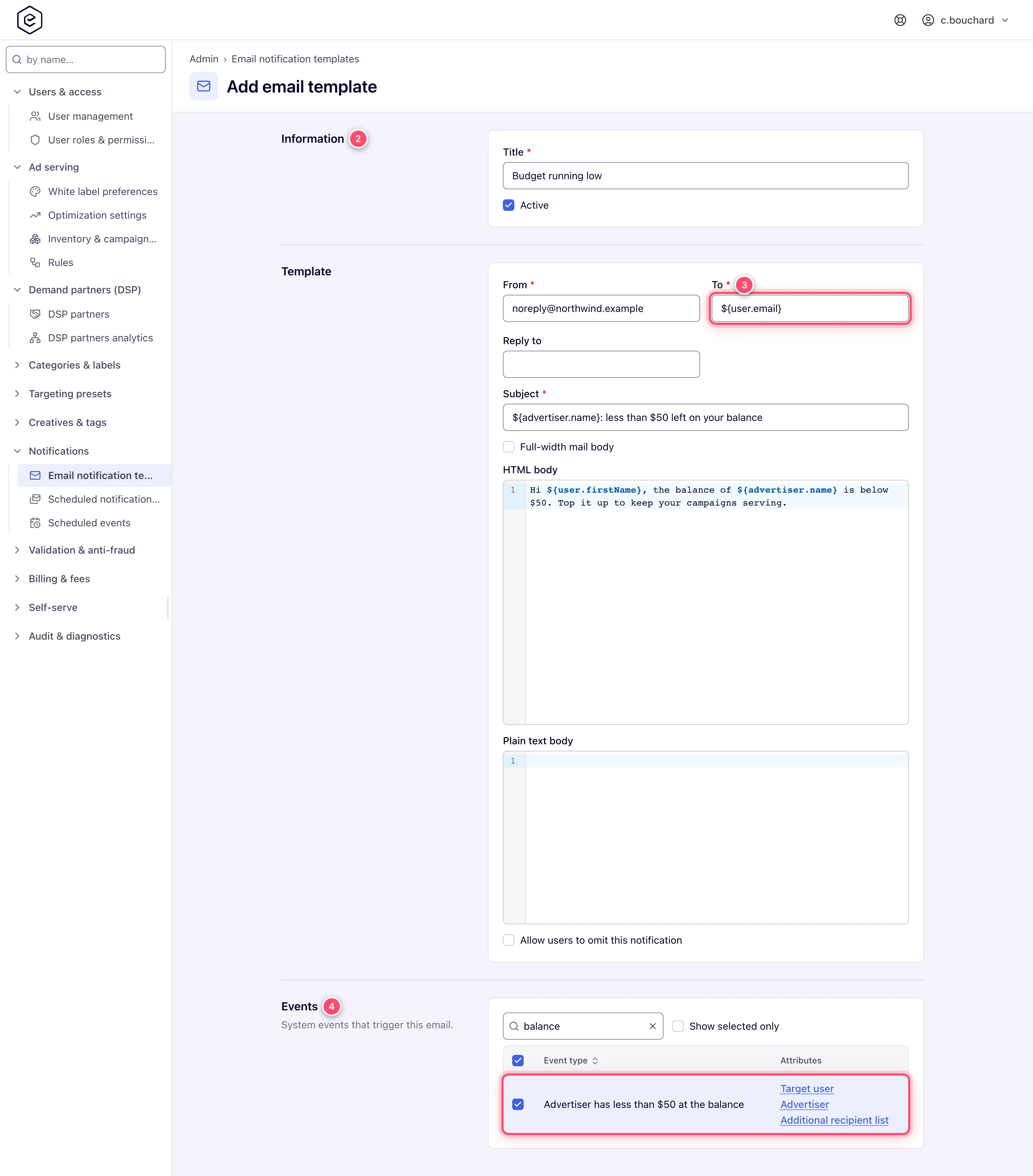
-
In Events, type balance in Filter and tick Advertiser has less than $50 at the balance. Leave Roles clear for everyone the advertiser is shared with, or tick the roles that should hear. Click Save.
Caveats and exceptions
- When it fires. The check runs each time new statistics for one of the advertiser’s campaigns are written: total budget minus what has been spent against it is at or below the threshold. It is not a once-a-day message — while the remainder stays under the threshold and the advertiser keeps delivering, every statistics write raises it again. Campaign and banner budgets do not trigger it; only the advertiser’s Total budget does. A daily or monthly advertiser budget does not either.
- Who gets it. Every active user the advertiser is shared with as Is Owner, Can Edit or Can View, each with their own copy of the mail. Template Roles narrow that further, as for any event.
- The threshold is a server-side setting, 50 by default; the event name shows the current value. Ask Epom support or your account manager to change it — there is no admin page for it.
- Because the event repeats, a Scheduled notification template (digest) on the same event gives each user one summary per period rather than a mail per check; a UI notification template gives an in-app notice instead. On a digest, remember to tick Roles — no roles ticked means nobody.
- The Target user’s macro root is
user, nottargetUser:${user.email}, not${targetUser.email}. A wrong root is mailed as literal text.
Not working?
| Symptom | Check | Where |
|---|---|---|
| Never fires | The advertiser has a Total budget above 0 (daily and monthly budgets do not count); the advertiser is still delivering — the check runs only when statistics are written | Account → Advertisers → advertiser → Limits, Budget row |
| Fires but no mail | A template is bound to the event and Active; on a digest, roles are ticked | Email / Scheduled notification templates → Events, Roles |
| Some users get it, others do not | The user is active and shared on the advertiser; their role is ticked (or none is); their address is not on the unsubscribe list and, for optional mail, their Receive notifications by email switch is on | The advertiser’s Shares; the template’s Roles; Email unsubscribe list |
| Too many mails | Expected on a plain email template; switch to a digest | Scheduled notification templates |
${targetUser.email} appears in the mail | Wrong macro root; use ${user.email} | The template’s To and body |
Everything else that can keep a mail from arriving is in Notifications & outbound mail — Not working?.
Reference
| Item | Value |
|---|---|
| Event | Advertiser has less than $50 at the balance (the amount shows the network’s threshold) |
| Attributes | Affected advertiser (${advertiser.…}), Target user (${user.…}) |
| Fires when | total budget − spent ≤ threshold, on each statistics write for the advertiser’s campaigns |
| Recipients | Active users shared on the advertiser (Is Owner / Can Edit / Can View), narrowed by template Roles |
| Threshold | Server-side setting, default 50 |
| Digestable | Yes — it carries a Target user and names an advertiser |
