
Cap volume, auto-deactivate and test the loop
Put guardrails on a CPA campaign — per-action daily and total caps, the campaign Limits, the no-conversions kill-switch that stops a dead landing page from burning traffic — and test the whole loop with one conversion before going live.
What it is and why
Performance pricing is only safe with a ceiling on it. Three controls on the campaign give you one: a per-action limit that stops the campaign after the agreed number of conversions, the Limits card for budget and overall conversion caps, and CPA Campaign Auto Deactivation, which switches the campaign off by itself when impressions keep coming and conversions do not. Then one test conversion proves the loop before real traffic does. This is the second stage of Run a CPA offer with affiliate postbacks.
Example. A Per conversion action limit of 300 a day on Install drops the whole campaign out of the auction after install 300; No conversions period, hours = 24 switches it off if the postback dies overnight, and No conversions traffic, ad impressions = 50,000 does the same for a landing page that stopped converting.
Typical scenarios
| You want | Set | Where |
|---|---|---|
| $4.00 per install, 7 days after the click, views not credited | action: Post-click window 7 Days, Post-view window 0; Pricing Global 4.00; campaign Pricing CPA + Use general pricing | Conversion Actions; campaign → Pricing |
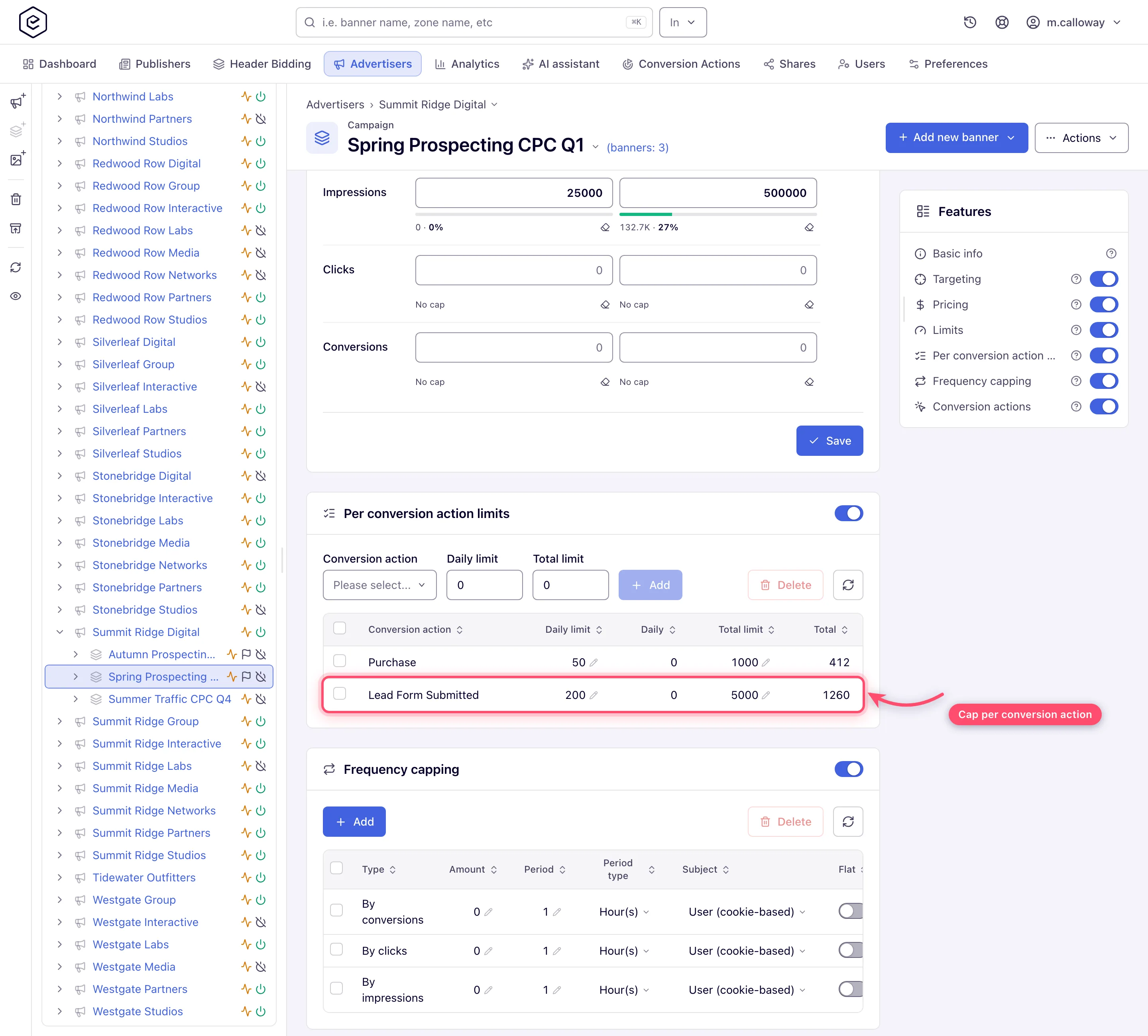
| Not more than 300 installs a day, then stop the campaign | Per conversion action limits: Daily 300 on Install | campaign → Per conversion action limits |
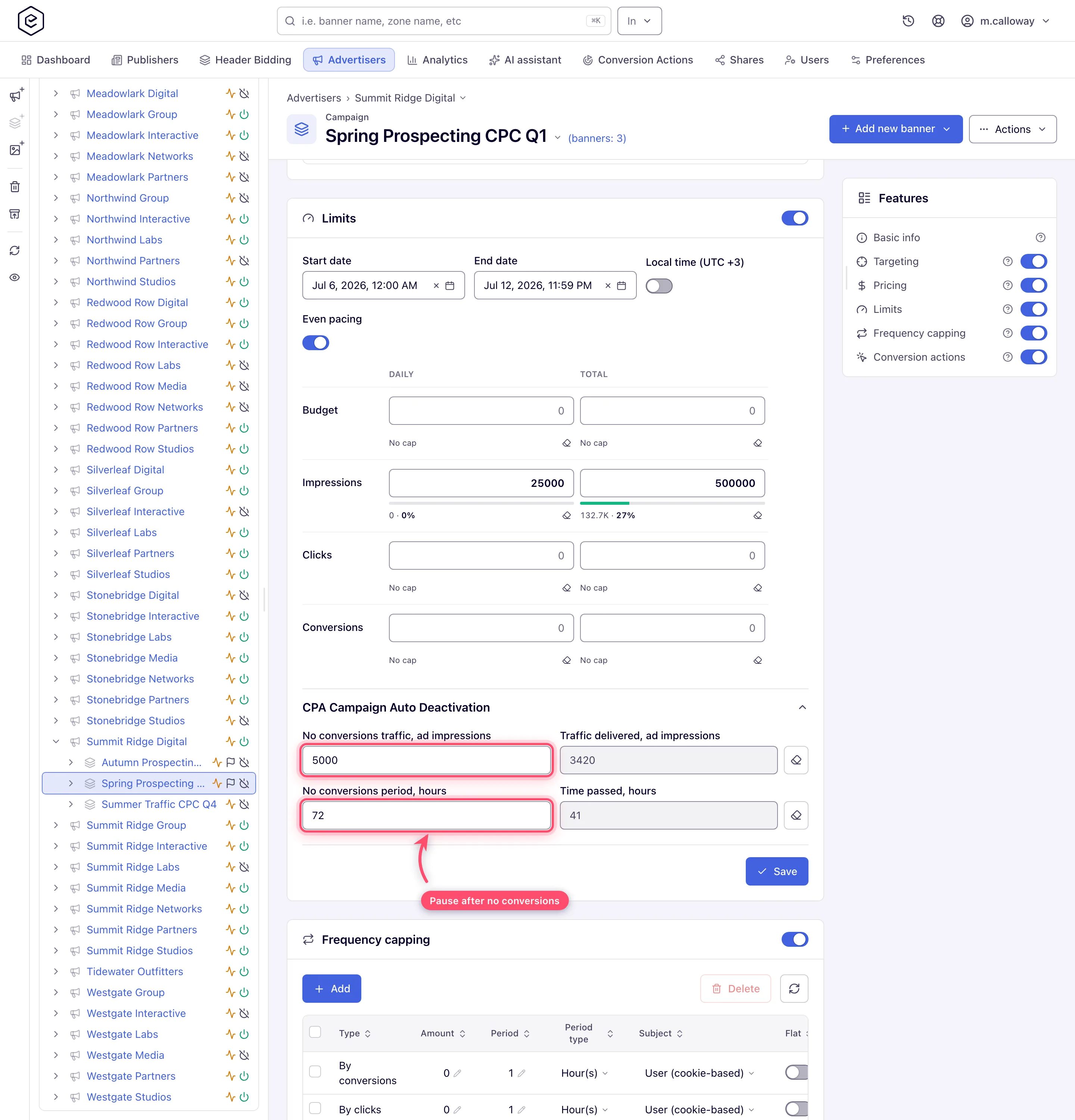
| A dead landing page switches the campaign off by itself | CPA Campaign Auto Deactivation: No conversions traffic, ad impressions 50,000 and/or No conversions period, hours 24 | campaign → Limits |
Step by step
Both cards sit on the campaign; Per conversion action limits and CPA Campaign Auto Deactivation are off for every role out of the box, so ask your network manager if a card is missing.
-
Put guardrails on volume and spend.
-
Per conversion action limits (campaign card): daily and total conversion caps for this specific action. When either cap fills, the whole campaign drops out of the auction, not just that action’s traffic (Per-action limits).
-
Limits card: Daily budget, Total budget, Daily conversions limit and Total conversions limit for the campaign as a whole (Limits).
-
CPA Campaign Auto Deactivation (collapsed subsection of the Limits card; CPA Banner Auto Deactivation on a banner): set No conversions traffic, ad impressions and/or No conversions period, hours — if the campaign delivers that many impressions, or that many hours pass, without a single conversion, it deactivates itself. This is the kill-switch for a broken landing page or a dead postback.
-
-
Test the loop before going live. Click your own ad, complete the funnel, fire the postback with the captured Sub ID, then check: the action’s Activity badge turns Live, and the Conversions Log report shows the event row. If you changed the action’s Default attribution type, the S2S window checkbox or a window value just before testing, give it a cache reload first — the ad servers pick action settings up on a schedule, every 10 minutes on a standard network, so a postback fired straight after the save is still classified by the old values. Testing traps are listed in Get the pixel and S2S tracking code.
Caveats and exceptions
Duplicates and validation
- Your test conversions can silently vanish. A second conversion from the same IP inside the Duplicate conversion window (per IP) (or one caught by S2S validation) is dropped without an error. When a test does not show up, wait out the window or test from another network before debugging the integration.
- Duplicate conversion window (per IP), minutes (and the per origin IP one) swallow accidental duplicates from the same address. The fields show only if your role may set them, and they do nothing while the network’s Conversion per IP time frame validation setting is off (it is on by default) — ask your network manager.
Limits and the kill-switch
- Auto-deactivation does not check the pricing type. Despite the “CPA” label, the no-conversions kill-switch fires for any campaign it is configured on. Never copy it onto a branding campaign that legitimately records no conversions.
- Per-action limits have no reset button. Unlike the main Limits card’s counter erasers, the counters on a filled per-action limit clear only when you delete the row (re-add it if you still want the cap); raising the limit helps only if the new figure is above the count already accumulated. A filled total cap also switches the campaign off, so switch it back on by hand.
- A total cap on the Limits card that fills also switches the campaign’s Active switch off, and it stays off after you raise the cap.
The caveats that apply to the whole offer — the roles — are on Run a CPA offer with affiliate postbacks.
Not working?
The campaign stopped, or your test conversion never showed up? The likely causes:
| Symptom | Likely cause | Check |
|---|---|---|
| The test conversion never appears | Dropped as a duplicate from the same IP (or by S2S validation); or Detailed conversion log is off so no row exists | Wait out the Duplicate conversion window, test from another network; action → Detailed conversion log |
| Postbacks are classified by old windows / the old default right after a save | Ad servers reload action settings every 10 minutes | Wait 10 minutes, then retest |
| The whole campaign stopped after one action’s cap filled | Expected: a filled per-action cap drops the campaign out of the auction | campaign → Per conversion action limits; delete and re-add the row to reset |
| Raised the per-action limit, the campaign still does not serve | The new figure is below the accumulated count, or the filled total cap switched the campaign off | Delete and re-add the row; campaign Active switch |
| A branding campaign switched itself off | CPA auto-deactivation was copied onto it; it fires for any campaign | campaign → Limits → CPA Campaign Auto Deactivation |
Role and permission symptoms, and the other stages, are on Run a CPA offer with affiliate postbacks.
Reference
Every row, column and reset rule of the two cards: Limit conversions per action and Set volume limits and budgets; the testing traps: Get the pixel and S2S tracking code.
