
Video requirement presets
Keep the publisher video specs (Hulu, Roku, Netflix … and your own) that a site's video creative requirements are filled from — add one by hand or read it from a PDF, link or pasted text with Fill from document, push a corrected spec to every site that uses it, and retire one without losing the sites' requirements.
A video requirement preset is a publisher’s video spec — resolutions and bitrates, duration, frame rate, container, codecs, audio, file size, loudness — kept once under Admin → Creatives & tags → Video requirement presets so that a network manager fills a site’s Video creative requirements card from it with Use a publisher spec instead of typing thirty values. The network starts with the major streaming publishers’ published specs — Hulu, Disney+, Peacock / NBCUniversal, Amazon, Roku, Paramount+, HBO Max, FOX, Netflix, Samsung Ads and the rest — and they are yours to correct, duplicate, retire or delete, exactly like the specs you add.
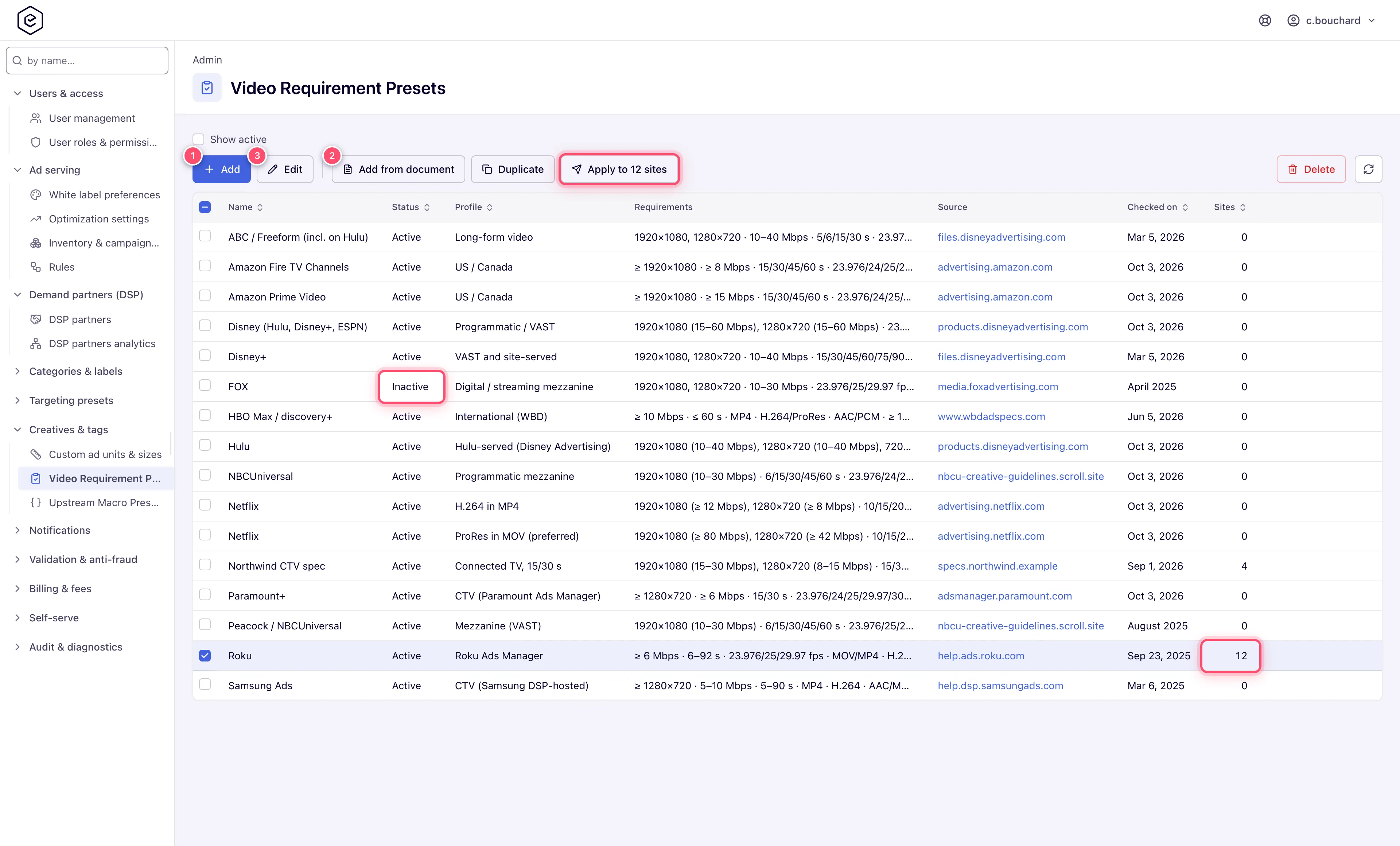
Example. Roku revises its spec and now wants 1920×1080 at 15–30 Mbps where the preset said 10–20. You edit the Roku preset, change the bitrate row and Save; the 12 sites filled from it now show Differs from the spec. Apply to 12 sites pushes the new values to all of them in one go, their marks clear, and the ad servers check the next creative against the new bitrate within seconds.
Typical scenarios
| You want | Do | Where |
|---|---|---|
| A publisher’s new spec in the list without typing it | Add from document, give it the PDF (up to 20 MB), the spec page link, or the pasted text, press Read, check, Save | List toolbar |
| One publisher’s three delivery profiles as three specs | Add from document on a PDF that describes them, tick the profiles; each Save stores one (Profile 2 of 3) | List toolbar |
| A spec that differs a little from a shipped one | Tick the shipped row → Duplicate → edit the copy ”… (copy)“ | List toolbar |
| A corrected spec on every site that uses it | Edit, Save, then Apply to N sites | Edit form or list toolbar |
| A spec nobody should pick any more, without touching its sites | Untick Active; the sites keep their requirements and still name it (Inactive) | Edit form |
Step by step
-
Open Admin → Creatives & tags → Video requirement presets. The grid shows each spec’s name and profile, its requirements, its source page, the date it was checked, its Status (Active or Inactive) and Sites — how many sites were filled from it. Show active hides the inactive ones.
-
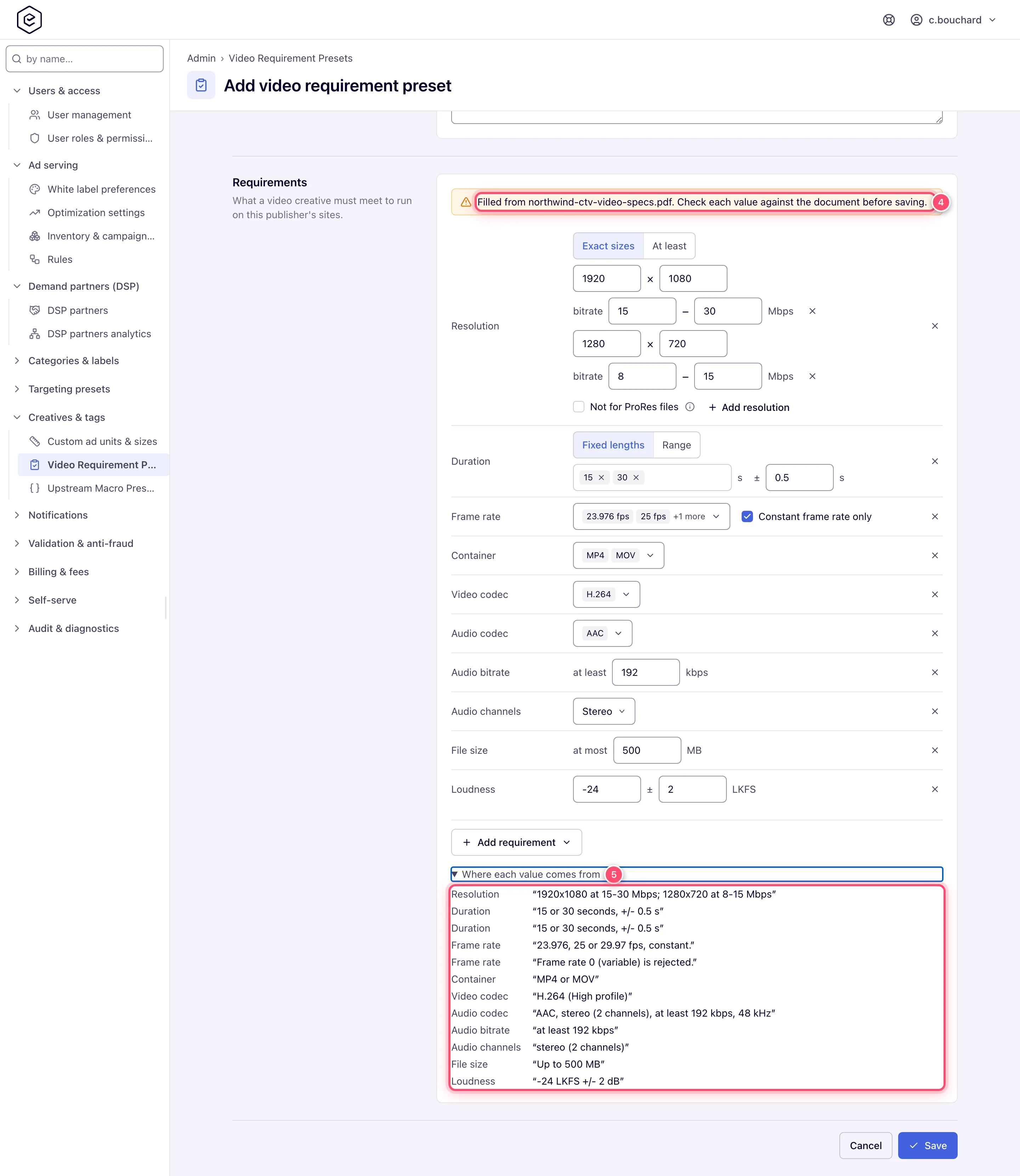
Click Add and fill in Name, Profile, Source, Checked on, Notes and at least one Requirements row (see Reference) — or let the document do it: press Fill from document, give the spec as a File, a Link or pasted Text, and press Read. The form fills; Where each value comes from quotes the passage behind each value and Read but not filled lists what a spec cannot hold. Nothing is saved yet — check the values.
-
Save. A value the server refuses is named under the field or the requirement row it belongs to. The spec is now offered under Use a publisher spec on every site’s video requirements card.
-
When a spec changes, edit it, Save, then click Apply to N sites (in the edit form, or in the toolbar for the ticked row). It asks first, naming how many sites it replaces, and reports how many were updated.
-
To duplicate a spec, tick its row and click Duplicate: a copy named ”… (copy)” opens for editing. To retire one, untick Active; to delete one, tick it and click Delete — it warns first when sites were filled from it.
Caveats and exceptions
- Who can do this. An admin role with the Video Requirement Presets Admin UI permission; release 153 gives it to every role that holds Custom Ad Units & Sizes. Network managers with the Video Creative Requirements permission do not manage presets but read the list — it is what Use a publisher spec offers them.
- A site keeps its own copy. Saving a preset changes no site: the sites filled from it show Differs from the spec until the spec is applied to them again. The edit form says how many sites that is. The ad servers never read this list — only the sites’ requirements.
- Apply to N sites pushes the saved spec. It is offered while at least one of the sites filled from the spec no longer matches it; in the edit form it is greyed out while the form holds unsaved changes — Save first, then apply. Each site gets what Use a publisher spec would give it — including over changes made on the site itself — and keeps its on/off switch. It reaches every site filled from the spec, whichever account owns it: the specs are an admin-panel tool, so it does not ask for access to each site the way applying the spec on a site does. The sites’ Differs from the spec marks clear, and the ad servers pick up the new requirements within seconds.
- Inactive, not gone. An inactive spec stays in this list, editable, and can be ticked again; sites already filled from it keep their requirements, are still checked against them and still name it (marked Inactive), and Apply to N sites still works for them. A new spec and a duplicate start active.
- Deleting a spec that sites were filled from asks first, naming how many. Confirmed, the spec is deleted and those sites keep their requirements and are still checked against them; they only stop naming the spec they came from. A spec the network started with does not come back once deleted.
- The list is per network. An edit to one of the specs the network started with is yours alone; it does not reach other networks.
- Fill from document reads once and saves nothing. An AI model reads the document and fills the requirements, the publisher’s name on a new spec (an existing one keeps its name), the profile, the date the document carries, the link it was read from as Source, and Notes for what the requirements cannot express. A document that describes several delivery profiles (site-served and VAST, mezzanine and programmatic) asks which one to fill; up to 10 are offered, and a document with more says how many it has. To make a spec of each profile, use Add from document on the list instead: tick the profiles you want and the form opens filled with the first; each Save stores it as a new spec and fills the form with the next, without reading the document again (Profile 2 of 3 above the requirements says where you are; Cancel drops the rest). Read but not filled lists what the model answered that a spec cannot hold — a codec outside the list, a frame rate of 0 — with the reason, in your language; those you set by hand or put in Notes.
- Fill from document costs AI budget. The button needs an Anthropic API key — your own, your network’s or the platform’s (see AI assistant) — and is not shown without one; each reading is billed like an AI assistant reply and counts against the same monthly allowance, and the button is greyed out once that is spent. A document the model declines to read, or one too long for one answer, is billed all the same.
- Document limits. A File is a PDF up to 20 MB, a PNG, JPEG, GIF or WEBP image up to 5 MB (a screenshot of a spec table works), or a text or HTML file up to 2 MB; a Link is downloaded up to 2 MB, from the public internet only — an internal address is refused.
Not working?
| Symptom | Likely cause | Check |
|---|---|---|
| The page is missing, or the URL shows Record not found. | Your admin role lacks Video Requirement Presets | Users and roles |
| A site editor does not see the spec under Use a publisher spec | The spec is Inactive | Edit → Active |
| Sites show Differs from the spec after you saved it | Expected — a site keeps its own copy | Apply to N sites |
| Apply to N sites is greyed out in the edit form | Unsaved changes in the form, or no site differs | Save first |
| Fill from document is not shown | No Anthropic API key on your user, network or the platform | AI assistant |
| Fill from document is greyed out | The monthly AI allowance is spent | AI assistant limits |
| ”Too little readable text” from a link | The page builds its content in the browser, so the downloaded page is empty | Save the page as a PDF, or paste its text under Text |
| The link is refused | It points at an internal address, or the page is over 2 MB | Use the public URL or the PDF |
| The reading says the spec is too long | The model reads a document in one answer | Send only the pages with the video ad requirements, or paste that part |
| A value you expected is missing after Read | It is under Read but not filled — a codec outside the list, a frame rate of 0 | Set it by hand, or note it under Notes |
| Save is refused | The message under the field or the requirement row says which value | Fix that row; at least one requirement row is needed |
Reference
| Field | What it does |
|---|---|
| Name | The publisher, as the site card lists it. Required; up to 128 characters. |
| Profile | Which of the publisher’s delivery profiles this is, when it has several (Mezzanine, Programmatic / VAST). Shown beside the name. |
| Id | How the API and apply-preset name the spec — lower-case letters, digits and hyphens. Set it when you add a spec, or leave it empty to have it made from the name and profile; it never changes afterwards. |
| Source | The publisher’s spec page the values come from (http:// or https://). |
| Checked on | The date on the spec, or the day you checked it — YYYY-MM-DD, or YYYY-MM when the spec gives only a month. The site card shows it with the spec’s name. |
| Notes | What the spec says that the requirements cannot check, and what was left out because of it. |
| Active | Whether site editors are offered the spec under Use a publisher spec. On for a new spec and for a duplicate. |
| Requirements | The same rows as on the site card — resolutions with their bitrate ranges, duration, video bitrate, frame rate, container, codecs, audio, file size and loudness; see Options and fields. At least one. |
| Permission | Lets you |
|---|---|
| Video Requirement Presets (Admin UI) | Open the page; add, edit, duplicate, apply, deactivate and delete specs; read documents with Fill from document. |
| Video Creative Requirements (account side) | Read the active specs under Use a publisher spec on a site. |
Over the API
GET /rest-api/video-requirements/presets.do lists the specs (total, more, and usedBy per
spec), GET …/presets/{presetId}.do reads one with every field and the sites filled from it,
POST …/presets.do adds one and POST …/presets/{presetId}.do changes only the fields sent (a
sent requirements replaces the whole spec). POST …/presets/{presetId}/copy.do duplicates one,
and POST …/presets/{presetId}/delete.do deletes one — refused with 409 and usedBy while
sites were filled from it, unless force=true. POST …/presets/{presetId}/apply-to-sites.do
re-applies one to every site filled from it and answers updated, the sites changed and
notUpdated (each site left as it was, with the reason); the list rows carry sitesDiffering,
how many of a spec’s sites no longer match it. Every preset carries active;
GET …/presets.do?active=true is the list sites pick from, and {"active": false} on the update
deactivates a preset (an inactive one can still be applied by id). Invalid values come back per
field in errors.
POST /rest-api/video-requirements/preset-from-document.do reads a spec document — exactly one
of file (multipart), url or text — and answers profiles (at most 10; total is how many
the document has and more whether some were left out), each with the fields presets.do
accepts plus quotes and notApplied; it saves nothing. GET on the same path answers
available (and reason: no_key or limit) with the size limits (maxPdfMb, maxImageMb,
maxPageMb, maxTextLength); a file over the largest of them is refused before it is read.
Every change needs the Video Requirement Presets admin permission; an AI assistant connected
over MCP finds these through api_search (“publisher spec”, “video spec”, “push spec to all
sites”, “fill a preset from a pdf”) and whoami reports may.videoRequirementPresets.
Related
- Video creative requirements — the site card the specs fill
- Other admin tools — the other small admin pages
- Upstream macro presets — the other Fill-from-document tool
- AI assistant — the key and allowance Fill from document uses
