
Supply chain, sellers.json and ads.txt: setup by scenario
How a network, its publishers and its demand partners set up sellers.json, the supply chain (schain) and ads.txt so buyers accept the inventory, worked through seven common scenarios — including header-bidding partners that are not advertisers — with the exact settings, the sellers.json entry, the schain node and the ads.txt block each one produces.
Buyers check three things before they bid. First, the supply chain in the bid request names who sells the impression. Second, that seller’s sellers.json confirms the seller ID. Third, the publisher’s ads.txt says that seller may sell this site. This page shows what to set for seven common setups and what buyers then see. All domains, IDs and names below are invented examples.
Who this is for
- Network operators and managers who sell publishers’ inventory to DSPs, through header bidding, or to tag-based demand partners.
- Publishers, to understand the ads.txt block the network sends them.
- Demand partners (exchanges, SSPs, other networks) checking what the network publishes.
Prerequisites
| Permission (Admin → Admin roles & permissions) | Enabled | Read-only | Disabled (default) |
|---|---|---|---|
| Site Supply Chain (sellers.json, ads.txt / app-ads.txt) | Edit a site’s seller type, listing and confidentiality; add and remove its Additional ads.txt lines (with the right to edit the site); list sites from the grid; re-check ads.txt | See the site’s sellers.json fields, its ads.txt block, header-bidding partners and check status, and the grid columns, locked under a sellers.json & ads.txt heading marked Read-only; the seller ID stays editable | Only the seller ID in the Supply chain section, no columns; REST leaves the fields out and refuses the ads.txt endpoints |
| Advertiser ads.txt / app-ads.txt Lines (demand partners) | Paste and remove a demand partner’s ads.txt lines on its advertiser | See the lines; the subsection is marked Read-only | No Demand partner ads.txt / app-ads.txt lines subsection; REST refuses the endpoints |
Both are off for every role until an administrator grants them. The White Label settings below need access to Admin → White Label.
Steps
The one-time network setup comes first; each scenario then adds what it needs. Where a partner’s line goes depends on who the partner is:
| Partner | Where its ads.txt line goes |
|---|---|
| Sells every site of the network | White Label → ads.txt / app-ads.txt lines |
| A demand partner selling through its own tag (network or exchange tag, DSP seat), set up as an advertiser | The advertiser’s Demand partner ads.txt / app-ads.txt lines (in its Basic info) |
| Sells one site and is not an advertiser — typically a header-bidding bidder | The site’s Additional ads.txt lines |
OWNERDOMAIN= and MANAGERDOMAIN= — who owns the site and who manages its inventory | White Label → ads.txt / app-ads.txt lines only |
An ordinary advertiser that only buys campaigns has no ads.txt line: ads.txt lists the companies that sell the inventory, not those that buy it.
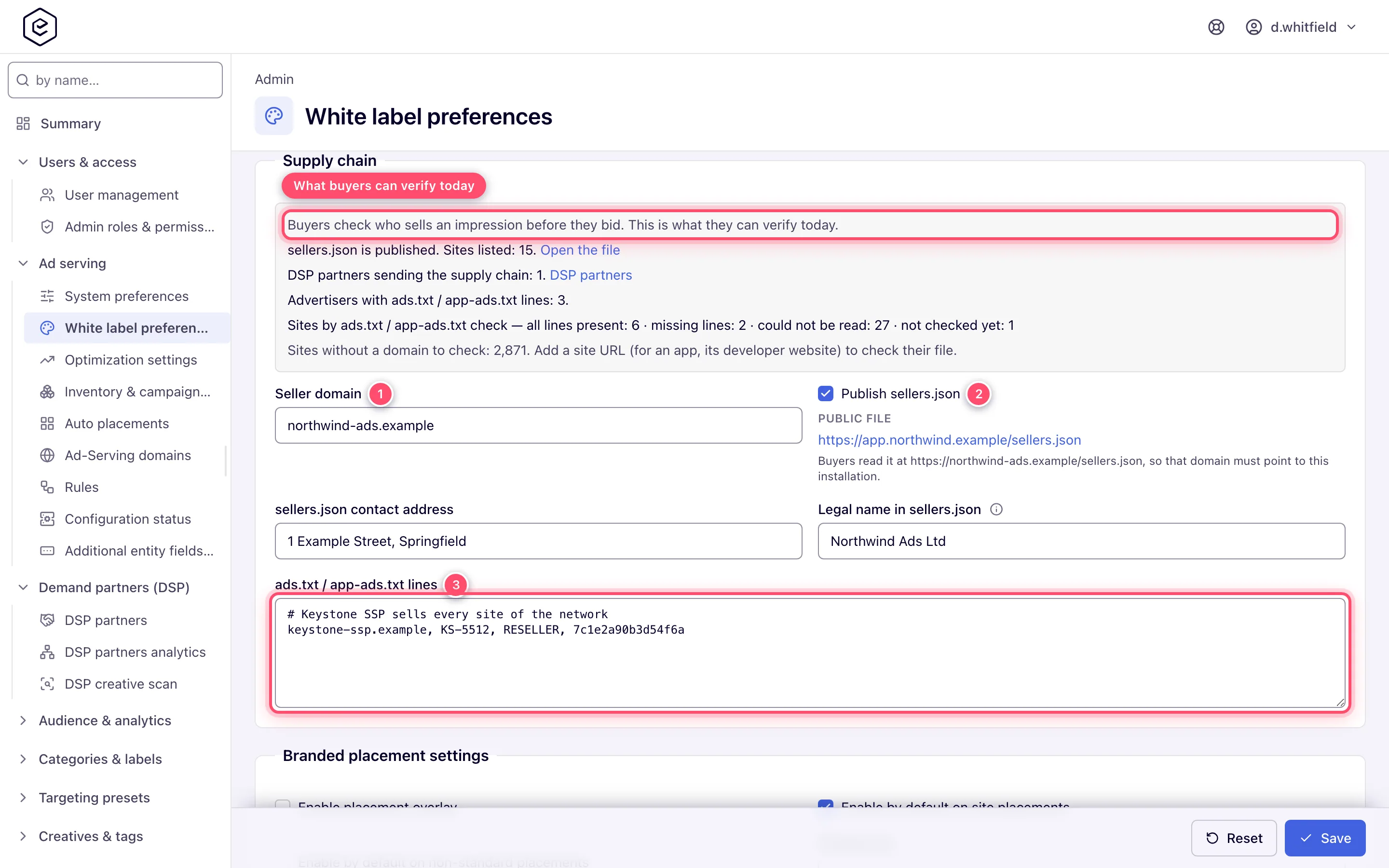
- Name the network as a seller. In Admin → White Label → Supply chain, set Seller
domain to the domain buyers know you by, for example
northwind-ads.example. Point that domain at the platform sohttps://northwind-ads.example/sellers.jsonreaches it. - Switch on Publish sellers.json and fill sellers.json contact address. The contact e-mail is the Email in Company info.
- Add network-wide ads.txt lines, if a partner sells every site you have: paste its block into
ads.txt / app-ads.txt lines on the same page. Invalid lines are refused on save, with their line numbers.
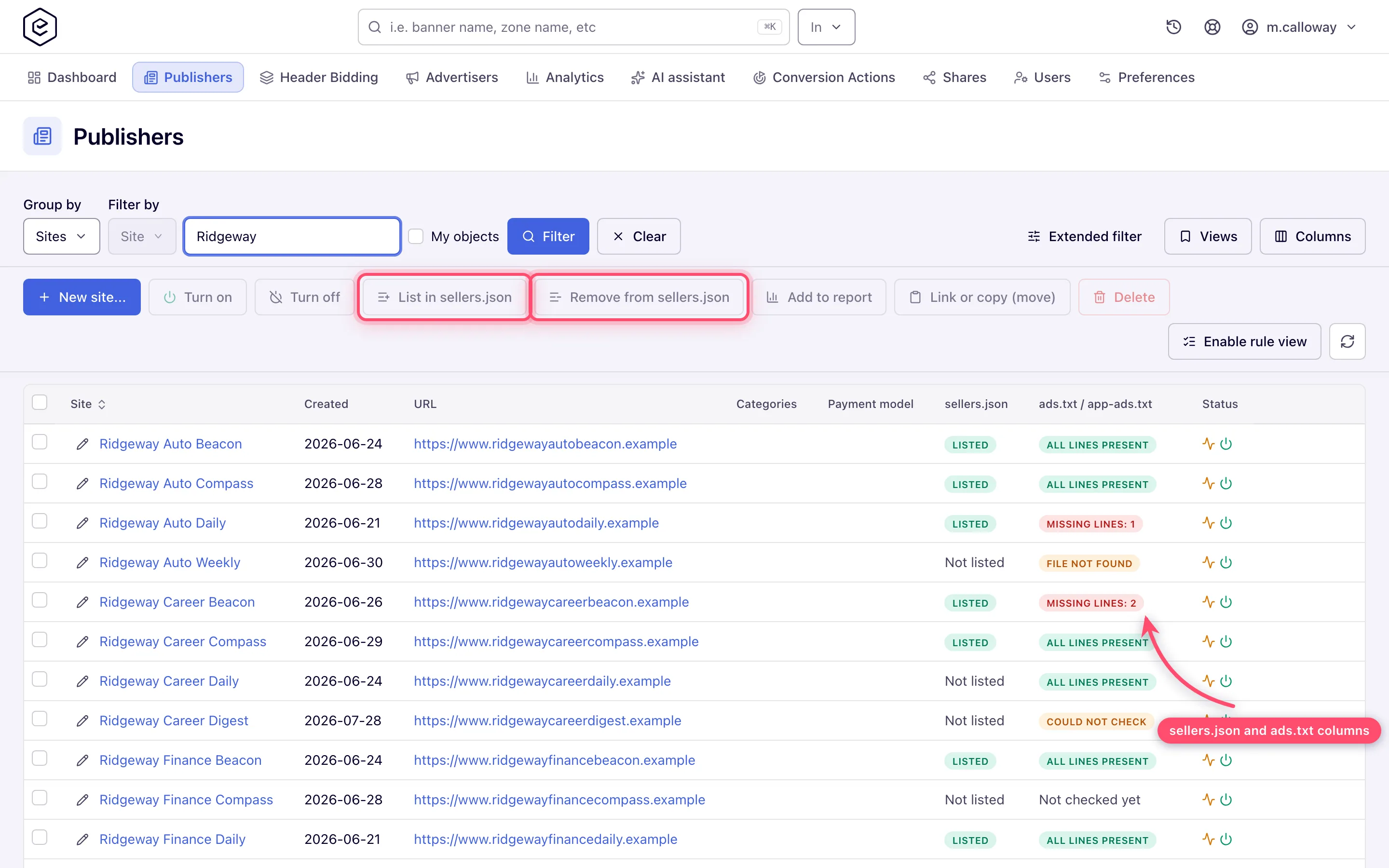
OWNERDOMAIN=andMANAGERDOMAIN=are set here and nowhere else: oneOWNERDOMAIN, and oneMANAGERDOMAINper country (MANAGERDOMAIN=northwind-ads.example, US; the one without a country is the global one). A second one is refused on save.MANAGERDOMAINopens every site’s file.OWNERDOMAINnames the site’s owner, so it opens only the files of the sites you own yourself — those nobody owns or your admin user owns, whichsellers.jsonlists under your own name; a publisher adds its own.CONTACT=andSUBDOMAIN=belong to the publisher’s own file and are refused here as well; lines saved before that are left out of every block. - Opt sites in. Turn on List in sellers.json on each site you sell, or select sites in the sites grid and press List in sellers.json.
Scenario 1: the network sells a publisher to DSPs over OpenRTB
Setup. The DSP endpoints are DSP partners; their banners run on the publisher’s placements. On the DSP partner, switch on Send supply chain (see DSP partners). On the site Sports Daily, leave Seller ID empty to use the generated ID, keep Seller type = Publisher, tick List in sellers.json.
sellers.json entry (the generated ID is an example). The name is the company of the site’s owner, the domain the root domain of the site URL:
{ "seller_id": "4831207", "is_confidential": 0, "seller_type": "PUBLISHER",
  "name": "Sports Daily Media Ltd", "domain": "sportsdaily.example" }
schain node buyers receive (source.schain on OpenRTB 2.6, source.ext.schain on 2.5). It
names the seller domain and the site’s seller ID because Publish sellers.json is on; with it
off, the node keeps the installation domain and the generated ID:
{ "ver": "1.0", "complete": 1,
  "nodes": [ { "asi": "northwind-ads.example", "sid": "4831207", "hp": 1 } ] }
ads.txt the publisher publishes at https://sportsdaily.example/ads.txt:
northwind-ads.example, 4831207, DIRECT
meridian-ssp.example, MRD-5512, RESELLER, 7c1e2a90b3d54f6a
The second line comes from the network-wide lines in step 3.
Scenario 2: header bidding
Setup. Header-bidding tags carry a supply chain only when both the White Label Seller
domain and the site’s Seller ID are filled in, because in header bidding
the buyer may pay the publisher directly. If you resell the inventory, set the site’s seller ID —
for example nw-sd-01 — and keep the site listed.
sellers.json entry: as in scenario 1, with "seller_id": "nw-sd-01".
schain in the tag (set as ortb2.source.ext.schain for Prebid):
{ "ver": "1.0", "complete": 1,
  "nodes": [ { "asi": "northwind-ads.example", "sid": "nw-sd-01", "hp": 1 } ] }
ads.txt: northwind-ads.example, nw-sd-01, DIRECT plus a line from every other bidder in the
tag. See Header bidding settings.
While the site has an active tag that carries this chain, its block asks for this pair whether or
not Publish sellers.json is on, because the tag sends it either way. If DSP partners also buy
the site, the block keeps the line their bid requests name it by as well — with sellers.json off
that is the installation domain and the generated ID; with it on, both name the same pair and one
line covers both. A site sold only through header bidding is not asked for the OpenRTB line.
The other bidders. Say Sports Daily’s tag also offers every slot to Adform, as Prebid bidder
adf. Adform is not an advertiser in your account — it bids in the publisher’s page, not through
a banner — so it has no advertiser to carry its line. The site’s ads.txt block lists it in the
Header-bidding partners table, one row per bidder:
Partner             Bidder code   Status
Adform adform.com adf Line missing — ask Adform for its line- Ask Adform for the line it gives this site, for example
adform.com, 2817, RESELLER. - Open the site’s Supply chain section, paste the line into Additional ads.txt lines and press Add lines. The line appears under Saved lines and joins the block under This site, and Adform’s status changes to Added, not on the live file yet.
- The publisher copies or downloads the block as before. Once a check finds the line in the publisher’s file, Adform’s status reads Live.
The status always combines the block with the last check of the live file. When there is no check that read the file — never checked, the file was not found or could not be fetched — a partner whose line is in the block reads In the list above — not confirmed on the live file, because nothing can be said about the file yet. A line added after the last check counts as not on the live file until the next check, nightly or Re-check now.
Each bidder is mapped from its Prebid code to the ad system it sells under, from a list checked
against each company’s own sellers.json and publisher documentation: adf adform.com, appnexus
appnexus.com, criteo criteo.com, rubicon rubiconproject.com, ix indexexchange.com, pubmatic pubmatic.com,
openx openx.com, sovrn lijit.com, smartadserver smartadserver.com, triplelift
triplelift.com, sharethrough sharethrough.com, gumgum gumgum.com, teads teads.tv, yieldmo
yieldmo.com, onetag onetag.com, richaudience richaudience.com, improvedigital
improvedigital.com, amx amxrtb.com, medianet media.net. Any other bidder is listed as Unknown ad
system — ask the partner.
The live check counts a known bidder’s system as missing when the publisher’s file has no record for that domain at all, and shows it under Missing from the live file as Any line from Adform (adform.com). A record you did not paste still satisfies it — the publisher may have Adform’s line from another seller.
Scenario 3: tag-based demand from another network
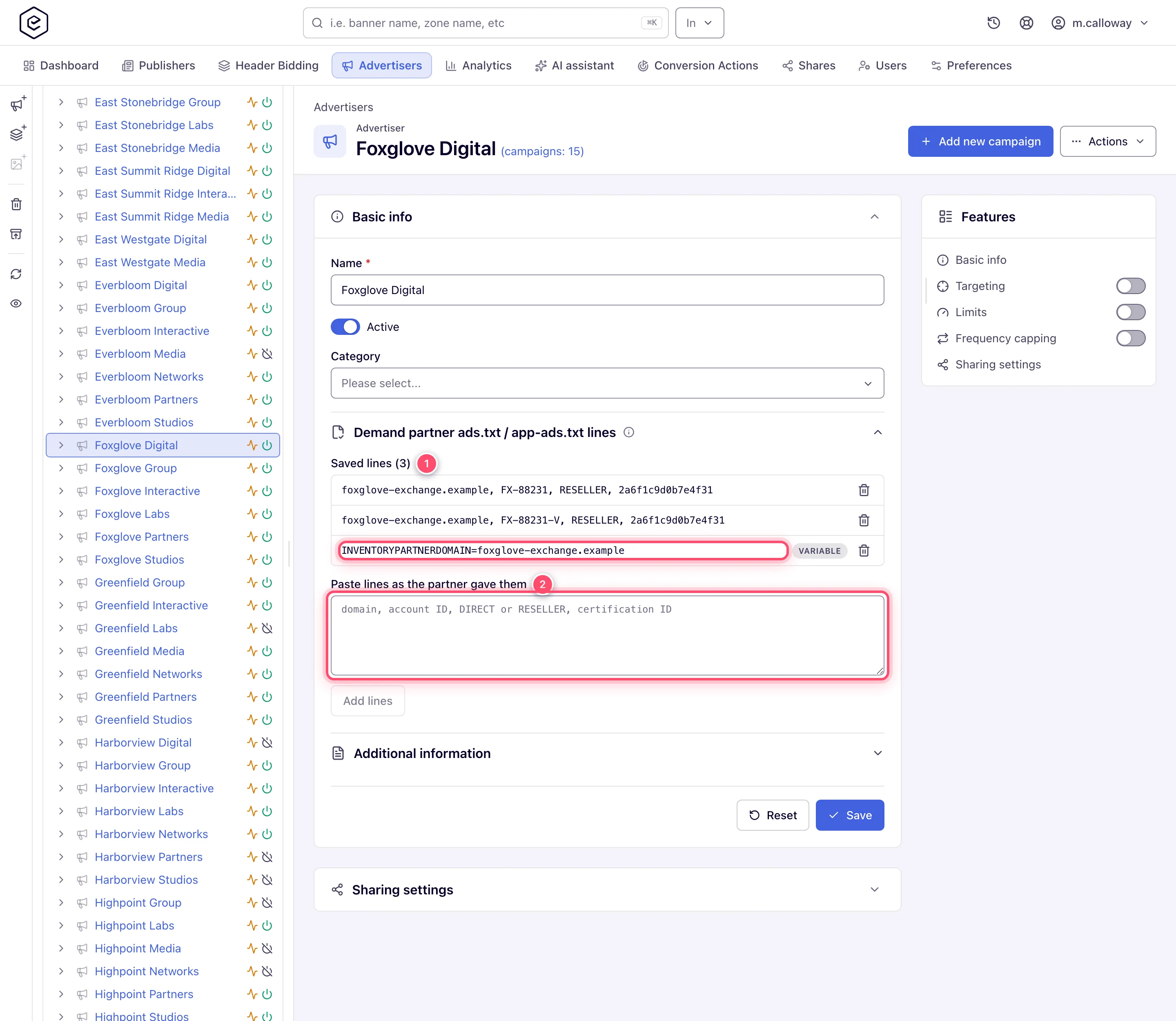
Setup. The advertiser Lakeshore Media is not a brand buying campaigns: it is another network, a demand partner whose JavaScript ad tag runs as a third-party code banner and resells the impression. Lakeshore asks every publisher to carry its line. Open Account → Advertisers → Lakeshore Media → Basic info → Demand partner ads.txt / app-ads.txt lines, paste the line, press Add lines:
lakeshore-tags.example, LKS-20417, RESELLERWhere it appears. Only on sites where one of Lakeshore’s active banners is linked to an active placement. Unlink the banner or switch it off and the line drops out of those sites’ blocks and checks. On the site page its line is grouped under Lakeshore Media · Demand partner, so the publisher can see why it is needed. A reader who may not see that advertiser gets the same line under Demand partner alone.
sellers.json / schain: unchanged — Lakeshore buys through its own tag, not through a bid request from you.
Scenario 4: an exchange hands over a multi-line block
Setup. The SSP behind advertiser Foxglove Digital — a DSP seat that resells through its own exchange — sends a block with comments and variables. Paste it on the advertiser’s Demand partner ads.txt lines exactly as received:
# Foxglove exchange block, paste as given
foxglove-exchange.example, FX-88231, RESELLER, 2a6f1c9d0b7e4f31   # display
foxglove-exchange.example, FX-88231-V, RESELLER, 2a6f1c9d0b7e4f31 # video
INVENTORYPARTNERDOMAIN=foxglove-exchange.example
MANAGERDOMAIN=foxglove-group.example
Add lines stores nothing and names the line to drop:
Line 5: OWNERDOMAIN and MANAGERDOMAIN describe the site owner; set them in White Label.Under the IAB ads.txt 1.1 rules OWNERDOMAIN and MANAGERDOMAIN say who owns the site and who
manages its inventory, so a partner cannot set them for the publisher. CONTACT and SUBDOMAIN
are the publisher’s own entries and are refused the same way. Delete the line and paste again.
INVENTORYPARTNERDOMAIN names the partner itself and is kept.
Comments and blank lines are dropped. Domains and relationships are lower- and upper-cased. Each record is kept once. Variables appear in the publisher’s block but are not required when the live file is checked. A variable stored before these lines were refused stays listed with Not published: it is left out of every site’s block until you remove it. The same rules apply to a site’s Additional ads.txt lines.
Scenario 5: an intermediary publisher, and sites kept out
Intermediary. A site Harbor Point Exchange is itself a reseller. Set Seller type = Intermediary (or Both if it also owns inventory). To hide its name in sellers.json, tick Confidential:
{ "seller_id": "nw-hp-07", "is_confidential": 1, "seller_type": "INTERMEDIARY" }The schain node is the same shape as scenario 1 with "sid": "nw-hp-07", but the chain is sent
with "complete": 0, in bid requests and header-bidding tags alike: a seller before you exists
and the request does not name it. Pass that seller’s chain on the ad tag to complete it
(scenario 7); a header-bidding tag cannot carry one.
ads.txt: buyers pair an INTERMEDIARY entry with RESELLER, so the site’s block names you as
a reseller — northwind-ads.example, nw-hp-07, RESELLER — and the live check looks for that line.
A Both site keeps DIRECT, which buyers accept for BOTH as they accept RESELLER.
Test and internal sites. Leave List in sellers.json off. Sites start unlisted, so a staging
site never reaches the file. With the file on and no site listed, sellers.json is still a valid
file with an empty sellers list.
Scenario 6: fixing “Missing lines: N”
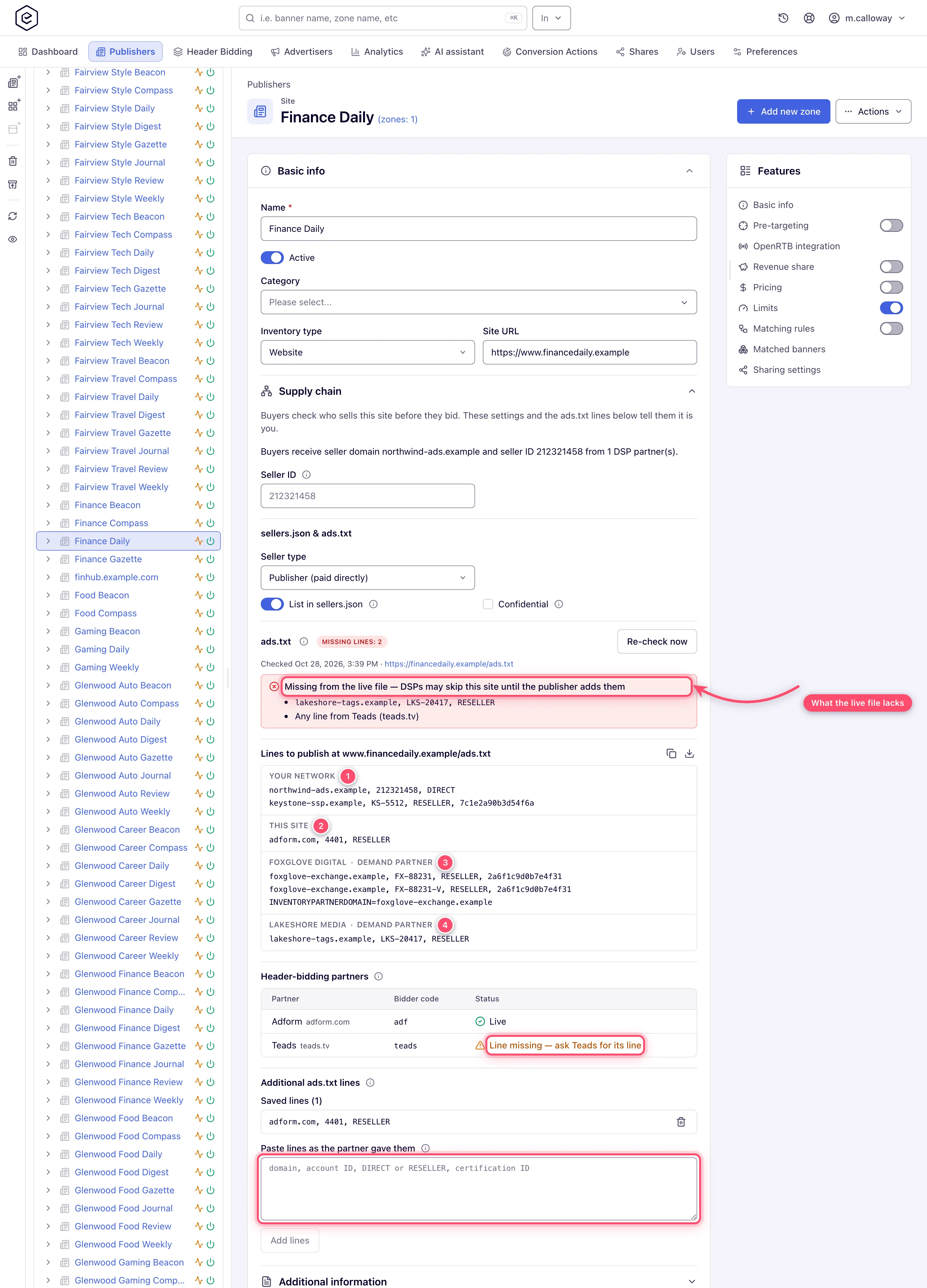
The site’s Supply chain section shows the last check of the live file, the address that was read, and what it lacks: whole lines, and header-bidding partners with no line from their ad system.
Typical causes:
- Root domain. The check reads the file at the root domain of the site URL, as buyers’
crawlers do:
https://news.sportsdaily.co.uk/liveis checked athttps://sportsdaily.co.uk/ads.txt. Plain HTTP is tried only when HTTPS cannot be reached. A file only on a subdomain is not found. - Redirects. Redirects within the root domain are followed, and one more hop outside it, as the IAB ads.txt 1.1 rules allow. A second redirect once outside, or a page that answers HTML, counts as File not found; a redirect to a private address is not followed and shows as Could not check. The reason is shown either way.
- Size. Only the first 1 MB of the file is read; a line further down shows as missing, and the section says the file was cut.
- A header-bidding partner with no line. Any line from Teads (teads.tv) means the file has no record of that ad system at all; add the line the partner gives you to Additional ads.txt lines and ask the publisher to publish it.
- Apps. An app site is checked for
app-ads.txton the site’s Developer website (the website listed on its store page), not on the store page itself. A site without one shows No domain to check. - Typos in the account ID. Domain and relationship are compared without regard to case; the account ID is compared exactly. The certification ID is not compared.
- Extra fields. A record has at most four fields — domain, account ID, relationship and
certification ID — read by the same rules as lines pasted here. A line with a fifth field, or a
variable with nothing after
=, is not read; anything extra belongs after a;or a#. - Stale result. The check runs every night on a network where at least one role holds the Site Supply Chain permission, enabled or read-only — the permission that shows its result; until a role does, sites read Not checked yet. After the publisher updates the file, press Re-check now (once a minute per site).
Scenario 7: a CTV channel sold through a stitcher
A FAST channel Harbor TV reaches smart-TV apps through its inventory partner Channel Partner,
whose SSAI stitcher (here SpringServe) calls your VAST tag. Set the site’s Seller type =
Intermediary (a chain on the tag is ignored on a Publisher site). On the video placement set
Server-side ad insertion = SpringServe (Magnite) (see Video placements);
the tag then carries schain={{SCHAIN}}, and SpringServe fills in the chain it received:
schain=1.0,1!channel-partner.example,cp-42,1DSPs receive that chain with your node appended:
{ "ver": "1.0", "complete": 1,
  "nodes": [
    { "asi": "channel-partner.example", "sid": "cp-42", "hp": 1 },
    { "asi": "adnetwork.example", "sid": "nw-ht-11", "hp": 1 }
  ] }
The app lists the partner in its app-ads.txt (INVENTORYPARTNERDOMAIN=channel-partner.example),
and the partner’s file lists you as its reseller: adnetwork.example, nw-ht-11, RESELLER. That is
also the line the site’s block asks for, since the own line of an Intermediary site is RESELLER
(scenario 5).
Bought by an IO, no chain on the tag. When you buy the channel directly by an insertion order and the tag brings no chain, the same Intermediary seller type makes the request say honestly that the chain is incomplete:
{ "ver": "1.0", "complete": 0,
  "nodes": [ { "asi": "adnetwork.example", "sid": "nw-ht-11", "hp": 1 } ] }
Many buyers bid less on an incomplete chain, or not at all. The lasting fix is outside the platform:
the channel lists you in its app-ads.txt as a reseller, or passes its chain on the tag.
Corner case: MediaTailor and Brightcove fill
schainonly from what the player passes to the stitcher’s session, and the IAB and Google DAI macro sets have none. Without it the request falls back to the chain without upstream nodes.
Glossary
| Term | Meaning |
|---|---|
| ads.txt | A text file on the publisher’s website listing who may sell its inventory |
| app-ads.txt | The same for apps, on the developer website |
| sellers.json | A file on the seller’s domain listing the publishers it sells, by seller ID |
| schain | The supply chain object in a bid request: one node per company that sells the impression |
| complete | 1 when the chain names every seller back to the owner of the inventory, 0 when one is missing |
| ASI | The seller’s domain in a schain node (asi) |
| seller_id / sid | The ID the seller gave the publisher; the same value in sellers.json, schain and ads.txt |
| DIRECT | The account in the ads.txt line belongs to the publisher, or to the seller it contracts directly |
| RESELLER | The account belongs to a company that resells the inventory on the seller’s behalf |
| Certification authority ID | Optional fourth field (TAG-ID) identifying the ad system |
| Demand partner | A company that resells the inventory or buys it through its own tag (network or exchange tag, DSP seat) — unlike an advertiser that only buys |
| Header-bidding partner | A Prebid bidder in the site’s header-bidding tag; it sells under its own ad system and needs its own ads.txt line |
Corner cases and gotchas
Corner case: the supply chain in DSP bid requests does not depend on List in sellers.json. List every site you sell to DSPs with the chain switched on, or buyers will not find its seller ID.
Corner case: changing a seller ID changes it in bid requests (with sellers.json on), header-bidding tags, sellers.json and the ads.txt block at once. The publisher must update the file too.
Corner case: a header-bidding partner is listed from the site’s active tags only. Switch a tag off and its bidders drop out of the block and of the check.
Corner case: the network’s own line follows the chain buyers receive. For DSP partners that is the OpenRTB supply chain: with Publish sellers.json off the installation domain and the generated ID, with it on the seller domain and the site’s seller ID. A site with an active header-bidding tag that carries a chain (seller domain and seller ID both filled in) is asked for the pair the tag sends instead, and for the OpenRTB pair as well only while DSP partners also buy it (an active banner of an active DSP partner on one of its active placements). The relationship follows the site’s Seller type:
DIRECT, orRESELLERon an Intermediary site.
Per-role notes
- Admin: seller domain, Publish sellers.json and network-wide lines are White Label settings; grants the two permissions.
- Network manager: per-site supply chain settings and additional lines, demand partners’ lines on their advertisers, the bulk listing in the grid.
- Publisher: publishes the block shown for the site; with read-only access to Site Supply Chain sees it on the site page with Copy and Download.
